A 2FA Playbook for DevOps & Cloud Teams (AWS, GCP, Azure)
DevOps teams manage sensitive credentials that control access to cloud environments like AWS, GCP, and Azure. Without two-factor authentication (2FA), a stolen password can give attackers full control over critical resources, databases, and customer data.
Key Takeaways:
- High-Risk Accounts: Root users, organization admins, and CI/CD platforms require the highest level of protection.
- Best 2FA Methods: Use FIDO2 security keys (e.g., YubiKey) for critical accounts, and avoid SMS-based MFA due to vulnerabilities like SIM swapping. Check out our SMS management blog for more on securing verification codes.
- Shared Responsibility: Cloud providers secure infrastructure, but you must configure 2FA for accounts and access controls.
- Threats Addressed: 2FA mitigates risks like phishing, credential theft, and insider attacks.
Action Plan:
- Secure root accounts with hardware security keys.
- Match 2FA methods to account risk levels (e.g., virtual MFA for developers, hardware keys for admins).
- Implement monitoring tools like AWS CloudWatch for alerts on high-risk account access.
- Establish break-glass policies with split control for emergency access.
Prioritizing 2FA across your cloud accounts and DevOps tools ensures stronger defenses against breaches and minimizes potential damage.
Protecting High-Risk DevOps and Cloud Accounts
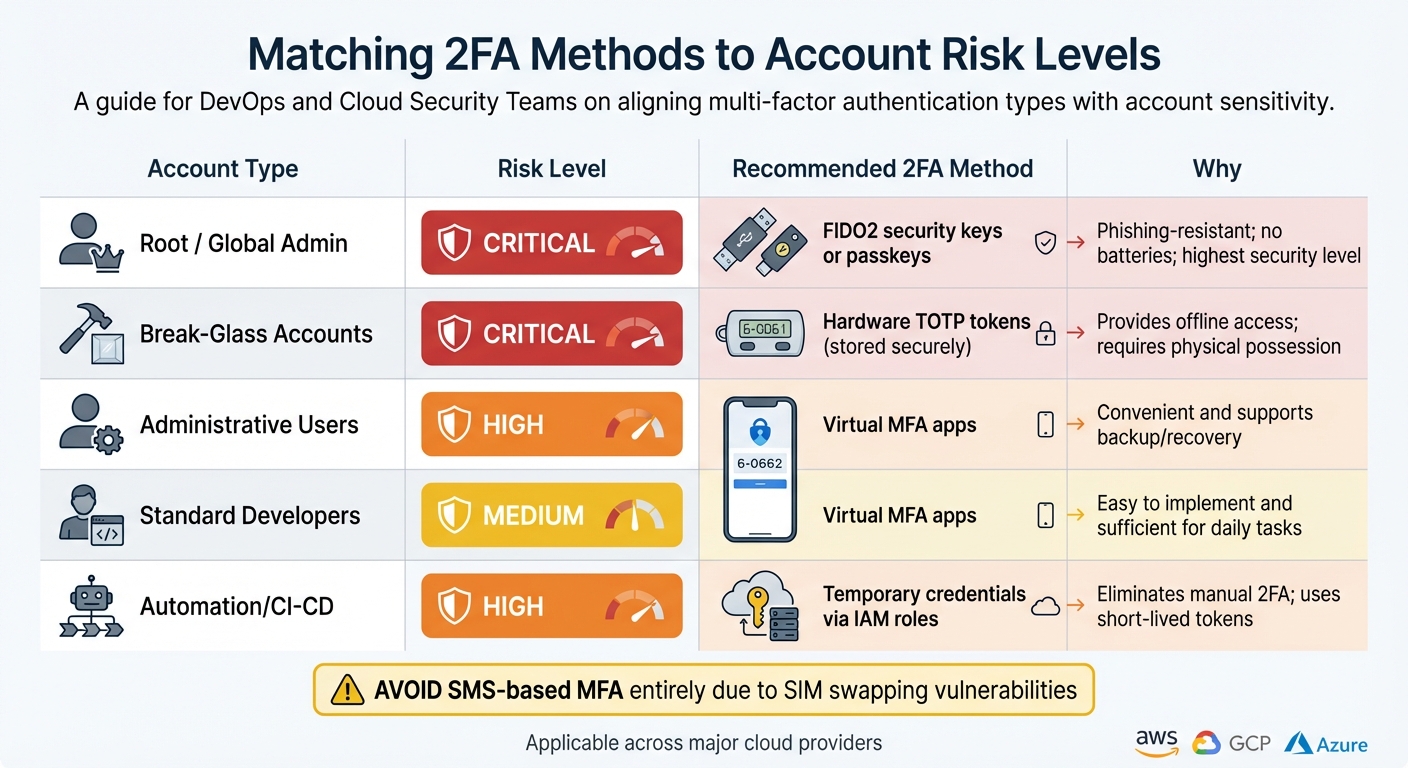
2FA Methods Comparison by Account Risk Level for DevOps Teams
High-Risk Accounts in AWS, GCP, and Azure
Not every cloud account carries the same level of risk. Some accounts, like those with unrestricted administrative access, can bypass standard security protocols, making them prime targets for attackers.
In AWS, the root user stands out as the most critical account to secure. This account has full access to all resources, services, and billing details and is often exempt from certain security policies [2][4]. Similarly, the AWS Organizations management account root user holds control over the entire organization, including member accounts and service control policies [2].
"We strongly recommend you don't access the AWS account root user unless you have a task that requires root user credentials." - AWS Identity and Access Management [2]
In GCP, organization and project owners function as the highest-privilege accounts, while Azure assigns this role to global administrators. Additionally, workforce identities managed through AWS IAM Identity Center or centralized identity providers need strong safeguards when granted broad permissions [6][9]. Privileged workloads, such as CI/CD platforms, also require secure credentials since they have the power to deploy code and modify production environments directly [9].
The next step is to align each account type with the most effective two-factor authentication (2FA) method to reduce these risks.
Matching 2FA Methods to Account Risk Levels
Different accounts demand different levels of security. Here's a guide to pairing 2FA methods with account risk levels:
| Account Type | Risk Level | Recommended 2FA Method | Why |
|---|---|---|---|
| Root / Global Admin | Critical | FIDO2 security keys (e.g., YubiKey) or passkeys | Phishing-resistant; no batteries; offers the highest level of security [1][4] |
| Break-Glass Accounts | Critical | Hardware TOTP tokens (stored securely) | Provides offline access; requires physical possession [1] |
| Administrative Users | High | Virtual MFA apps | Convenient and supports backup/recovery [3] |
| Standard Developers | Medium | Virtual MFA apps | Easy to implement and sufficient for daily tasks [3] |
| Automation/CI-CD | High | Temporary credentials via IAM roles | Eliminates manual 2FA; uses short-lived tokens [9][10] |
This approach ensures each account type is matched with a security measure that aligns with its risk profile.
To enhance redundancy, AWS allows you to register up to eight MFA devices per account [1][2].
Avoid SMS-based MFA entirely. AWS no longer supports new SMS MFA setups due to vulnerabilities like SIM swapping [1]. Shift to virtual TOTP apps or FIDO2 security keys as soon as possible.
"Because they can run on unsecured mobile devices, virtual MFA might not provide the same level of security as phishing-resistant options such as FIDO2 security keys and passkeys." - AWS Identity and Access Management [3]
For maximum protection of root accounts, consider implementing a multi-person approval process. For example, one group of administrators could hold the password while another controls the physical MFA device [2].
DevOps Tools That Need 2FA
Securing DevOps platforms with 2FA is just as critical as protecting high-risk cloud accounts. These tools often hold the keys to your deployment pipelines and infrastructure, making them attractive targets for attackers.
Platforms like GitHub and GitLab should enforce 2FA for all users, especially those with write access. Similarly, CI/CD tools such as Jenkins and CircleCI need robust 2FA measures to prevent attackers from injecting malicious code into deployment pipelines. Infrastructure-as-code platforms, including Terraform Cloud and Pulumi, also demand strong security since they control configurations that impact your entire environment. For automation and service accounts that can't use interactive 2FA, rely on temporary credentials via AWS IAM Roles Anywhere or OIDC federation [9].
To stay one step ahead, monitor root and administrative activities using tools like Amazon CloudWatch or EventBridge. These can send automated alerts to your security team whenever high-risk accounts are accessed unexpectedly [2].
Selecting 2FA Methods for DevOps Environments
Comparing 2FA Methods: Pros and Cons
Picking the right two-factor authentication (2FA) method in a DevOps environment is about finding the balance between strong security and manageable complexity. FIDO security keys (like YubiKeys) are among the most secure options, as they use public key cryptography, making them highly resistant to phishing attacks. They don’t need batteries or internet access, but managing their physical distribution and replacements can add some logistical challenges.
Virtual authenticator apps like Google Authenticator or Authy are popular for their convenience. They generate time-based one-time passwords (TOTP), are free, and easy to set up. However, they rely on mobile devices, which can be a risk if users are tricked into entering codes on fraudulent websites.
Hardware TOTP tokens are standalone devices that generate six-digit codes without needing a smartphone. These are ideal for environments where mobile devices aren’t allowed, but they come with their own risks, such as battery depletion or being misplaced. Synced passkeys offer phishing resistance and easy recovery, but they depend on the security of the syncing service being used.
Understanding these trade-offs is critical when securing accounts with elevated access privileges.
Understanding Threats and Remaining Risks
Each 2FA method addresses specific risks but doesn’t eliminate them entirely. For example, FIDO security keys and passkeys are excellent at preventing phishing by verifying the domain before authenticating. On the other hand, virtual authenticator apps and hardware TOTP tokens can be exploited if users are tricked into entering their codes on fake sites. Furthermore, if a device running an authenticator app is stolen and unlocked, it could compromise account access.
"Identity is the new perimeter. If your identity boundaries are porous, your code is public." - Ronen Slavin, CTO, Cycode [7]
Recognizing these vulnerabilities is key to implementing 2FA solutions that genuinely strengthen your system’s defenses. This understanding is especially crucial when configuring protections for high-risk accounts.
2FA Requirements for Root and Break-Glass Accounts
Root and break-glass accounts require the highest level of security because they override normal access controls.
"Because a root user can perform privileged actions, it's crucial to add MFA for the root user as a second authentication factor." - AWS Identity and Access Management [2]
For these accounts, using hardware security keys is non-negotiable. This aligns with earlier discussions, emphasizing that only the most secure methods should protect your most critical accounts.
For break-glass recovery scenarios, backup hardware security keys should be stored in a secure physical location, such as a vault or safe [11].
"We recommend that you prioritize resiliency and consider requiring two or more people to authorize access to the [root password] storage location." - AWS Well-Architected Framework [5]
While virtual authenticator apps might be sufficient for standard DevOps tasks, those performing high-stakes operations - like terminating production instances - should use hardware keys or be required to authenticate via MFA for added security [12].
Managing Shared Access and Break-Glass Credentials
Who Should Control the Second Factor?
For DevOps and cloud teams, managing two-factor authentication (2FA) access and emergency credentials is just as crucial as choosing secure authentication methods. But here’s the tricky part: deciding who controls the Multi-Factor Authentication (MFA) device for critical accounts is where security meets practicality.
Shared credentials stored in a secure vault might simplify access, but they make tracking logins harder. An effective solution is split-knowledge control - one group manages the password while another holds the MFA device. This ensures dual approval for critical actions. AWS emphasizes this approach:
"One group of administrators with access to the password, and another group of administrators with access to MFA. One member from each group must come together to sign in as the root user" [2].
Recovery channels should also be split between individuals. For example, the person accessing the root account’s email inbox should not be the same as the one managing the recovery phone number [2]. AWS and Microsoft Entra ID enable up to 8 MFA devices for root or emergency accounts, allowing backup devices to be distributed across trusted administrators [2] [1].
Using a team-managed email address, like [email protected], for root accounts ensures continuity if someone leaves the organization [2]. This setup helps maintain security while allowing team access.
All these measures naturally call for well-documented break-glass policies to handle emergencies effectively.
Creating Break-Glass Access Policies
Break-glass policies need to be prepared, tested, and securely stored long before an actual emergency arises. Store hardware MFA tokens and password components in separate fireproof safes, each located in a different physical location [13] [14]. Microsoft advises maintaining at least two emergency access accounts per organization and running validation drills every 90 days [13] [14].
"Break glass accounts should be kept secret and no admin should know the entire password without 'breaking the glass'."
– Daniel Chronlund, Microsoft Security MVP [14]
Set up automated alerts to notify the security team immediately when a break-glass account is used. Critical alerts (Sev 0) should be sent via email or SMS [13]. For Azure environments, make sure these accounts are excluded from Conditional Access policies and rely on cloud-only identities (e.g., *.onmicrosoft.com) rather than synced on-premises accounts [13] [14]. Additionally, in Microsoft Entra Privileged Identity Management (PIM), assign the Global Administrator role permanently to ensure access during a PIM service outage [13].
Having these policies in place lays the groundwork for setting structured 2FA rules tailored to specific environments and roles.
Setting 2FA Policies by Environment and Role
When it comes to high-risk 2FA requirements, your policies should align with the specific needs of each environment.
- Production environments: Require hardware security keys for all administrative access. No exceptions.
- Staging environments: Virtual authenticator apps may be sufficient for routine operations. However, any action that could affect production data - like database migrations or API key rotations - should still require hardware MFA.
- Development environments: Authenticator apps can be acceptable for day-to-day tasks, but stronger measures should protect access to shared secrets or deployment pipelines.
Restrict administrative roles to specific resource groups rather than granting broad permissions [7] [8]. Just-In-Time (JIT) escalation can be used for temporary high-privilege access [7] [8] [15].
Every action should be tied to a unique identity. Even in emergency scenarios, responders should use their own named accounts (e.g., <USER_ID>-BREAK-GLASS) to ensure all activities are auditable [15]. As Ronen Slavin, Co-Founder & CTO of Cycode, explains:
"Identity is the new perimeter. If your identity boundaries are porous, your code is public" [7].
sbb-itb-070b8f8
Using Real-SIM Numbers for Cloud Account SMS Verification
Why AWS, GCP, and Azure Block VoIP Numbers
Cloud platforms like AWS, GCP, and Azure avoid using VoIP numbers for SMS-based two-factor authentication (2FA) because these numbers are easy to obtain and often exploited by spammers and bots. On the other hand, real-SIM numbers are tied to identity verification and carrier registration, making them far more secure and difficult to acquire in bulk - qualities that are crucial for safeguarding critical systems.
Another issue with VoIP numbers is that many are classified as "voice-only", meaning they lack SMS routing capabilities, which causes verification codes to fail. VoIP expert Martyn Davies highlights this limitation:
"VoIP providers may have number ranges (mobile, local, geographic etc) that can receive calls, but they don't necessarily have any SMS infrastructure at all" [16].
This gap in functionality underscores why real-SIM numbers are a better fit for secure verification processes.
How Real-SIM Numbers Solve Verification Problems
Real-SIM numbers, issued by major US carriers like AT&T, T-Mobile, and Verizon, are widely recognized by over 1,000 platforms. These numbers operate on standard cellular networks, avoiding common VoIP issues like SMS delivery failures (~1.66%) and delays [17].
Even with shifts in SMS-based MFA policies, real-SIM numbers remain essential for tasks like account recovery and identity verification [4]. Their physical nature makes them harder to exploit compared to VoIP numbers, which can be generated programmatically. This added layer of security aligns with the "something you have" principle of MFA and significantly reduces account compromise risks - by as much as 99.9% when any form of MFA is implemented [17].
Adding Real-SIM Numbers to DevOps Workflows
Real-SIM numbers can be seamlessly integrated into DevOps workflows to enhance security and reliability.
For root account recovery, always opt for a non-VoIP number to avoid issues like virtual number expiration or carrier blocking [4]. Long-term rentals are a better choice over one-time verification numbers, especially for accounts that may require periodic re-verification, such as billing or administrative logins.
Using APIs, you can automate 2FA code retrieval, route them to secure dashboards, and send webhook alerts to specific, restricted channels. For added security, register multiple MFA devices (AWS allows up to eight devices [1]) across team members and locations. This ensures uninterrupted access without needing to physically transfer devices.
Avoid relying on public SMS numbers for sensitive accounts, as these are often listed on public websites and risk being blacklisted by major platforms. Use a reverse phone lookup tool to confirm that a number is not flagged as VoIP. For high-risk environments, combine SMS-based MFA with hardware security keys for an added layer of protection [18].
Conclusion: Building a 2FA Strategy for DevOps Teams
Main Takeaways
Secure root accounts first.
Start by enabling MFA on critical accounts like AWS root users, GCP organization admins, and Azure Global Administrators. Do this on day one. To avoid lockouts and ensure shared access, register up to eight MFA devices per user [1][2].
Match 2FA methods to account risk.
Use FIDO2 security keys for root and break-glass accounts - they’re phishing-resistant and offer the highest level of security. For daily operations, virtual authenticator apps are effective but can be compromised if the mobile device is breached [3].
Split control for added security.
Divide control over passwords and MFA devices. AWS Identity and Access Management advises:
"No one person should have access to both the email inbox and phone number since both are verification channels to recover your root user password" [2].
Stick to real-SIM numbers for SMS verification.
VoIP numbers often get rejected, while real-SIM numbers are more reliable for SMS verification. Use non-VoIP numbers for recovery across AWS, GCP, and Azure. Tools like JoltSMS offer dedicated real-SIM solutions that integrate smoothly with DevOps workflows via APIs and webhooks.
With these principles in mind, let’s look at actionable steps your team can take.
Action Steps for Your Team
Audit your current setup.
Review your AWS, GCP, and Azure accounts for missing MFA and check recovery numbers to ensure they’re real-SIM, not VoIP. Leverage IAM Access Analyzer to identify and remove unused credentials [9]. Also, confirm your AWS verification number isn’t tied to a VoIP service, as some business phone systems block SMS verification.
Centralize identity management.
Implement centralized identity management using federation services like AWS IAM Identity Center or equivalents on GCP and Azure [6][9]. Enforce MFA for sensitive tasks - such as terminating instances or deleting data - by setting IAM policy conditions like aws:MultiFactorAuthPresent [12].
Set up monitoring and alerts.
Use tools like Amazon CloudWatch or EventBridge to create alerts when root or break-glass accounts are accessed [2][15]. These alerts provide an audit trail and allow your security team to respond quickly to unauthorized access attempts.
Plan for emergencies in advance.
Establish break-glass accounts with clear naming conventions (e.g., <USER_ID>-BREAK-GLASS) and store physical MFA devices in secure locations like a vault or safe [1][15]. Test your break-glass procedures every quarter. As the AWS Well-Architected Framework advises:
"Verify that incident responders have the correct access pre-provisioned in AWS to reduce the time needed for investigation through to recovery" [15].
FAQs
What’s the most secure way to set up 2FA for root accounts in cloud environments?
When it comes to securing root accounts in cloud environments, hardware-based authenticators are the top choice. These include FIDO2/U2F security keys (or passkeys) and dedicated hardware TOTP tokens. To ensure uninterrupted access, it’s smart to register multiple devices as backups.
Unlike app-based or SMS-based 2FA, hardware solutions offer stronger protection against phishing and similar attacks. If safeguarding critical root accounts and infrastructure is a priority, hardware-based 2FA should be your go-to option.
What are the best practices for setting up a break-glass policy for emergency access in DevOps?
A break-glass policy is your safety net for emergencies like production outages, providing a secure yet accessible pathway for critical actions. To get started, set up a dedicated break-glass IAM role or root-user account with only the minimum privileges necessary for recovery. To avoid misuse, require multi-person approval for activation and assign ownership to a group email instead of an individual. Protect access further with multi-factor authentication (MFA) - preferably a hardware token or real SIM - and store the MFA device in a secure physical vault, accessible only in emergencies.
To keep things secure, enforce a least-privilege access model, rely on temporary credentials rather than static keys, and store recovery mechanisms like email, phone, and DNS credentials in the same vault. Use tools like CloudTrail to log every activation, enable MFA-protected API calls, and configure alerts for real-time monitoring. Test the process regularly in a staging environment, rotate stored secrets and MFA devices every 90 days, and leverage tools like IAM Access Analyzer to ensure the setup remains secure. By combining strict controls, detailed monitoring, and routine testing, you can establish a break-glass policy that ensures both security and operational readiness when it matters most.
Why are real-SIM numbers better than VoIP numbers for SMS verification in cloud accounts?
Real-SIM numbers are the go-to option for SMS verification, boasting a verification success rate exceeding 95%. Cloud platforms widely accept them due to their reliability. On the flip side, VoIP numbers often face significant challenges, with failure rates ranging between 60% and 80%, making them far less dependable.
The reason behind this disparity lies in how platforms like AWS, GCP, and Azure perceive these numbers. VoIP numbers are often flagged as less secure and more susceptible to misuse. In contrast, Real-SIM numbers are linked to physical devices, which enhances their trustworthiness and ensures smoother compatibility for critical cloud account verifications.