Granting 2FA Access to Contractors Without Giving Up Control
Managing 2FA for contractors can be tricky. If you tie two-factor authentication (2FA) to a contractor's personal phone, you risk losing control when their contract ends. Revoking access often requires resetting 2FA for the entire team, creating disruption and leaving potential security gaps.
The solution? Use a company-controlled real-SIM number. This approach ensures your business retains ownership over 2FA codes, simplifies offboarding, and provides audit trails for compliance. Here's how it works:
- Centralized Control: Rent a real-SIM number that routes 2FA codes to a secure Slack channel or dashboard.
- Instant Offboarding: Revoke access in seconds without resetting 2FA for everyone.
- Audit Trails: Track who accessed codes and when for better accountability.
- Compatibility: Works on platforms that reject VoIP numbers, like AWS, Stripe, or banking systems.
At $50/month, a real-SIM service like JoltSMS offers a practical way to secure contractor access while maintaining control. This ensures smooth workflows, compliance, and peace of mind.
The Risks of Using Personal Phones for Contractor 2FA
Loss of Control and Audit Trails
Relying on personal phones for two-factor authentication (2FA) introduces a serious access risk. Once a QR code is scanned or a secret key is stored, the ability to generate codes remains indefinitely. To revoke access, a complete 2FA reset is required, which can be time-consuming and disruptive [1].
Another major issue is the lack of audit trails. When codes are tied to personal devices, there’s no way to track who accessed them, when they were used, or from what device. This makes it nearly impossible to investigate security breaches. Imagine explaining to a SOC2 auditor that you have no way to verify who accessed sensitive systems - it’s a credibility nightmare. With 81% of data breaches linked to weak or stolen credentials, this accountability gap becomes a significant security risk [4]. Worse yet, this loss of control creates logistical problems during emergencies when immediate access is needed.
Practical Problems
Emergencies that occur outside of business hours can quickly spiral into chaos if 2FA codes are locked away on a contractor’s personal phone. If a contractor is unreachable and access to critical systems like AWS or Stripe is needed, teams can find themselves stuck. In some cases, businesses have had to reset 2FA across multiple shared accounts after a single contractor left, wasting hours of time and coordination [1].
Compliance and Policy Conflicts
The risks don’t stop at operational challenges - they extend to compliance violations and policy breaches. Failing to track access undermines security and can directly violate regulatory requirements. For instance:
- SOC2 mandates strict access control and audit logging.
- GDPR requires clear accountability for data access.
- HIPAA enforces unique user identification.
Sharing 2FA QR codes over platforms like Slack or email also violates the principle of least privilege, exposing sensitive information to individuals who don’t need it. Screenshots of these codes can become permanent, searchable records - an easy target if the communication platform is ever compromised.
To make matters worse, many teams skip resetting 2FA during offboarding because of the disruption it causes. This oversight leaves former contractors with lingering access to critical systems, creating long-term vulnerabilities [1][4].
sbb-itb-070b8f8
Benefits of Using a Company-Controlled Shared Number
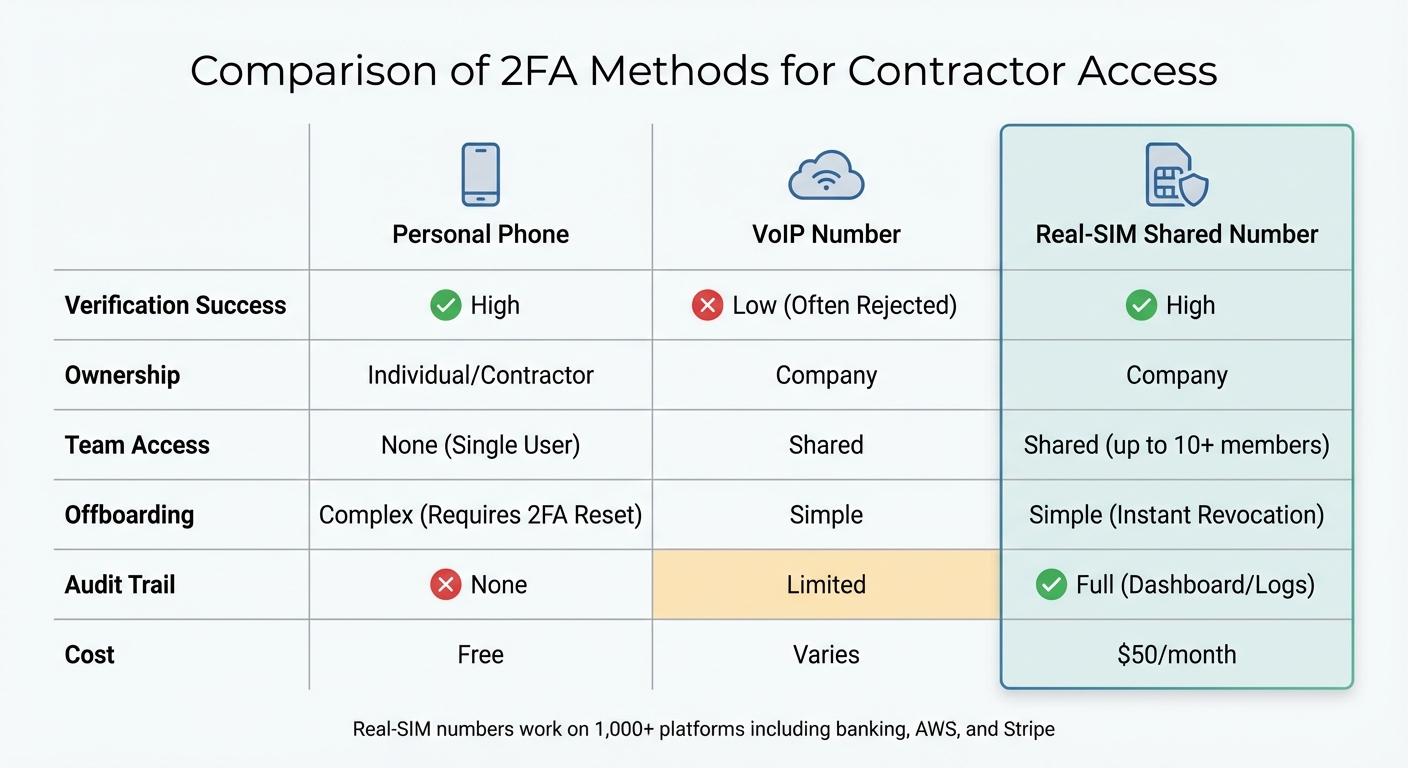
Comparison of 2FA Methods: Personal Phone vs VoIP vs Real-SIM Numbers
How Shared Numbers Work
A company-controlled shared number streamlines how contractors handle two-factor authentication (2FA) access. Instead of sending codes to personal devices, your business rents a dedicated real-SIM mobile number that the company fully controls. When a 2FA code is sent to this number, the service instantly captures and forwards it to your team's Slack, Discord, or email. This ensures that the company retains ownership of the access point, while authorized team members can view the codes in real time through a shared dashboard or team channel. This setup enhances transparency and accountability.
Advantages Over Personal and VoIP Numbers
Real-SIM numbers solve many of the problems associated with using personal or VoIP numbers for 2FA. For instance, banking platforms, fintech services like Stripe, and government websites often reject VoIP numbers during sign-up or re-verification because carrier lookups identify them as virtual numbers [2]. Real-SIM numbers, on the other hand, are treated as legitimate mobile devices and easily pass these security checks.
"Many sites and services reject VoIP numbers during account sign-up or re-verification. JoltSMS (Real-SIM) works on banking, fintech, and government sites." [2]
Using a centralized system also provides detailed audit trails through dashboards and team channels. You can assign specific roles - such as Owner, Manager, or Viewer - allowing contractors to access codes without altering account settings or billing. When a contractor's work ends, you can revoke their access instantly, eliminating potential risks. Plus, because all authorized team members can see incoming codes at the same time, you avoid issues where a contractor is unreachable during critical off-hours.
Comparison Table: Personal Phones vs. VoIP vs. Real-SIM Numbers
| Feature | Personal Phone | VoIP Number | Real-SIM Shared Number |
|---|---|---|---|
| Verification Success | High | Low (Often Rejected) | High |
| Ownership | Individual/Contractor | Company | Company |
| Team Access | None (Single User) | Shared | Shared (up to 10+ members) |
| Offboarding | Complex (Requires 2FA Reset) | Simple | Simple (Instant Revocation) |
| Audit Trail | None | Limited | Full (Dashboard/Logs) |
A real-SIM shared number costs $50/month, covering unlimited inbound SMS and access for up to 10 team members. When you weigh this against the costs of failed verifications, emergency 2FA resets, and compliance issues due to inadequate audit trails, the value becomes clear.
Setting Up a Secure Workflow for Contractor 2FA
Onboarding Contractors
Start by provisioning a dedicated real-SIM U.S. mobile number through JoltSMS, which activates almost instantly after payment [2]. Once your number is live, head to the dashboard to configure routing settings and notification preferences. To keep things organized, label the number with a clear identifier, like "Contractor – Project Alpha", so it’s easy to manage multiple accounts.
Next, use the built-in team access feature to send an invitation link to your contractor. These links expire after 7 days, automatically closing any unused access windows for added security. Assign contractors a Viewer role, which lets them view incoming 2FA codes but prevents them from modifying routing settings or accessing billing details.
With this setup, contractors are securely onboarded and ready to access 2FA codes. The next focus is monitoring their activity effectively.
Temporary Access and Activity Monitoring
A real-time dashboard acts as a centralized hub for tracking 2FA activity. Contractors can easily retrieve codes by checking the designated Slack channel or the dashboard itself, eliminating the need for manual forwarding.
Role-based access control ensures contractors see only what they need. With roles like Owner, Manager, and Viewer available for up to 10 team members, you can tightly control permissions. Every received code is logged with a timestamp, creating a permanent audit trail that’s crucial for compliance. This setup not only simplifies monitoring but also drastically reduces offboarding time - from hours to just about 10 seconds [1].
Once secure access is confirmed, transitioning to revocation and offboarding is straightforward.
Revocation and Offboarding
When a contractor’s work is complete, simply select their profile on the dashboard and click "Deactivate." This instantly revokes their access, cutting off their ability to view the Slack channel, access the dashboard, or receive forwarded codes. Since you retain full control of the number, there’s no need to reset 2FA on the original platform or coordinate access handovers.
This instant "kill switch" eliminates the hassle of lengthy 2FA resets when a contractor leaves. By keeping the real-SIM number under company control from the start, you ensure that your 2FA process remains secure and seamless even after offboarding.
Choosing the Right 2FA Methods for Contractors
Balancing Security and Usability
When managing contractor access, finding the right two-factor authentication (2FA) method is all about balancing security with ease of use. Not every contractor role demands the same level of protection. For instance, a freelance social media manager accessing your Instagram account faces far fewer risks than a systems administrator handling AWS root access.
For contractors with high-level permissions, it's best to assign individual accounts. On the other hand, for shared accounts like social media or marketing tools, a team-based 2FA management tool is more practical. Such tools can track who accessed which code and when, ensuring accountability. For platforms that only support SMS verification, consider using a company-controlled real-SIM number. A service like JoltSMS, priced at $50/month, centralizes control over SMS codes without compromising security [3][2].
The goal is to align the 2FA method with the potential damage a breach could cause. Use hardware keys for roles with significant risk, app-based authenticators for everyday SaaS access, and SMS 2FA via shared numbers only when necessary. This approach helps clarify how verification APIs differ from phone number services.
Verification APIs vs. Phone Number Services
Understanding the difference between verification APIs and phone number services is essential when choosing 2FA solutions. Verification APIs, like Twilio Verify, are designed for developers to add SMS verification to their own applications. For example, they allow you to send verification codes to your customers.
However, if your goal is to receive verification codes from external platforms like WhatsApp, Stripe, or banking apps, a service like JoltSMS is the better choice. JoltSMS provides an actual phone number to receive these codes [2]. For detailed setup instructions, visit the JoltSMS help center.
In short, Twilio Verify is about sending SMS verification codes, while JoltSMS focuses on receiving them. While both involve SMS, their purposes are entirely different.
Combining SMS with Other 2FA Methods
Relying solely on SMS for high-security accounts is risky. Instead, combine it with other methods. For example, route SMS codes from a company-controlled real-SIM number to a secure Slack channel. This creates an additional layer of security by introducing two checkpoints.
For accounts that support multiple 2FA options, enable both SMS and app-based authentication. Store TOTP (time-based one-time password) secrets in a business password manager or a dedicated team 2FA tool like Authn8, which is free for up to three users [1][4]. This setup ensures you have a backup and maintains an audit trail.
Avoid sharing QR codes through screenshots or email. These methods create permanent, untraceable copies that can remain accessible long after a contractor’s access should have ended. Instead, use centralized tools that allow for instant revocation without resetting the entire account [1][4].
| Method | Security Level | Audit Trail | Revocation Ease | Best For |
|---|---|---|---|---|
| Individual Accounts | Highest | Native/Complete | Instant | High-risk/Enterprise roles |
| Team 2FA Tool | High | Complete Logs | Instant | Teams of 5+ and compliance |
| Shared Real-SIM | Medium | Channel Logs | Moderate | SMS-only platforms |
| Hardware Keys | Highest | Yes | Physical | Admin/Privileged access |
| Shared QR Codes | Low | None | Very Hard | Avoid for contractors |
Conclusion: Why Company-Controlled Numbers Work Better
Effective 2FA management is a cornerstone of protecting your organization’s assets. The method you choose can either fortify your security or expose critical vulnerabilities. With company-controlled real-SIM numbers, ownership stays firmly within your organization, ensuring compatibility with high-security platforms that often reject VoIP alternatives.
The statistics are eye-opening: 81% of data breaches involve weak or stolen credentials[4]. Allowing contractors to use their personal phones introduces an untraceable weak point, making it impossible to revoke access instantly. On the other hand, a company-controlled number ensures every code is routed to a secure Slack channel or dashboard, creating automatic logs and allowing you to revoke access in seconds. This approach eliminates a major security gap.
Platforms like banking apps, Stripe, and AWS frequently reject VoIP numbers for verification. JoltSMS solves this by using carrier-grade SIM hardware that works seamlessly on over 1,000 platforms[2]. This ensures contractors can access essential tools without delays or workarounds. Real-SIM numbers offer a dependable and cost-efficient solution for verification needs.
Revoking access is just as crucial as granting it. With company-controlled numbers, offboarding is quick and straightforward. When a contractor’s role ends, access can be revoked instantly through the dashboard - no need to reset 2FA for the entire account and no lingering risks tied to personal devices. Assigning a dedicated number to each client or high-risk account keeps everything isolated and easy to manage[2].
FAQs
How does using a company-controlled real-SIM number improve 2FA security for contractors?
Using a company-managed real-SIM number adds an extra layer of security by ensuring OTPs (one-time passcodes) are sent to a carrier-verified, non-VoIP line that your organization directly oversees. This approach helps reduce risks such as lost personal devices, SIM-swapping attacks, or OTP delivery issues caused by platform restrictions.
By centralizing control, your team can easily monitor access, issue temporary two-factor authentication (2FA) credentials to contractors, and revoke them instantly when necessary. This eliminates the need to depend on personal devices or external numbers, keeping your systems firmly within your control.
How does using real-SIM numbers improve compliance and auditability for 2FA access?
Using real-SIM numbers offers a dependable way to maintain precise audit trails for two-factor authentication (2FA), a critical aspect of meeting compliance requirements like SOC 2, GDPR, and HIPAA. Unlike sharing codes through personal phones or screenshots, real-SIM numbers link every one-time password (OTP) to a specific user and timestamp. This makes it straightforward to track exactly who accessed the code and when.
With JoltSMS, you can assign roles such as Owner, Manager, or Viewer and set expiration dates for invitations, ensuring that only authorized individuals can access verification codes. On top of that, carrier-level metadata from real-SIM numbers creates tamper-resistant records, offering stronger traceability compared to VoIP numbers. These features allow organizations to maintain control, meet compliance standards, and avoid audit complications caused by unauthorized access.
Why aren’t personal phones or VoIP numbers ideal for contractor 2FA?
Using personal phones for contractor two-factor authentication (2FA) can lead to both security and management headaches. Since personal devices aren't centrally managed, it becomes tricky to oversee access or revoke it promptly when necessary. On top of that, VoIP numbers pose their own challenges, as many platforms block them for SMS verification, making them an unreliable option.
A more effective approach is to rely on a shared, company-managed number. This ensures contractors have secure, temporary access while the company retains complete control over the entire process.