How Agencies Manage 2FA Across Dozens of Client Accounts

Managing two-factor authentication (2FA) across multiple client accounts can be chaotic without a clear system. Agencies often face challenges like account lockouts, rejected VoIP numbers, and employee turnover, which can disrupt access to platforms like Google Ads, Meta Business Manager, and AWS. Here's how to simplify and secure 2FA processes:
- Use real-SIM numbers: Platforms often reject VoIP numbers, so real-SIM numbers are more reliable, with a 95–99% success rate.
- Centralize 2FA codes: Avoid tying codes to personal devices. Use company-controlled numbers and tools like JoltSMS to manage codes in one dashboard.
- Organize accounts: Categorize accounts as agency-owned, client-owned, or shared. Assign clear responsibilities and use standardized naming conventions.
- Secure backups: Maintain recovery codes and backup numbers to prevent lockouts.
- Track and audit: Keep detailed logs of verification attempts and ensure compliance with security standards.
A structured, company-owned 2FA system ensures smooth operations, minimizes downtime, and protects client relationships. Tools like JoltSMS can help centralize and streamline 2FA code management for agencies handling multiple accounts.
Building a 2FA System That Scales
Understanding why agencies need a structured two-factor authentication (2FA) approach is just the beginning. The real challenge lies in creating a system that can grow with your agency - whether you're managing 10 clients or 100. The key is to build a framework that remains efficient and organized, no matter the scale. To start, you need to clearly define account ownership, as this will shape the foundation of your 2FA strategy.
Mapping Who Owns Which Accounts
The first step is to categorize client accounts into three groups: agency-owned, client-owned, and shared.
- Agency-owned accounts include tools like internal project management platforms or shared analytics dashboards that your team controls.
- Client-owned accounts are platforms where the client retains primary control, such as their domain registrar or business bank account.
- Shared accounts - like Google Ads or Meta Business Manager - require access for both the agency and the client.
Once you've sorted accounts into these categories, assign clear responsibilities to specific team members for managing 2FA. This ensures accountability and avoids situations where everyone assumes someone else is in charge. According to the Cybersecurity and Infrastructure Security Agency (CISA), using Multi-Factor Authentication reduces the likelihood of being hacked by 99% [3].
Store credentials securely in a business-grade password manager with encrypted sharing capabilities. This avoids the risks of sharing login details through insecure methods like email or messaging apps. Poor password management is a leading cause of breaches [5]. By using a centralized credential vault, your team can securely access client accounts with just one click, while maintaining consistency across your growing 2FA system.
With ownership and responsibilities mapped out, the next step is to create a uniform system for labeling and organizing accounts.
Creating Naming and Tagging Standards
A chaotic 2FA system can quickly spiral out of control without consistent naming conventions. To keep things organized, establish a clear and uniform labeling format, such as ClientName_Platform_AccountType. For example, a Facebook Ads account for a client named Acme Corp could be labeled AcmeCorp_Facebook_Ads.
Take this a step further by tracking phone numbers assigned to each account. Use a database to log details like number assignments, verification history (including success and failure rates), platform-specific cooldown periods, and associated costs [1]. This prevents accidental number rotations, which could trigger fraud detection systems. Frequent number changes, after all, can set off fraud alerts [1].
Additionally, implement role-based access control (RBAC) to restrict access to client credentials. Only authorized team members should have access to sensitive information. Documenting workflows and permissions ensures a consistent and secure process across all client accounts [7].
Setting Up Multiple Verification Methods
To avoid lockouts and ensure flexibility, support multiple verification methods, including SMS codes, voice calls, and authenticator apps. While SMS is the most common, some platforms - like LinkedIn - may require voice verification during business hours if unusual activity is detected [1].
Secure recovery codes for each account, as these are crucial in case primary methods fail [6]. Encourage your team to enable biometric locks, such as Face ID or fingerprint authentication, on their mobile authenticator apps for an extra layer of protection [4].
Every platform has its quirks, so it’s important to match your verification method to the platform's specific requirements. By understanding these nuances, you can ensure smooth and secure access to client accounts without unnecessary hurdles.
Picking the Right Phone Number Setup
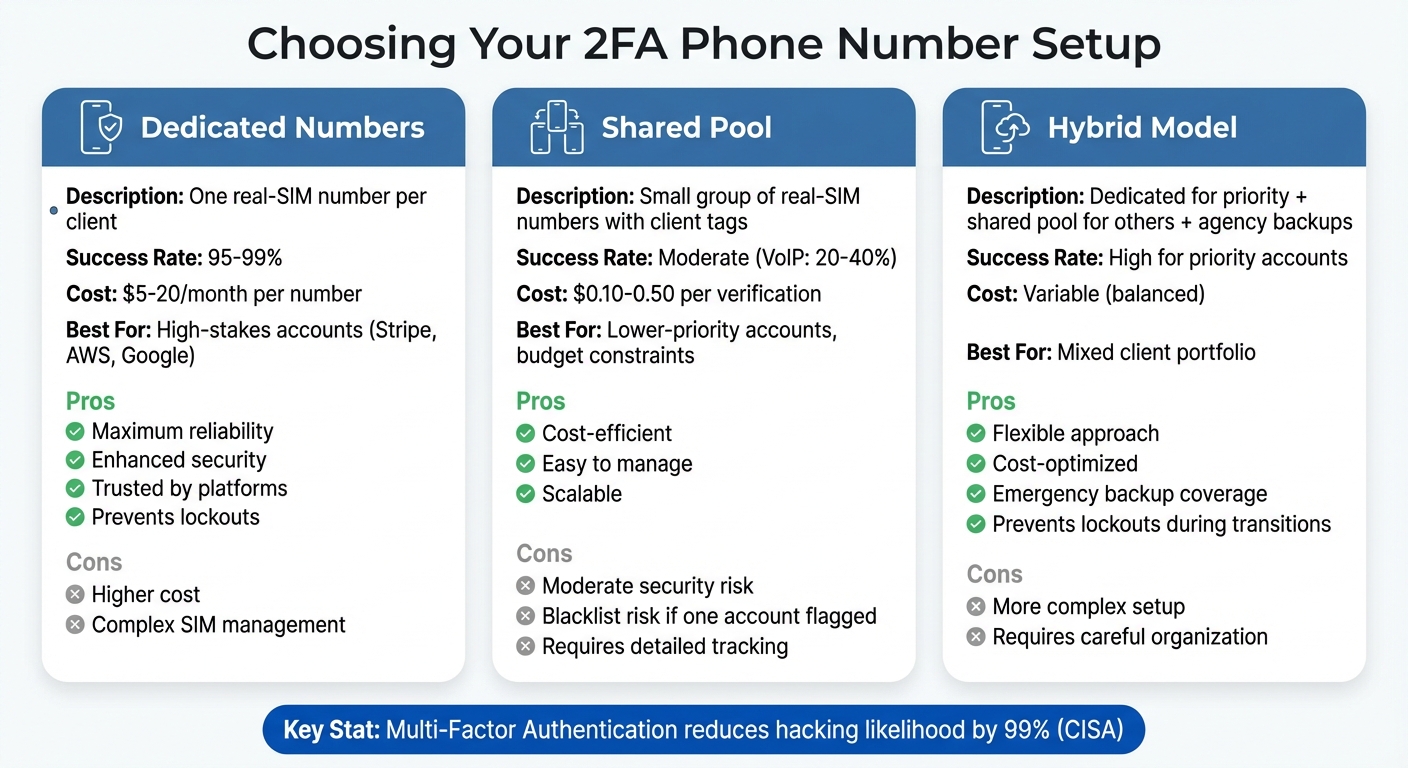
Agency 2FA Phone Number Setup Comparison: Dedicated vs Shared vs Hybrid Models
Once you've outlined account ownership and established clear naming conventions, the next step is to decide on your phone number setup. You’ll typically choose between dedicated, shared, or hybrid models. This choice plays a key role in building a scalable and secure two-factor authentication (2FA) system for client accounts. Let’s break down the pros and cons of each option.
One Dedicated Number Per Client
This approach assigns each client their own real-SIM number, offering unmatched reliability and security. Platforms like Instagram, Twitter, and LinkedIn often assess the reputation of phone numbers, and a consistent, dedicated number appears more trustworthy. This can reduce risks of account lockouts [1].
For high-stakes accounts like Stripe, AWS, or Google, dedicated numbers minimize downtime and account lockouts caused by employee turnover or unreliable VoIP numbers [2]. Real-SIM numbers boast impressive 2FA success rates of 95–99%, compared to just 20–40% for VoIP alternatives. However, the cost of this setup ranges from $5 to $20 per month per number. While effective, managing a large volume of SIM activations can become logistically challenging [1].
Shared Number Pool with Client Tags
If budget constraints are a concern or you're managing lower-priority accounts, a shared number pool is a cost-efficient alternative. This method uses a small group of real-SIM numbers, tagged to client accounts, for one-time verifications or occasional access. Avoid random number rotations; numbers with a consistent verification history are more credible [1].
To keep things organized, maintain detailed records of number assignments, verification activity, and platform-specific cooldown periods. This helps avoid accidental reuse that could trigger fraud detection. While shared pools are affordable - costing $0.10 to $0.50 per verification - they come with moderate security risks. If one account linked to a shared number is flagged, the entire number could be blacklisted [1].
Hybrid: Client Numbers Plus Agency Backups
For situations where neither dedicated nor shared models fully meet your needs, a hybrid setup offers a middle ground. Assign dedicated numbers to high-priority client accounts while using a shared pool for less critical ones. Additionally, maintain agency-controlled backup numbers for emergencies.
These backup numbers are particularly useful for shared accounts, like Google Ads or Meta Business Manager, where both you and the client require reliable access. Even if the client owns the primary number, having a secondary verification method under your control can prevent lockouts during account transitions or if the client becomes unresponsive [2].
Setting Up 2FA Workflows with JoltSMS
Managing All SMS Codes in One Place
The JoltSMS inbox brings all client verification codes into a single dashboard, making it easy for your team to stay organized. Instead of juggling multiple devices or forwarding codes between team members, every SMS lands in real time, ready for everyone to access. You can even set up webhook notifications to send these codes directly to tools like Slack or Discord, ensuring instant visibility for your team.
This setup eliminates the confusion of figuring out who has a specific code. Using real-SIM numbers ensures fast and reliable delivery, with most codes arriving in under 5 seconds. For platforms that take longer (up to 30 seconds), you can use exponential backoff polling - start at 2-second intervals and gradually increase to 15 seconds - to catch codes as efficiently as possible [1].
By centralizing code management, you’re better positioned to integrate these workflows into your secure credential systems.
Connecting JoltSMS to Password Managers
Pairing JoltSMS with password managers like 1Password or LastPass creates a seamless system for managing client credentials. Store each client’s login details alongside their assigned JoltSMS number in a shared, encrypted vault. This makes it simple for team members to access both the password and the phone number when needed.
This setup is particularly useful during offboarding. If an employee leaves, the 2FA number stays with the company, not the individual [2]. To keep things organized, label each entry with the client name and account type (e.g., "AcmeCorp AWS"), following your team’s naming conventions.
US Time Zones and Date Formats
Configure your JoltSMS workflows to match U.S. standards. Use the MM/DD/YYYY format for date stamps in audit logs, and set timestamps to your agency’s local time zone - Eastern, Central, Mountain, or Pacific. Phone numbers should follow the standard U.S. format, like (555) 123-4567. When requesting numbers via the API, include "country": "US" to ensure you receive U.S.-based real-SIM numbers. Aligning the phone number’s geography with your client’s location can also help prevent fraud detection [1].
For compliance and security purposes, maintain detailed logs of all verification attempts. These records create a reliable audit trail, which is essential for regulated client accounts [2].
sbb-itb-070b8f8
Handling Client Transitions and Audit Logs
Transferring 2FA When Clients Leave
When wrapping up a client engagement, it’s essential to review all accounts tied to your agency’s phone numbers. Take the time to update each platform’s settings and transfer control back to the client.
"Move SaaS 2FA to a company-owned real-SIM number to prevent lockouts, centralize code access, and keep an auditable, secure process for critical accounts." - JoltSMS [2]
For sensitive tools like Stripe or AWS, it’s a good idea to keep a stable real-SIM number active for 1–2 years instead of switching numbers frequently [2]. Document every step of the transfer process in your password manager, alongside the client’s credentials. Once the migration is complete, provide the client with a detailed report showing which accounts were transferred and when.
After securing the transfers, ensure you maintain thorough logs for compliance purposes.
Keeping Audit Logs for Compliance
After completing client transitions, maintaining detailed audit logs is crucial for accountability. These logs should include specifics like who accessed a code, the client account associated with it, the exact timestamp (MM/DD/YYYY), and the accessing device or IP address [8].
JoltSMS simplifies this process by automatically generating timestamped records for every verification code received. These logs meet U.S. compliance standards for SOC2, GDPR, and HIPAA audits [8]. Make it a habit to regularly export and securely store these records. For example, if a client needs to know who accessed their Facebook Ads account on 03/15/2025 at 2:47 PM EST, you’ll have the exact details ready to share. This level of precision not only helps resolve access disputes but also safeguards your agency’s reputation during or after an engagement.
Responding to Security Problems
With secured transfers and detailed audit trails in place, you’ll be better equipped to handle security concerns. If a JoltSMS number is linked to a departing staff member, rotate it immediately [2]. The same applies if there’s any sign of access compromise [2].
For platforms that flag unusual activity, ensure the phone number’s geographic location matches the IP address being used to access the account [1]. If platforms like Instagram or Twitter reject a number as invalid, it’s likely being detected as VoIP - switching to a real-SIM number should resolve the issue [1].
To stay prepared, maintain a response checklist that includes steps like number rotation, password resets, and client notifications. This ensures your team can act quickly and effectively when security issues arise.
Conclusion: Building a Reliable 2FA System
Handling 2FA across multiple client accounts doesn’t have to be chaotic. With the right strategies in place, you can streamline the process and improve reliability. A major factor is using real-SIM numbers, which offer better success rates compared to VoIP numbers that are often flagged or blocked [1].
Centralizing ownership of all client 2FA codes under company-controlled numbers is a critical step. This approach prevents issues like lockouts during staff changes and ensures compliance through clear, auditable records. Assigning dedicated numbers to specific clients not only enhances account stability but also minimizes the risk of triggering security alerts.
Tools like JoltSMS can make managing these codes even easier. By integrating JoltSMS with your password manager, you can centralize all 2FA codes in one dashboard. Features like automatic timestamped logs and team access through Slack or Discord webhooks simplify operations. For high-priority accounts like Stripe or AWS, maintaining stable numbers for 1-2 years is recommended to avoid unnecessary security reviews [2].
Beyond technology, setting up efficient workflows is equally important. Keep detailed documentation of which numbers are tied to which clients, establish clear offboarding protocols, and ensure consistency between your phone numbers' geographic location and login IP addresses. These practices help maintain long-term reliability and prevent disruptions caused by codes being sent to personal devices.
FAQs
How can agencies efficiently manage 2FA for multiple client accounts as they grow?
Agencies can scale two-factor authentication (2FA) efficiently by managing each client’s verification process as a separate, trackable entity. One effective method is assigning a dedicated real-SIM phone number to each client or group of similar clients. These numbers can be labeled within an SMS inbox to keep messages organized, simplify reporting, and ensure a seamless transition when client engagements wrap up. Unlike VoIP services such as Google Voice - which are better for calls but often fail with authentication - real-SIM numbers are widely accepted by platforms, reducing the risk of verification errors.
To keep operations running smoothly, agencies should focus on three main steps:
- Maintain a pool of real-SIM numbers that can be assigned as needed.
- Capture incoming verification codes instantly for quick access.
- Link each client’s account to a specific number for the duration of their engagement.
With tools like JoltSMS, agencies can automate the provisioning of numbers, tag them for easy tracking, and reassign or retire numbers as contracts end. This approach ensures the system remains scalable, organized, and compliant, even as the client list grows.
Why should agencies use real-SIM numbers instead of VoIP for managing 2FA?
Real-SIM numbers offer agencies a more dependable and secure choice for two-factor authentication compared to VoIP numbers. Because they are linked to physical SIM cards issued by mobile carriers, they are widely accepted by services like WhatsApp, banks, Stripe, and Google. In contrast, VoIP numbers are frequently flagged and rejected, leading to annoying errors such as, "This number cannot be used for verification."
Beyond their higher acceptance rates, real-SIM numbers provide carrier-grade security measures like PIN/PUK codes and network authentication, making them much harder to spoof or compromise. They also deliver consistent SMS reliability, quicker response times, and a more trackable way to manage 2FA for multiple client accounts. By opting for real-SIM numbers, agencies can sidestep verification headaches and simplify their authentication workflows.
How does JoltSMS help agencies manage 2FA for multiple client accounts?
JoltSMS streamlines two-factor authentication (2FA) management for agencies by offering real-SIM phone numbers that integrate effortlessly with over 1,000 platforms. Agencies can assign a unique U.S. number to each client or service, avoiding the usual pitfalls of shared or VoIP numbers, which often fail during verification. To keep things organized, numbers can be tagged, making it simple to filter, search, and manage accounts effectively.
When a project wraps up, agencies have the flexibility to either transfer or deactivate the assigned numbers, all while keeping a secure audit trail intact. JoltSMS automatically records timestamps, message content, and metadata, ensuring compliance with U.S. privacy regulations like TCPA and CCPA. Teams can also stay on top of things with real-time notifications sent directly to Slack, email, or other tools, ensuring no 2FA codes slip through the cracks.
Thanks to its powerful API, JoltSMS allows agencies to automate tasks such as provisioning and rotating numbers, eliminating the need for manual intervention. By combining real-SIM dependability, comprehensive logs, and automated workflows, JoltSMS empowers agencies to handle 2FA securely and efficiently across all client accounts.