Receive OTPs in Discord for Your Gaming or Crypto Team
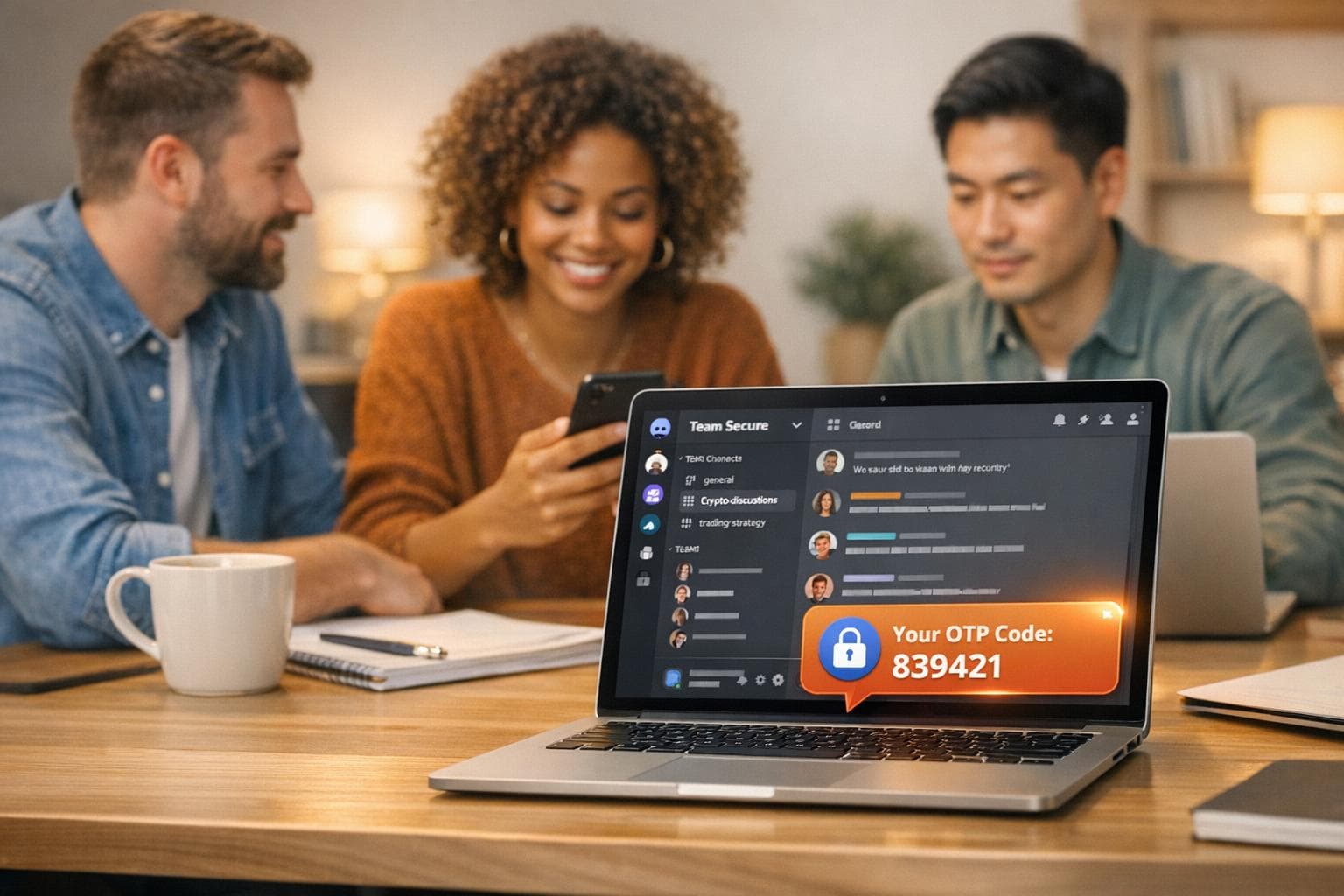
When managing shared accounts for gaming guilds, crypto teams, or DAOs, receiving one-time passwords (OTPs) can be a hassle. Traditional two-factor authentication (2FA) often sends codes to a single phone, creating bottlenecks during urgent situations. A solution? Forward OTPs directly to a private Discord channel using JoltSMS.
Here’s how it works:
- JoltSMS Real-SIM Numbers: Unlike VoIP numbers (e.g., Google Voice), JoltSMS uses real mobile numbers that work with platforms like Discord, Coinbase, and Steam. These numbers cost $50/month, include unlimited inbound SMS, and are more reliable for OTP delivery.
- Webhook Integration: Configure JoltSMS to send OTPs to a designated Discord channel in real time. This ensures your team can access codes instantly without depending on one person.
- Backup Options: Set up email forwarding as a secondary method to ensure redundancy.
This setup is ideal for teams needing quick, secure access to shared accounts. It eliminates delays, improves coordination, and ensures OTPs are always accessible.
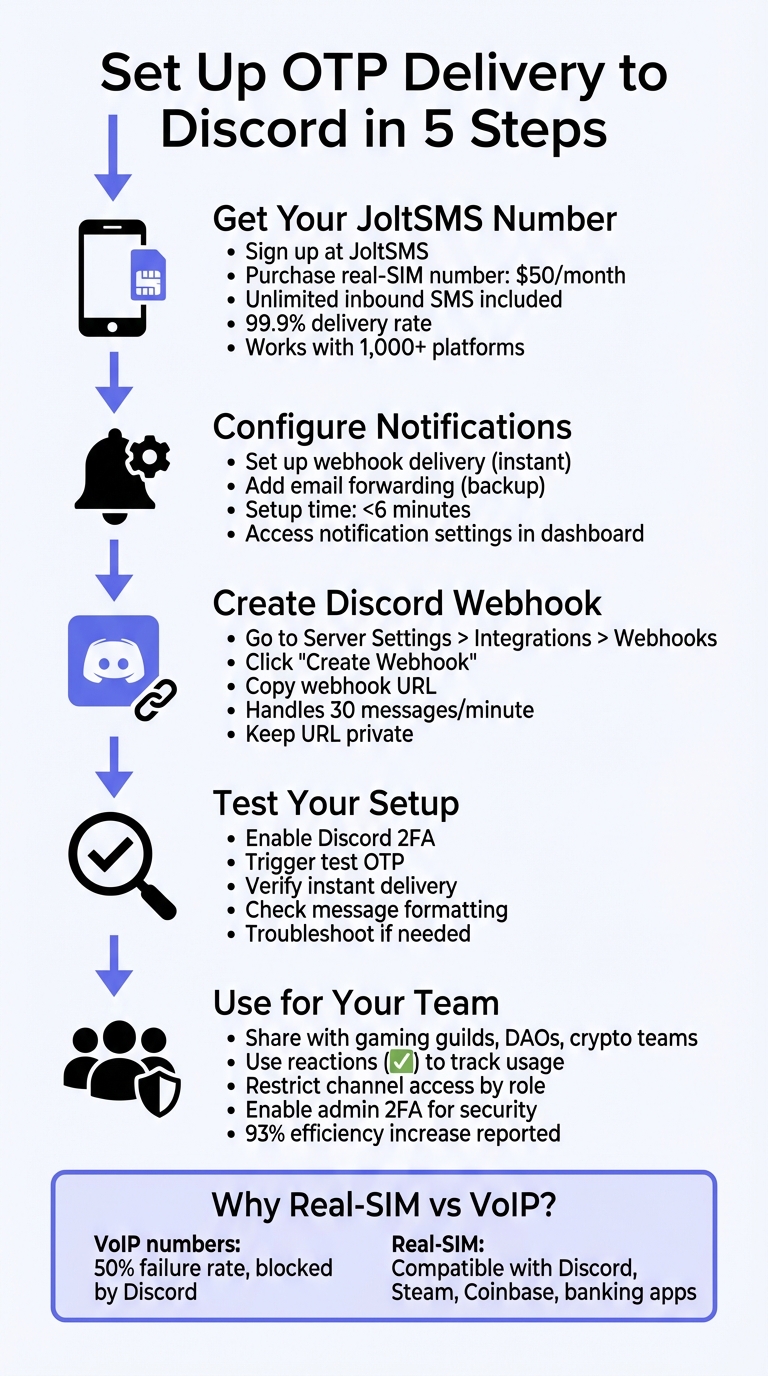
How to Set Up OTP Delivery to Discord in 5 Steps
Step 1: Create Your JoltSMS Account and Get a Number
Head over to JoltSMS, sign up with your details, and choose your preferred payment method. Once registered, you can purchase a dedicated US real-SIM number for $50 per month. This number is exclusively yours for the rental period and is activated immediately. Through your real-time dashboard, you can manage SMS, notifications, and account settings effortlessly. The package includes unlimited inbound SMS under a fair-use policy, making it ideal for verification needs in gaming guilds, DAOs, and crypto teams. This is your starting point for seamless OTP routing on Discord.
Now, let’s explore why real-SIM numbers are a better choice compared to VoIP options for receiving OTPs.
Why Real-SIM Numbers Work Better Than VoIP for OTPs
Platforms like Discord and most crypto exchanges block VoIP numbers - such as those from Google Voice or OpenPhone - from receiving OTPs. Their security systems often flag virtual numbers as "landline" or "non-mobile", which leads to automatic rejection.
"The phone number that you enter in Discord must be a valid cell phone number. If you enter a landline number or a VOIP phone number, you won't receive the code." – GroovyPost [6]
Real-SIM numbers, on the other hand, are recognized as legitimate mobile lines by these verification systems. With virtual number providers, there’s a significant risk - up to a 50% failure rate - when verifying accounts on platforms with strict security policies [7]. JoltSMS real-SIM numbers, however, are compatible with over 1,000 platforms, including Discord, Steam, Coinbase, and even banking apps.
Using temporary or virtual numbers can also lead to problems, such as expired numbers, which make it harder to recover accounts or receive follow-up verification codes. JoltSMS eliminates these issues by offering a guaranteed minimum 30-day number stability with automatic renewal, ensuring your team has continuous access to shared accounts.
JoltSMS Pricing and Features
For $50 per month, you get unlimited inbound SMS, instant webhook delivery, REST API access, and 24/7 support. Plus, there’s a money-back guarantee if OTP delivery fails. With a 99.9% delivery rate powered by carrier-grade infrastructure, JoltSMS ensures reliable OTP delivery, whether it’s for time-sensitive trades or urgent administrative tasks. Numbers renew automatically each month, giving you uninterrupted service.
Step 2: Set Up Notifications to Forward OTPs
Once your JoltSMS number is activated, the next step is configuring OTP delivery to your Discord server. JoltSMS provides two options: webhook delivery for instant updates in Discord channels and email forwarding as a backup. You can manage these settings through the JoltSMS notification settings in your dashboard.
Webhook delivery is the go-to method for real-time OTP sharing. When an SMS is received on your JoltSMS number, the system sends it to Discord almost instantly via an HTTP POST request. This is perfect for time-sensitive verifications. On the other hand, email forwarding ensures messages are sent to a shared inbox, offering access even if Discord is unavailable or some team members aren’t on the server. Setting up both methods ensures OTPs are routed efficiently and reliably.
Configure Webhook Delivery for Discord
To enable webhook delivery, you’ll first need a Discord Webhook URL (you’ll create this in Step 3). Once you have the URL, log in to your JoltSMS dashboard, navigate to the notifications section, and paste the Webhook URL into the provided field. Be sure to select JSON as the payload format. JoltSMS will automatically structure incoming SMS messages so they appear neatly in your Discord channel.
"Discord's built-in Webhooks function as an easy way to get automated messages and data updates sent to a text channel in your server." – Discord Support [5]
Keep your Webhook URL private - anyone with access to it can post messages in your Discord channel without needing to join the server [9]. If the URL is ever compromised, delete it immediately in Discord and generate a new one. Discord webhooks can handle about 50 requests per minute [10], which is more than enough for typical OTP volumes, whether you’re running a gaming guild, a DAO, or a small crypto team. Enabling both webhooks and email ensures OTPs are delivered promptly and securely.
Set Up Email Notifications as a Backup
Email forwarding acts as a reliable backup for OTP delivery. To set this up, go to the notification settings in your JoltSMS dashboard and add a shared team email address, such as [email protected] or [email protected], as the forwarding destination. This way, multiple team members can access OTPs simultaneously without relying solely on Discord.
The setup process takes less than six minutes [3]. While email delivery is almost immediate, it may experience slight delays depending on your email provider’s performance. For the best results, use both methods: webhooks for instant visibility and email forwarding for redundancy and record-keeping. Together, these options ensure OTPs are always accessible and securely delivered.
Step 3: Create a Discord Webhook for OTP Delivery
Once you've set up your notifications, the next step is configuring a Discord webhook to handle OTP delivery. This webhook URL serves as the endpoint where JoltSMS sends OTP messages directly to your designated channel. To proceed, ensure your account has the Manage Webhooks permission [2][13]. Typically, this permission is granted to server admins or high-level roles like "Admin" or "DAO-Lead."
Generate a Webhook URL in Discord
To create a webhook, open your Discord server and head to Server Settings > Integrations > Webhooks. Alternatively, click the Settings (cog icon) next to your chosen channel and select Integrations [8][13]. From there, click "New Webhook" or "Create Webhook" to begin. Customize the webhook’s name and profile picture to make it easy for your team to identify incoming OTP messages [5]. Choose a private channel for the OTP delivery, then click "Copy Webhook URL" to copy the unique endpoint.
Paste this URL into your JoltSMS dashboard's notification settings. Discord webhooks can handle up to 30 messages per minute [12], which is more than enough for standard OTP traffic. Before going live, test the webhook by sending a sample message. You can use tools like an Embed Generator or make a simple POST request to ensure messages display correctly in your channel [2].
Organize and Secure Your Discord Channel
Once your webhook URL is ready, take steps to secure your channel to prevent unauthorized access to OTP messages. Keep the webhook URL private - anyone with the URL can send messages to your channel, even without a Discord account [2][12]. If the URL is ever exposed, delete it immediately in Integrations and generate a new one to revoke access [2].
Set up a dedicated, private channel specifically for OTP delivery to keep sensitive codes from being mixed into general discussions [5][8]. Use Discord’s role-based permissions to limit access, assigning roles like "Admin", "Developer", or "DAO-Lead" to ensure only authorized users can view incoming OTPs. Additionally, enable two-factor authentication (2FA) for all administrators managing webhook settings to provide an extra layer of security [11].
sbb-itb-070b8f8
Step 4: Test Your OTP Setup
Now that you've completed Steps 1–3, it's time to test your OTP setup and confirm that everything is working smoothly, especially the OTP routing to Discord. After configuring the webhook, you’ll want to ensure that OTPs are successfully appearing in your designated Discord channel. To do this, trigger Discord’s Two-Factor Authentication (2FA) or SMS Backup Authentication by heading to User Settings > My Account and enabling one of these security features. When Discord sends a verification code to your JoltSMS number, it should show up in your channel within seconds [11].
You can also test the webhook separately by using the Embed Generator to send a sample POST to your URL [2].
Pay attention to the delivery speed - OTPs should arrive instantly. If they show up but are already expired, it might indicate that your provider is using unreliable "gray routes" (cheaper routing options that often cause delays) [4]. JoltSMS avoids this issue by using direct carrier routes for faster and more dependable delivery. Keep your webhook URL secure during this process. If you think it has been exposed, delete it in Integrations and generate a new one right away.
If you run into any issues during testing, check out the common problems and solutions below.
Fix Common Problems
Some common issues you might encounter include permission errors, formatting mistakes, or network restrictions. First, make sure your account has the Manage Webhooks permission for the specific channel - without it, the integration won’t be able to post messages [2]. If OTPs aren’t arriving, confirm that your JoltSMS number is a real-SIM number and not a VoIP number. Many platforms block VoIP numbers to prevent spam, which is why JoltSMS uses carrier-grade SIM hardware [1].
Common Issues and Solutions Table
Here’s a quick reference table to troubleshoot common errors:
| Issue | Likely Cause | Solution |
|---|---|---|
| OTP not received | Service detected a VoIP number | Use a real-SIM number since VoIP numbers are often blocked [1]. |
| Webhook fails to post | Missing "Manage Webhooks" permission | Confirm the channel has "Manage Webhooks" permission enabled [2]. |
| Delayed or expired OTP | Provider using cheaper routing options | Switch to a provider with direct carrier routes to avoid delivery delays [4]. |
| Message formatting errors | Incorrect payload or URL suffix | Ensure the sender uses JSON format and includes the correct URL suffix [5]. |
| Error 400 (Bad Request) | Invalid JSON format or unsupported characters | Validate the JSON payload and remove any unsupported characters [9]. |
| Error 404 (Not Found) | Webhook URL is incorrect or deleted | Re-generate or re-copy the webhook URL from Discord Integrations [5]. |
Step 5: Use OTPs for Gaming Guilds, DAOs, and Crypto Teams
Once you've set up secure Discord integration, you can take things further by using OTP (One-Time Password) sharing to streamline how gaming guilds, DAOs, and crypto teams operate. With this setup, sharing OTPs becomes instant and hassle-free. For example, whether it's a shared Steam account or a treasury wallet, there's no need to rely on a single person to pass along a six-digit code during critical moments. This setup ensures smoother operations and keeps everyone on the same page.
Examples: Gaming Guilds and DAOs
Here's how it works in practice: A gaming guild could limit access to an OTP channel to its leaders, while a DAO might restrict it to treasury managers. Imagine Steam sends a 2FA code to your JoltSMS number - within seconds, that code appears in the designated Discord channel. Any authorized leader can then log in without needing to chase down the guild owner. Similarly, DAOs managing treasury wallets on platforms like Coinbase can use this method to ensure quick and secure access for their managers.
Boost Team Collaboration with Shared OTPs
Want to keep things organized? Use Discord reactions to track OTP usage and avoid duplicate logins. When a code arrives, team members can react with a checkmark emoji (✅) to show they've used it, letting everyone know the code is no longer valid. This simple system doubles as an audit trail, helping crypto teams document who accessed accounts and when - perfect for keeping tabs on treasury activity [3].
Conclusion
Using JoltSMS to deliver OTPs directly to Discord offers a practical solution to the challenges posed by VoIP numbers. Since Discord doesn’t allow VoIP or landline numbers for verification, services like Google Voice or OpenPhone fall short when reliability is crucial [6].
This setup streamlines verification and improves team efficiency. For example, gaming guilds managing shared Steam accounts or DAOs handling treasury access benefit from removing the bottleneck of a single point of contact. With webhooks, all authorized team members can instantly view verification codes. Plus, this method reduces risks like SIM swapping or token compromise by eliminating the need to share personal phone numbers or Discord credentials [14][15].
Automation plays a key role here, with 93% of users reporting increased efficiency [3]. When paired with JoltSMS’s impressive 99.9% delivery rate, you can trust that codes will arrive promptly. At $50 per month, JoltSMS provides a dedicated real-SIM number with unlimited inbound SMS, ensuring reliability.
Whether you're leading a competitive gaming guild, managing a DAO treasury, or overseeing a crypto fund, forwarding OTPs to Discord through JoltSMS ensures smooth operations. The setup takes less than 10 minutes, giving your team immediate access to verification codes without compromising security or depending on a single individual.
FAQs
How does JoltSMS ensure reliable delivery of OTPs compared to VoIP services?
JoltSMS uses carrier-grade real-SIM numbers to send OTPs, ensuring they take the same mobile network routes as regular text messages. This means the messages appear just like ones sent from personal devices, easily passing verification checks and avoiding blocks from platforms that typically reject VoIP numbers.
On the other hand, VoIP services like OpenPhone or Google Voice often face issues with 2FA systems, leading to delays or even failed delivery of codes. By leveraging real-SIM technology, JoltSMS offers a reliable and uninterrupted solution, making sure your team - whether it's a gaming guild, DAO, or crypto fund - receives OTPs quickly and without hassle.
How can I securely use Discord webhooks to receive OTPs?
To securely send OTPs from JoltSMS to a Discord channel using a webhook, it's crucial to treat the webhook URL as a highly sensitive credential. Avoid hardcoding it into your source code or exposing it in version control systems. Instead, store it securely using environment variables or a secret management tool. Always use HTTPS to encrypt data during transmission, and take advantage of Discord's built-in rate-limiting and permissions to restrict the webhook's capabilities - such as limiting it to posting messages only.
For an extra layer of protection, consider adding an authentication token or a custom header that only your JoltSMS integration knows. Validate each incoming request against this token to ensure authenticity. If possible, whitelist the IP ranges used by JoltSMS to block traffic from unauthorized sources. Regularly rotate the webhook URL to minimize risks and keep an eye on your Discord server's audit logs to detect any unauthorized activity. Finally, validate the structure of the OTP payload to ensure it aligns with the expected format, which can help prevent phishing attempts or spam messages.
Can I use JoltSMS for purposes other than gaming or crypto teams?
JoltSMS isn’t just for gaming guilds or crypto DAOs - it’s a versatile tool that works anywhere you need to manage one-time passwords (OTPs). Using real-SIM phone numbers, it receives OTPs and forwards them to your system via webhook or email. This means you can integrate JoltSMS with platforms like Discord for things like DevOps alerts, finance updates, or even streamlining small-business operations.
Getting started is straightforward. Set up a webhook for your platform (like Discord) and configure JoltSMS to send OTPs directly to that endpoint. Prefer a no-code approach? You can use tools like Zapier to link JoltSMS with hundreds of apps. This makes it a great choice for centralizing 2FA codes, whether you’re managing a CI/CD pipeline, handling financial workflows, or coordinating a remote support team.