Scaling Marketplace Seller Accounts Without Losing Access
Managing multiple marketplace accounts on platforms like Amazon, Walmart, eBay, or Etsy can be tricky. One wrong move - like sharing the same phone number across accounts - can lead to account suspensions or bans. Here’s what you need to know to keep your accounts safe and running:
- Avoid VoIP Numbers for 2FA: Platforms reject VoIP numbers (e.g., Google Voice, OpenPhone) due to carrier lookups that flag them as unreliable. Use real SIM-based numbers instead.
- Unique Number for Each Account: Assign a dedicated phone number to each account to avoid being flagged for linked accounts.
- Stick with Real-SIM Numbers: Real-SIM numbers bypass detection systems, ensuring smooth verification and reducing suspension risks.
- Secure Recovery Codes: Always store 2FA recovery codes in a password manager to prevent lockouts.
- Set Up Team Access Safely: Use tools like Slack or Discord for 2FA code sharing, and keep numbers under company control - not tied to personal devices.
Suspensions can be costly, but with proper isolation strategies, real-SIM numbers, and secure team workflows, you can scale your marketplace accounts without losing access.
Why VoIP Numbers Get Rejected for 2FA
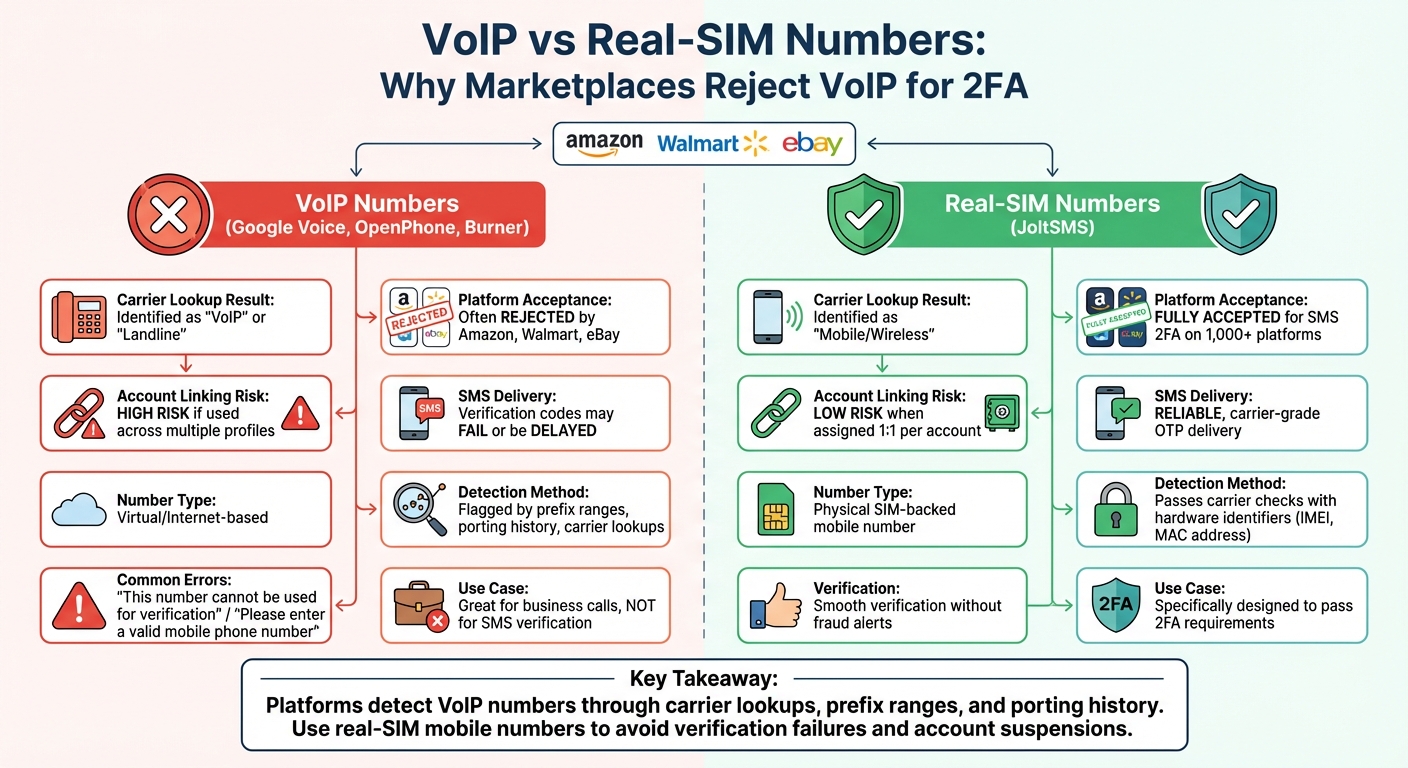
VoIP vs Real-SIM Numbers for Marketplace 2FA Verification
When you add a phone number for two-factor authentication (2FA), automated systems check whether it’s linked to a major mobile carrier like Verizon or T-Mobile, or if it’s a VoIP provider such as Google Voice, OpenPhone, or Burner. If the system detects a VoIP number, it’s flagged and rejected immediately [1].
This issue goes beyond simple detection. VoIP services use specific phone number blocks - known as prefix ranges - that security algorithms can easily identify [1]. Additionally, VoIP numbers often have a history of frequent porting (switching between carriers), which raises red flags for platforms like Amazon and Walmart. This pattern suggests the number isn’t tied to a reliable, physical telecommunications network.
"Platforms detect VoIP and disposable numbers with carrier lookups, prefix ranges, porting history and behavior; use a real-SIM mobile number to avoid verification failures."
– JoltSMS [1]
If you’ve ever encountered errors like "This number cannot be used for verification" or "Please enter a valid mobile phone number," you’ve experienced this firsthand. Walmart, for example, only allows U.S.-based numbers for its text-based 2FA. After five failed login attempts, your account locks for 24 hours [5]. This isn’t just inconvenient - it can block access to your funds or inventory when you need them most.
Common VoIP Rejection Errors
When you try to use a VoIP number for 2FA, platforms typically respond with specific error messages. The most frequent one is "This number cannot be used for verification," triggered when a carrier lookup identifies the number as non-mobile. Other common errors include "Please enter a valid mobile phone number" or silent failures where the verification code never arrives.
These errors aren’t random. They stem from automated fraud prevention systems that compare your number against databases of known VoIP providers. If your number falls within a flagged prefix range or shows a history of frequent porting, the platform assumes it’s disposable and blocks it [1].
Using the same VoIP number across multiple accounts amplifies the risk. If one account gets flagged, all linked accounts could face suspension [3][8].
"Amazon's sophisticated systems constantly monitor for related accounts. If accounts are linked and any associated account is found to be in violation or is not in good standing, all linked accounts are at risk of suspension."
– AMZ Sellers Attorney [8]
Switching to real-SIM numbers is a reliable way to avoid these issues.
How Real-SIM Numbers Fix Verification Problems
Real-SIM numbers offer a dependable solution to the challenges posed by VoIP rejections. Unlike VoIP numbers, real-SIM numbers are registered to mobile carriers, not software-based providers. When a marketplace runs a carrier lookup on a real-SIM number, it’s categorized as "Mobile/Wireless" instead of "VoIP" or "Landline" [1]. This distinction helps the number clear the initial verification step without triggering fraud alerts.
Real-SIM numbers also come with unique hardware identifiers like IMEI and MAC addresses, which create a verifiable mobile identity [4]. These identifiers make it nearly impossible for platforms to classify the number as disposable or temporary.
| Feature | VoIP Numbers (Google Voice, etc.) | Real-SIM Numbers (JoltSMS) |
|---|---|---|
| Carrier Lookup | Identified as "VoIP" or "Landline" | Identified as "Mobile/Wireless" |
| Acceptance | Often rejected by platforms like Amazon/Walmart | Fully accepted for SMS 2FA |
| Account Linking | High risk if used across multiple profiles | Low risk when assigned 1:1 per account |
| Reliability | Verification codes may fail or be delayed | Reliable, carrier-grade OTP delivery |
JoltSMS provides carrier-grade real-SIM numbers that work on over 1,000 platforms, including Amazon, Walmart, eBay, and Etsy. While VoIP numbers are excellent for business calls, they often fail SMS verification checks. JoltSMS numbers, however, are specifically designed to pass 2FA requirements. Each number is dedicated and private during your rental period, ensuring no overlap with other users that could lead to account associations.
How to Assign Phone Numbers to Each Account
Once you've embraced the use of real-SIM numbers, the next crucial step is ensuring proper phone number allocation for your accounts.
Assigning a unique real-SIM number to each high-value account is key to avoiding chain bans. Platforms like Amazon and Walmart use phone numbers as primary identifiers to link related accounts. If one account is flagged and shares a number with others, all accounts could face restrictions.
One Number Per High-Value Account
For your main marketplace accounts, always assign a distinct real-SIM number to each one. This ensures complete separation and prevents platforms from connecting your accounts through shared phone numbers. Amazon, for instance, actively monitors for accounts that share identifiers and flags them accordingly.
"There must be no crossover of any kind between the seller accounts. To help ensure this. Provide the following for each account: Separate telephone numbers, Separate points of contact, Separate account management."
– Walmart Marketplace Policy [2]
Stick with the same number for 1–2 years to establish a solid account history and minimize the need for re-verification [1].
When Shared Numbers Are Acceptable
Using shared numbers might be acceptable in specific, low-risk scenarios - such as temporary testing accounts - where strict account isolation isn’t essential. For example, internal tools or non-marketplace testing can function with a shared number for 6–12 months [1]. However, shared numbers should never be used for active marketplace accounts on platforms like Amazon, Walmart, eBay, or Etsy. These platforms are vigilant about identifying and linking accounts.
Number Allocation by Platform
Here’s a breakdown of phone number strategies tailored to specific platforms, helping you avoid cross-account linking:
| Platform | Phone Number Strategy | Key Requirement | Risk Level |
|---|---|---|---|
| Amazon | One unique number per account | Must be unique to prevent related account bans [3] | High – all linked accounts risk suspension |
| Walmart | One unique number per account | Explicitly required by policy for multiple accounts [2] | High – sharing can trigger detection |
| eBay | One unique number per account | Recommended to prevent digital fingerprinting [3] | Moderate to High – linked accounts share risks |
| Etsy | One unique number per account | Needed to avoid chain suspensions [3] | High – proactive account linking is enforced |
Both Amazon and Walmart allow multiple accounts, but only for valid business reasons, like managing separate brands or legal entities. Even in these cases, strict data isolation - including unique phone numbers - is mandatory to comply with their policies.
Setting Up JoltSMS Numbers for Your Team
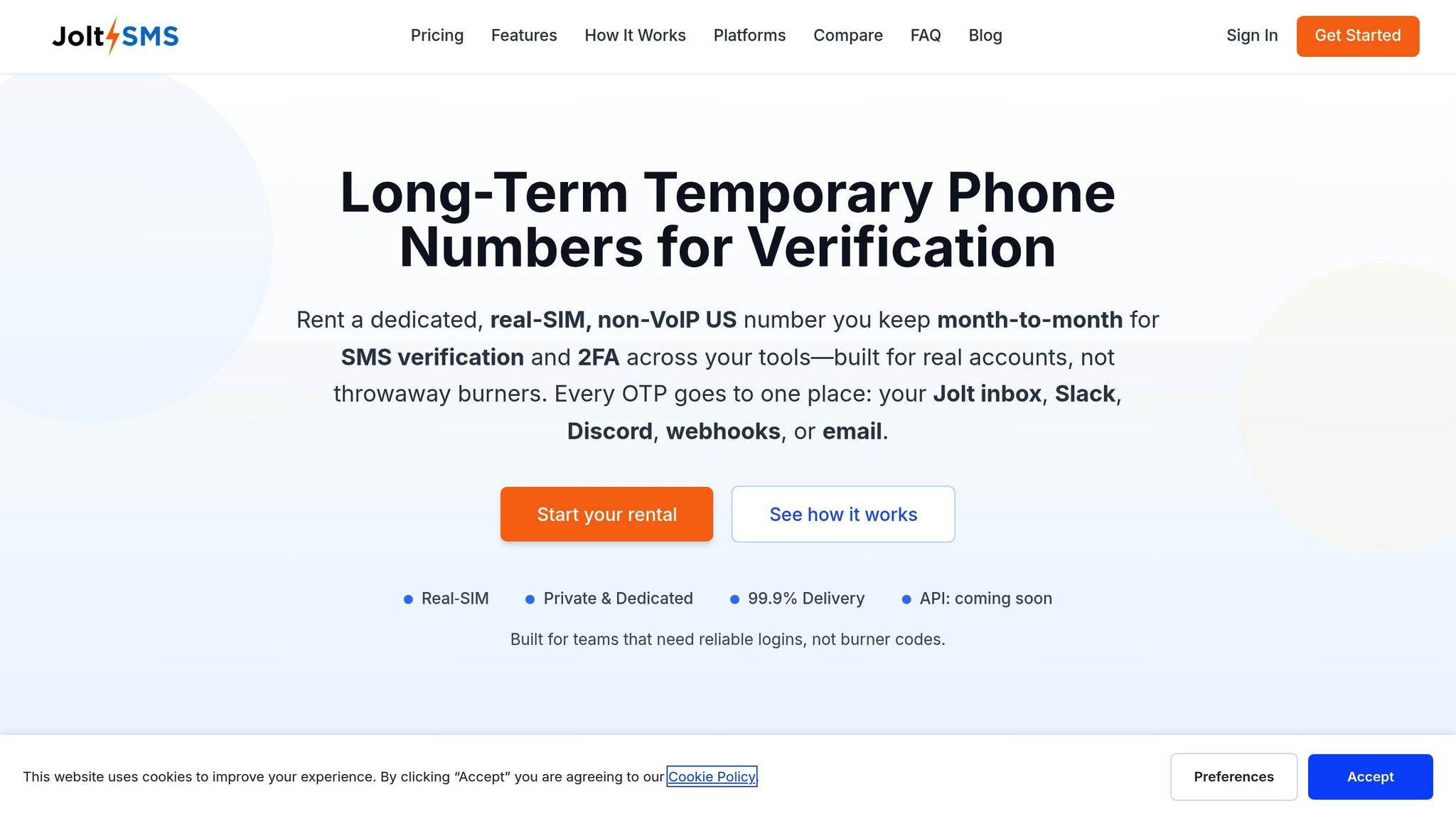
Get your JoltSMS numbers ready for seamless team access and dependable verification.
How to Purchase and Configure JoltSMS Numbers
Follow these steps to set up your real-SIM numbers:
- Sign up and purchase numbers: Head to JoltSMS.com and select the dedicated U.S. numbers you need. Each number is $50 per month, offering unlimited inbound SMS with a 30-day minimum rental period. Once purchased, you'll gain immediate access to your dashboard.
- Set up team notifications: Use webhooks to forward incoming verification codes directly to your team's Slack or Discord channels, ensuring everyone stays in the loop.
- Assign numbers to accounts: In the dashboard, label each number to match its associated marketplace account, like "Amazon-Brand-A" or "Walmart-Store-2." This labeling system is especially helpful for agencies juggling multiple accounts, keeping everything organized and audit-ready.
- Test verification: Before linking the numbers to live accounts, send a test SMS to confirm that verification codes appear in your dashboard and team channels almost instantly.
For Walmart Seller Center, choose "Text" as the authentication method and use your JoltSMS U.S. number to receive the 10-minute verification code [5].
This setup keeps your team aligned and ready to handle verification codes efficiently. The table below explains why real-SIM solutions like JoltSMS outperform VoIP services for verification purposes.
JoltSMS vs VoIP Services Comparison
The difference between real-SIM and VoIP services can save you from costly verification headaches.
| Feature | JoltSMS (Real-SIM) | VoIP Services (Google Voice, RingCentral, OpenPhone) |
|---|---|---|
| Number Type | Physical SIM-backed mobile number | Virtual/Internet-based |
| Marketplace Acceptance | High (bypasses carrier detection) | Low (often flagged as disposable) |
| Platform Compatibility | 1,000+ platforms including Amazon, Walmart, Stripe | Frequently rejected for 2FA |
| Team Collaboration | Built-in Slack/Discord webhooks, role-based access | Usually tied to a single user account |
| Inbound SMS | Unlimited verification codes | Often blocked by short-code senders |
| Number Longevity | Dedicated rental (never recycled during your use) | May be reclaimed or reassigned |
| Pricing | $50/month per number | Varies ($10–30/month typical) |
"Most 'second number' apps are VoIP... they're great for calling or one-off texts - but many websites reject VoIP for account verification." – JoltSMS [9]
The standout benefit of JoltSMS is its recognition as a legitimate mobile line by platforms like Amazon and Walmart. This ensures you avoid the dreaded "VoIP not supported" errors that can disrupt account setup or raise red flags. While VoIP services are fine for calls, JoltSMS is your go-to solution for verification that works when it matters most.
sbb-itb-070b8f8
How to Avoid Account Bans and Keep Access
Protecting your marketplace accounts starts with keeping phone numbers isolated, establishing strict team protocols, and prioritizing security. A single mistake can lead to bans across all linked accounts, so staying vigilant is crucial.
Managing Number Rotation and Recovery Codes
Stick with a real-SIM 2FA number for 12–24 months on high-value accounts. For accounts with lower priority or for testing purposes, consider rotating numbers every 6–12 months. Real-SIM numbers provide stable, verifiable access, reducing the chances of marketplace suspensions.
Secure recovery codes before making any number changes. Store them in a centralized password manager to avoid being locked out. Losing access to a JoltSMS number without recovering these codes can result in permanent account lockouts. Platforms like Amazon and Walmart are strict - if you lose your 2FA credentials, they won’t make exceptions.
Assign a unique number to each high-value account. Reusing the same phone number across multiple accounts is a quick way to trigger "related account" suspensions [3][4][2]. For example, if one account gets flagged, platforms like Amazon can identify and ban all accounts linked to the same number.
Once your numbers are stable and recovery codes are secured, focus on implementing strict team access controls to further protect your accounts.
Team Access Rules and Security Steps
To minimize security risks, ensure your team adheres to these practices:
Forward verification codes to Slack or Discord using JoltSMS webhooks. This allows your team to access 2FA codes efficiently without sharing physical devices or compromising login credentials [1]. Revoke access immediately when someone leaves the team.
Use company-owned numbers instead of personal devices. If an employee leaves and takes their personal number, you could lose access to all accounts tied to that line. JoltSMS numbers remain under company control, eliminating this risk [1].
"There must be no crossover of any kind between the seller accounts. To help ensure this, provide separate telephone numbers, separate points of contact, and separate account management." – Walmart Marketplace Policy [2]
Restrict 2FA access to essential personnel. For added security, set up separate webhook destinations for different account tiers. For instance, route 2FA codes for high-value Amazon accounts to a private channel accessible only to senior staff.
Ban Prevention Checklist
Here’s a quick summary of key steps to prevent account bans:
| Action | Amazon | Walmart | eBay/Etsy |
|---|---|---|---|
| Unique phone number per account | Required [3] | Required [2] | Required [3] |
| Separate bank account/credit card | Required [7][10] | Required [4][6] | Required |
| Distinct email address | Required [7] | Required [2] | Required |
| Isolated browser profile or device | Recommended [3][7] | Recommended [4] | Recommended [3] |
| Request written permission for multiple accounts | Best practice [7] | Required for exceptions [2] | N/A |
| Use real-SIM (not VoIP) for 2FA | Critical [1] | Critical (U.S. only) [5] | Critical [1] |
For Amazon, consider opening a Seller Central case to request approval for a second account. While not mandatory in 2025, having written confirmation of your business need can be a lifesaver [3][7]. For Walmart, explicit approval is required for multiple accounts - clearly document separate brands or product lines to strengthen your case [2].
Be mindful of Walmart's strict verification limits. Codes expire in 10 minutes [5], and multiple login attempts from different locations can trigger issues. Train your team to act promptly when codes arrive, ensuring smooth and secure access.
Adding Authenticator Apps for Extra Security
Authenticator apps like Google Authenticator, Microsoft Authenticator, or Authy provide an extra layer of security by generating time-sensitive codes every 30 seconds, even without an internet connection. These apps rely on the Time-based One-Time Password (TOTP) protocol, offering stronger protection compared to SMS-based 2FA by minimizing the risk of interception. Once your account is set up with a JoltSMS real-SIM number, using an authenticator app ensures a more secure login process. This added layer works perfectly alongside the SMS verification offered by JoltSMS.
Linking Authenticator Apps with JoltSMS
After completing verification with JoltSMS, head to your account's security or login settings and look for an option like "Add Authenticator App" or "2-Step Verification." Scan the QR code provided using your authenticator app, then input the six-digit code it generates. Make sure to save the recovery codes immediately - store them securely in a password manager like 1Password or Bitwarden to avoid being locked out of your account.
Keep your JoltSMS number active as a backup recovery option. Many platforms allow you to reset 2FA by sending a code to your registered phone number. Also, ensure your device’s clock is set to automatic to prevent any time-sync errors that could disrupt the authenticator app’s functionality.
Managing Authenticator Apps Across Teams
To bring these security benefits to your team, use authenticator apps that support encrypted cloud backups, like Authy or Microsoft Authenticator. These tools allow multiple team members to access the same 2FA seed without needing to share physical devices. For critical accounts, consider setting up "break-glass" backup options - a dedicated company device that holds backup authenticator apps. This ensures continued access if a team member leaves or loses their device.
For added protection, enable "App Lock" in your authenticator app settings to require a PIN or biometric scan each time the app is opened. To simplify team workflows, route JoltSMS verification codes to shared channels like Slack or Discord using webhooks. This can help streamline notifications as your team transitions from SMS-based verification to authenticator apps for daily logins.
Conclusion
Successfully scaling your marketplace accounts boils down to three key factors: real-SIM numbers, complete account isolation, and strong security measures. Unlike VoIP numbers, JoltSMS real-SIM numbers reliably pass carrier checks for two-factor authentication (2FA) and account recovery, providing a dependable solution for account management.
The stakes are high - account suspensions can cost anywhere from $50,000 to $200,000, making robust isolation a necessity [11]. To avoid linked bans, each account must have its own phone number, IP address, and browser fingerprint. For instance, Walmart requires unique phone numbers for every additional approved account [2], while Amazon uses over 55 fingerprinting parameters to detect related accounts [11].
To maintain security, keep your JoltSMS numbers active for 1–2 years, route 2FA codes to centralized communication platforms like Slack or Discord, and store recovery codes securely in a password manager. By combining real-SIM numbers with a disciplined isolation strategy, you can safeguard your business from unnecessary risks.
A well-executed multi-store strategy doesn’t just protect your accounts - it also drives growth. Sellers who prioritize proper isolation report revenue increases of 3× to 5× within two years [11]. Building the right infrastructure today - dedicated real-SIM numbers, antidetect browsers, residential proxies, and team-wide 2FA access - sets the foundation for long-term success.
"Proper multi-account management isn't optional - it's essential infrastructure for your business." – Multilogin Academy [11]
FAQs
Why are real-SIM numbers better than VoIP for verifying marketplace accounts?
Real-SIM numbers are trusted by major marketplaces like Amazon, Walmart, eBay, and Etsy because they are tied to legitimate mobile carriers. This connection guarantees dependable delivery of SMS verification codes, reducing the chances of messages being blocked.
On the other hand, VoIP numbers are often seen as unreliable or temporary, which can result in frequent verification failures. Choosing real-SIM numbers helps you sidestep these problems, providing smoother account management and consistent access to your accounts.
How can I manage multiple marketplace accounts without risking suspension?
Managing multiple seller accounts on platforms like Amazon, Walmart, eBay, or Etsy can help boost your business, but it requires a strategic approach to avoid account suspensions. Marketplaces are quick to flag linked accounts for potential fraud, so keeping each account entirely independent is key.
To stay on the right side of platform policies, treat every account as its own standalone business. This means setting up a unique LLC or DBA, obtaining a separate EIN, and using distinct bank accounts and credit lines for each store. Make sure each account also has its own dedicated email address and a real-SIM phone number for SMS verification and two-factor authentication (2FA). Avoid using VoIP numbers, as many platforms block them. Enabling 2FA is a simple but effective way to enhance security.
On the technical side, it’s crucial to isolate the digital footprint of each account. Use separate browser profiles or virtual machines for each one, and connect through unique residential proxies or network connections to prevent overlaps in IP addresses or device fingerprints. Assign specific team members to manage individual accounts, and keep all records - such as inventory, financials, and performance metrics - completely separate.
By combining legal separation, secure verification practices, and isolated technical setups, you can grow your accounts while minimizing risks.
What makes JoltSMS the best choice for verifying marketplace accounts?
JoltSMS provides dedicated real-SIM U.S. numbers that are perfect for receiving verification codes, addressing a common issue with VoIP numbers that often get blocked. These numbers are dependable for long-term use, offering both privacy and consistency - ideal for managing multiple marketplace accounts without hassle.
Additionally, JoltSMS includes features like audit-trail-ready compliance and webhook-enabled SMS delivery, making it simple to stay organized and secure. Whether you're handling two-factor authentication (2FA) for platforms like Amazon, Walmart, eBay, or Etsy, JoltSMS ensures a smooth and reliable experience.