How Startups Get Locked Out of Stripe, AWS, and Google (and How to Prevent It)
Getting locked out of platforms like Stripe, AWS, or Google Workspace can paralyze your startup. It happens when critical accounts rely on personal, employee-owned, or VoIP phone numbers for verification. If those numbers become inaccessible - due to employee turnover, carrier issues, or platform restrictions - you lose control over essential systems, halting operations and revenue.
Here’s how to avoid it:
- Use company-controlled phone numbers: Replace personal or VoIP numbers with dedicated, real-SIM numbers for verification.
- Centralize account ownership: Register accounts under company emails and document credentials securely.
- Set up backup methods: Add multiple admins, enable hardware security keys, and store backup codes.
These simple steps protect your business from costly downtime and ensure uninterrupted access to critical platforms.
3 Mistakes Startups Make with Verification Numbers
Many startups face account lockouts because of a few common missteps with verification numbers. These mistakes might seem minor at first but can lead to serious disruptions, leaving your business vulnerable at the worst possible moments.
Using Personal Numbers for Business Accounts
In the rush to get things up and running, startups often rely on personal phone numbers for business accounts. While this might seem convenient, it comes with serious risks. If you change carriers, miss a payment, or experience a suspension, you could lose access to the verification codes needed to log in.
Personal numbers also create ownership headaches. Imagine your co-founder uses their personal number to register critical services like AWS. If they leave the company - especially on bad terms - you might find yourself negotiating just to regain access to your own systems. These risks aren’t limited to personal numbers; similar issues can arise with other non-business-specific numbers as well.
Relying on VoIP Numbers for Verification
VoIP services like Google Voice, OpenPhone, and RingCentral are excellent for handling business calls and customer communication. However, they’re a poor choice for account verification. Platforms like Stripe, AWS, and Google often block VoIP numbers because they’re easy to acquire in bulk, making them a security risk. These platforms need to ensure that a real person is managing the account, and VoIP numbers don’t meet that standard.
Here’s where it gets tricky: everything might seem fine initially. You set up accounts with a VoIP number, and it works - until the platform performs a security check or requests re-verification. That’s when you’ll encounter messages like “This number cannot be used for verification” or “Please use a valid mobile number.” At that point, you’re locked out, and resolving the issue often involves contacting support and going through a tedious identity verification process.
VoIP numbers are great for their intended use, but they just don’t work when it comes to SMS verification. Unlike VoIP services, solutions like JoltSMS use real-SIM technology, which platforms consistently accept for verification.
Employee-Owned Numbers and Turnover Problems
Another common pitfall is relying on employee-owned numbers for critical accounts. For instance, your first developer might set up the AWS root account with their personal number, or your operations manager might register Stripe using their own cell phone.
The problem? If that employee leaves - whether they’re traveling, change their number, or simply stop responding - you’re left scrambling to regain access. This situation can lead to frustrating delays, as platform support teams often require days or even weeks to resolve such issues. For a startup, that kind of downtime can be devastating.
At its core, this issue is about control. If employees own the verification numbers tied to your business accounts, your company doesn’t truly control its own infrastructure. As your startup grows and becomes more reliant on these platforms, this risk only increases.
What Happens When You Get Locked Out
Getting locked out of a critical business platform can grind your operations to a halt. Without access to the verification number tied to your account, you're often stuck in a lengthy and frustrating support process. Let's break down what this looks like for some of the most essential services:
Stripe: Frozen Funds and Revenue at Risk
Stripe relies on your original verification number to secure your account. If you lose access to that number, you lose control over your account. While customer payments still process, the funds remain inaccessible. For startups with tight cash flow, missing even a single payout cycle can mean scrambling to make payroll or delaying payments to vendors.
The recovery process is no walk in the park. You'll need to submit specific documents and wait for a manual review. During this time, you're unable to update banking details, respond to disputes, or manage refunds. If there's a company ownership dispute, things get even more complicated. In such cases, legal documentation proving ownership is required, which adds more delays.
AWS: Locked Out of Critical Infrastructure
AWS ties root account access to the phone number used during registration. If you lose access to that number, even full IAM permissions won’t help you regain control of essential administrative functions. You can’t update billing details, change security settings, or access services requiring root credentials.
This becomes a nightmare if you're dealing with a security incident or need to update your payment method. AWS support can assist, but the verification process is rigorous. You'll be asked to provide business registration documents, tax IDs, and sometimes notarized letters proving ownership. If your payment method fails and you can’t update it, AWS may throttle services, potentially taking your entire infrastructure offline.
Google Workspace: A Teamwide Shutdown
Losing access to the recovery number for your Google Workspace admin account can lock out your entire team. When this happens, emails stop working, shared documents become inaccessible, and calendar invites fail. Communication with customers, investors, and partners comes to a standstill.
Recovering a Google Workspace account without the original recovery number is challenging. You’ll need to prove domain ownership, submit business verification documents, and navigate several layers of support. This process can take 3–5 business days, and success isn’t guaranteed if your proof of ownership falls short. In the meantime, your team loses access to vital emails, contracts, and files stored in Google Drive.
These scenarios highlight the critical importance of maintaining a verified, company-controlled number - a solution we’ll explore in detail later.
How to Prevent Verification Lockouts
The risk of verification lockouts can feel daunting, but the bright side is that they’re completely avoidable. By taking a few simple but effective steps, your startup can ensure uninterrupted access to vital platforms like Stripe, AWS, and Google Workspace - even during team transitions or changes to contact details.
Use Company-Controlled Verification Numbers
The first and most crucial move is to replace personal or employee-owned numbers with a company-controlled verification number. This ensures the number stays with your business, not with individuals who may leave the team.
One common mistake startups make is relying on VoIP services for verification. While VoIP numbers work for calls, they’re often rejected for SMS verification by platforms like banks, payment processors, and cloud services. Why? Because VoIP numbers are easier to spoof and lack the security standards required for sensitive accounts.
The better alternative is a real-SIM number dedicated to business verification. Providers like JoltSMS offer U.S.-based real-SIM numbers that are fully compatible with platforms such as Stripe, AWS, and over 1,000 others. Unlike VoIP, these numbers meet strict SMS verification requirements. At $50/month, you get a private number with unlimited inbound SMS, ensuring it’s never shared or recycled - minimizing the risk of verification failures.
Centralize and Document Account Ownership
Once you’ve secured a company-controlled number, the next step is to centralize account ownership. Every critical account - whether it’s Stripe, AWS, Google Workspace, or your banking platforms - should be registered under company email addresses and phone numbers, not personal ones.
To keep things organized and secure, document all account details in a centralized location, such as a password manager accessible to key leadership. This ensures that essential information is always within reach.
Additionally, make it a standard practice to use role-based email addresses (like [email protected] or [email protected]) instead of individual employee emails. This approach guarantees continuity and smooth transitions when team members leave the organization.
With your verification numbers centralized and account details documented, it’s time to add layers of redundancy.
Set Up Multiple Admins and Backup Methods
Never rely on just one person to manage access to critical accounts. Assign at least two or three administrators to every essential platform. This redundancy ensures that if one admin is unavailable, others can step in without delay.
To further safeguard access, enable backup authentication methods wherever possible. Hardware security keys, such as YubiKey, provide an extra layer of protection and don’t rely on phone numbers. Additionally, securely store backup codes - they’re a lifesaver if primary methods fail.
For your verification number, consider setting up webhook integrations to forward SMS codes directly to team communication channels like Slack or Discord. This way, multiple team members can access verification codes in real time, reducing dependence on any single person.
By combining multiple admins, backup authentication options, and shared SMS access, you can eliminate single points of failure and significantly reduce the risk of lockouts.
Next, we’ll walk you through a detailed prevention checklist to help you implement these measures effectively.
sbb-itb-070b8f8
Prevention Checklist for Startups
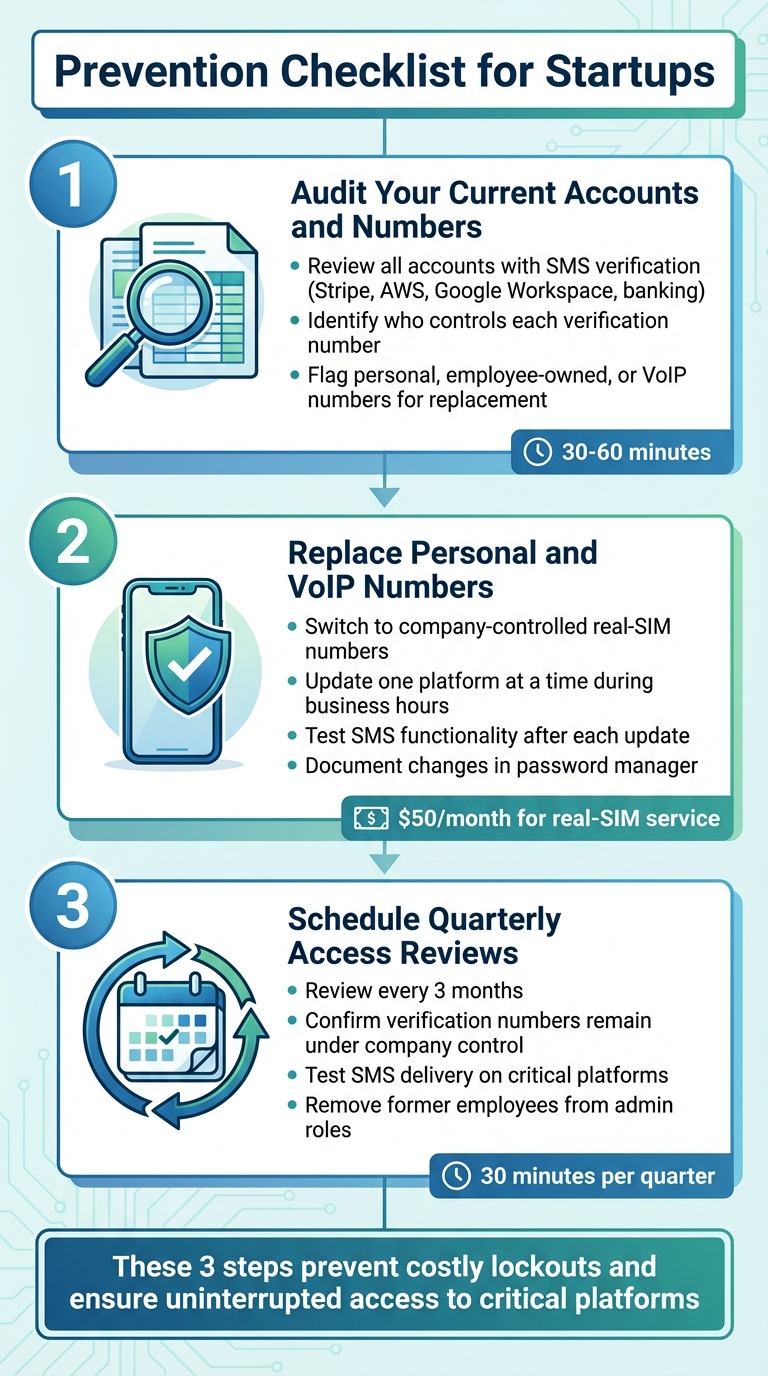
3-Step Prevention Checklist to Avoid Platform Verification Lockouts
It's time to take action. This checklist outlines the steps your startup needs to follow to secure critical accounts and avoid verification lockouts. Use it to safeguard your accounts efficiently.
Audit Your Current Accounts and Numbers
Start by conducting a thorough review of your verification methods. Identify all accounts that rely on SMS verification. This includes platforms like your Stripe dashboard, AWS root account, Google Workspace admin console, and any banking or payment services your startup uses. For each account, note the phone number currently registered for verification and determine who controls it.
Pay close attention to whether these numbers are personal cell phones, employee-owned numbers, or VoIP services such as Google Voice or OpenPhone. If you find that any critical accounts are tied to a former employee's number or a personal cell phone, flag them for immediate replacement. This quick audit, which takes about 30–60 minutes, can save you from days of potential downtime.
Replace Personal and VoIP Numbers with Real-SIM Numbers
Update your accounts with company-controlled real-SIM numbers. Services like JoltSMS offer U.S.-based numbers for $50/month that are compatible with platforms like Stripe, AWS, and over 1,000 others.
Make these updates during business hours to ensure you can promptly verify codes. Update one platform at a time, test the SMS functionality, and document the changes in your password manager. If you're currently using a VoIP service for calls, you can keep it - just don’t rely on it for SMS verification anymore.
Schedule Quarterly Access Reviews
Set a recurring reminder every three months to review account access. During these reviews, confirm that all verification numbers remain under company control. Test SMS delivery on at least one critical platform to ensure everything is working as expected. Also, verify that designated administrators still have access and remove any former employees from admin roles.
These quick, 30-minute reviews can help you catch potential issues before they escalate. If someone leaves your team, you'll address it during the next review rather than facing a lockout crisis in the middle of the night.
Conclusion
Getting locked out of platforms like Stripe, AWS, or Google can bring your business to a standstill, halting revenue and disrupting essential operations. The upside? These situations can be avoided entirely with a few proactive steps.
Here’s the key: use company-controlled real-SIM numbers instead of personal or VoIP numbers, centralize account ownership so no single person has exclusive access to critical systems, and set up backup access methods well in advance. These straightforward measures can save your business from unnecessary chaos.
Unfortunately, many startups overlook the importance of securing verification numbers until they’re already locked out. Waiting too long to address these risks can result in costly downtime and lost revenue. Taking action now can prevent those headaches down the road.
Start by dedicating just 30 minutes this week to auditing your critical accounts. Check which numbers are tied to your most essential platforms, replace personal or employee-owned numbers with dedicated verification numbers, and document everything securely in your password manager. These small steps can make a big difference in avoiding operational disasters.
The startups that grow and thrive are the ones that prioritize resilience before it’s tested. Don’t wait - secure your systems today and safeguard your business’s future.
FAQs
Why shouldn’t startups use personal or VoIP numbers for account verification?
Using personal or VoIP numbers for account verification might seem convenient, but it often leads to problems like failed verifications, account lockouts, or frustrating delays. Many platforms view these numbers as unreliable or even fraudulent, which can disrupt your workflow and damage your startup’s reputation. On top of that, when employees leave, their phone numbers may change, introducing further security and access complications.
A better approach? Use real-SIM numbers that platforms trust and accept. Make sure your verification process is centralized, and avoid sharing the same number across multiple accounts to keep everything secure and running smoothly.
How can startups avoid getting locked out of platforms like Stripe and AWS?
Startups looking to maintain uninterrupted access to platforms like Stripe and AWS should prioritize using real-SIM phone numbers for verification. Many platforms block VoIP numbers, which can lead to unnecessary complications. Additionally, having multiple verified numbers on file is a smart move - it helps account for changes like employee turnover or phone number updates. Keeping contact details up to date and establishing a clear process for managing verifications can go a long way in minimizing any potential disruptions. These proactive measures ensure startups stay connected to the tools they rely on.
Why should I use real-SIM numbers instead of VoIP for verification?
Real-SIM numbers are trusted by platforms like Stripe, Google, and AWS for verification purposes because they are linked to physical devices. This connection makes them more secure and dependable. On the other hand, VoIP numbers, being virtual, are often flagged or blocked as they are seen as less reliable for verifying identities.
Choosing a real-SIM number increases the likelihood of successfully receiving verification codes. This helps you avoid the hassle of lockouts or delays when trying to access essential services. For both businesses and individuals, they are the go-to option for smooth and reliable verification processes.