When To Use SMS 2FA vs Authenticator Apps vs Passkeys
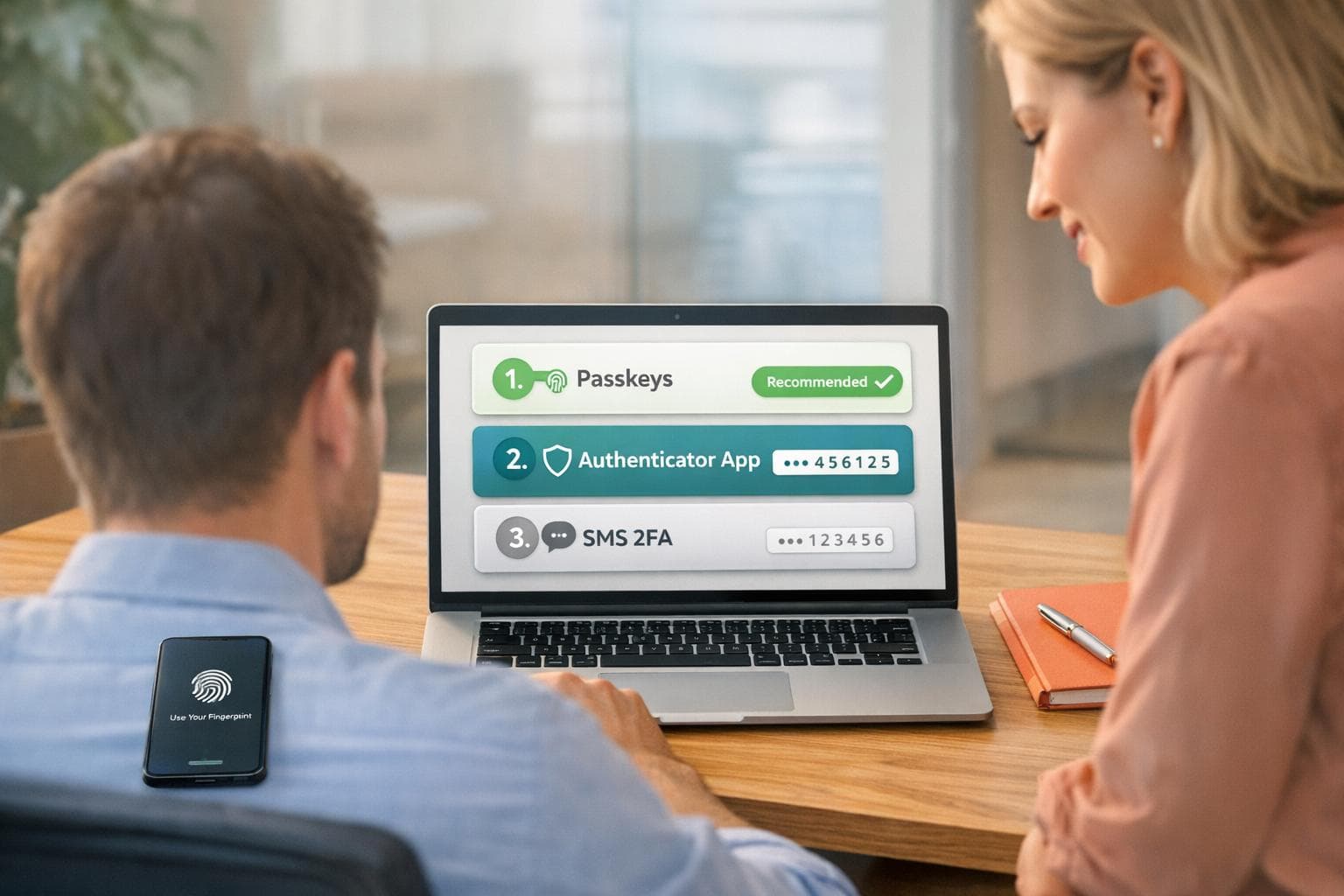
Passwords alone aren’t enough to keep your accounts safe anymore. Two-factor authentication (2FA) adds an extra layer of security, but not all methods are equally secure. Here’s a quick breakdown of the three main options:
- SMS 2FA: Relies on text codes sent to your phone. It’s easy to use but vulnerable to SIM-swapping and phishing attacks. Best used only when no other option is available.
- Authenticator Apps: Generate time-sensitive codes on your device. Much safer than SMS but still susceptible to real-time phishing. Ideal for most accounts.
- Passkeys: The most secure option, using cryptographic keys tied to specific websites or apps. They’re phishing-resistant and easy to use but not yet supported everywhere.
Key takeaway: Use passkeys whenever possible, rely on authenticator apps as a backup, and only use SMS 2FA as a last resort. This layered approach ensures strong protection for your accounts.
SMS 2FA: How It Works and When You Need It
How SMS 2FA Works
SMS-based two-factor authentication (2FA) provides an added layer of security by sending a unique six-digit code to your registered mobile phone after you enter your password. This code acts as proof that you have access to the associated device. Its straightforward design and the widespread use of mobile phones make SMS 2FA a popular choice. For service providers, the setup is simple: they send a text message via a telecom provider and verify the code entered by the user. This ease of implementation is why SMS remains the go-to option for many platforms, even though it has known security vulnerabilities.
Let’s take a closer look at the risks that come with relying on SMS for 2FA.
Security Risks of SMS 2FA
One of the biggest threats to SMS-based 2FA is SIM swapping. In this type of attack, scammers use social engineering tactics to convince your mobile carrier to transfer your phone number to a SIM card they control. Once they have access to your number, they can intercept your 2FA codes. For example, in August 2019, Twitter CEO Jack Dorsey’s account was compromised for 15 minutes in a SIM-swap attack. Similarly, a cryptocurrency investor suffered a $24 million loss in 2018 after falling victim to the same scheme[1].
Another vulnerability lies in the SS7 protocol, which allows attackers to intercept text messages remotely without needing physical access to your device. Additionally, adversary-in-the-middle phishing attacks trick users into entering both their passwords and SMS codes on fake login pages, enabling attackers to steal this information in real time.
"SMS was never designed with security in mind. Messages are sent over unencrypted channels, making them vulnerable to interception." - KvaPay [1]
High-security platforms, such as banks, Stripe, WhatsApp, and cryptocurrency exchanges, often block VoIP numbers (like Google Voice or OpenPhone) for SMS verification. These services require a physical SIM-based number to ensure secure and reliable delivery of codes while reducing the risk of automated abuse.
Using a real-SIM number and enabling carrier locks can help mitigate these risks. Despite these precautions, many platforms still rely on SMS 2FA due to outdated systems.
When You're Forced to Use SMS 2FA
Some services still make SMS 2FA the only available option. This is particularly common in legacy systems, such as those used in banking, which haven’t yet adopted newer authentication technologies. In these cases, using a real-SIM number - accepted by over 1,000 platforms - can improve reliability. For instance, WhatsApp requires a phone number for registration, while platforms like Stripe use SMS to verify business owners during account setup. Even when other 2FA options are available, SMS often remains a fallback for account recovery.
If you have no choice but to use SMS 2FA, opt for a real-SIM number instead of a VoIP number for better reliability. Services such as JoltSMS provide dedicated, carrier-grade numbers that are compatible with thousands of platforms. A dedicated number also reduces the risk of SIM-swapping attacks, as it’s less likely to be publicly linked to your accounts. To further protect yourself, contact your mobile carrier to enable a "Port-Out PIN" or carrier lock, which requires a unique PIN before your number can be transferred. Additionally, disabling SMS-based password resets whenever possible adds another layer of security to your accounts.
sbb-itb-070b8f8
Authenticator Apps: A Safer Option
How Authenticator Apps Work
Authenticator apps like Google Authenticator, Microsoft Authenticator, and Authy create six-digit codes directly on your device using a Time-based One-Time Password (TOTP) algorithm. Here’s how it works: during setup, you scan a QR code that transfers a secret key to your app. The app then combines this key with the current time (rounded to 30-second intervals) to generate a unique code using a cryptographic hash.
These codes are generated locally on your device, meaning they don’t rely on internet or cellular networks. This makes them functional even without connectivity. The server, which has its own copy of the secret key, runs the same calculation based on the current time to verify the code you enter. Since most codes expire within 30 to 60 seconds, the limited time frame significantly reduces the risk of attacks.
Why Authenticator Apps Are More Secure Than SMS
The way authenticator apps operate makes them much safer than SMS-based verification. Unlike SMS, which transmits codes over phone networks, these apps generate codes directly on your device. This design eliminates vulnerabilities like SIM-swapping attacks and SS7 protocol exploits. Even if someone tricks your carrier into transferring your number to their SIM card, they won’t have access to your authenticator app or its codes.
The security benefits are backed by data. Microsoft research shows that on-device authenticators can block:
- 100% of automated bot attacks
- 99% of bulk phishing attacks
- 90% of targeted attacks
In contrast, SMS-based two-factor authentication (2FA) only prevents about 76% of automated attacks [1]. While authenticator apps aren’t completely immune to real-time phishing attacks - where attackers intercept and use codes immediately - they’re still a much safer choice for everyday use.
"SMS-based 2FA is the least secure method... prone to SIM swap attacks, vulnerable to SS7 protocol exploits, and easily intercepted by phone malware." - LoginRadius [2]
Barriers to Using Authenticator Apps
Despite their stronger security, authenticator apps come with some challenges. For starters, the setup process - scanning QR codes and linking accounts - can be confusing for less tech-savvy users. Another major drawback is device dependency. If your phone is lost or stolen and you haven’t set up backups, you could lose access to all your linked accounts.
Additionally, manually entering codes can feel tedious, leading to "login fatigue" and higher abandonment rates compared to simpler methods like passkeys. TOTP also depends on your device’s clock being accurate; even a small discrepancy can cause codes to fail.
To minimize these risks, save the one-time recovery codes provided during setup in a secure, offline location. Many modern apps, such as Google Authenticator (starting with version 6.0+ on Android and 4.0+ on iOS) and Microsoft Authenticator, now offer encrypted cloud backups. This ensures you won’t lose access even if your device is lost. For extra protection, consider enabling multiple 2FA methods as a fallback. Choosing the right 2FA method means weighing these challenges against the risks of alternatives like SMS or passkeys.
Passkeys: Passwordless Authentication
How Passkeys Work
Passkeys replace traditional passwords by using FIDO2 and WebAuthn standards, allowing you to log in with methods like FaceID, TouchID, Windows Hello, or a PIN. Here's the basic idea: your device creates a pair of cryptographic keys - a public key stored on the server and a private key kept securely on your device. When you log in, the server sends a challenge, and your device responds with a cryptographic signature verified using the public key. This entire process happens in milliseconds.
One standout feature of passkeys is that they’re tied to a specific website or app. For instance, if you create a passkey for your bank at bankofamerica.com, it won’t work on a phishing site, even if the fake site looks identical.
Passkeys come in two forms: synced passkeys, which are stored with cloud services like iCloud Keychain or Google Password Manager (making them accessible across your devices), and device-bound passkeys, which stay locked to a specific device or hardware security key. Big players like Apple (iOS 16+), Google (Android 9+), and Microsoft (Windows 10/11) already support passkeys, and browsers like Chrome, Safari, Edge, and Firefox (v122+) are compatible, making this technology more accessible than ever.
This setup not only strengthens security but also simplifies the login experience, as we’ll explore next.
Benefits of Passkeys
Passkeys offer a major advantage: they’re immune to phishing. Since they rely on domain-specific cryptographic signatures, a passkey created for one site won’t work on a fake site designed to steal your credentials. Unlike authenticator apps that use shared secrets, passkeys sidestep this vulnerability entirely.
"The result is a phishing-resistant login with no reusable credentials to steal." - Andrew Shikiar, Executive Director and CEO, FIDO Alliance
They’re also faster. Passkey logins are up to 4× quicker than traditional password-plus-code setups [3]. There’s no need to wait for SMS codes, open an authenticator app, or type anything manually - just a quick biometric scan or PIN, and you’re in. This streamlined process reduces the "MFA fatigue" that often pushes users toward less secure options.
For organizations, the security benefits are undeniable. While SMS-based two-factor authentication (2FA) stops around 76% of automated attacks, passkeys block 100% of automated bot attacks, 99% of bulk phishing attempts, and 90% of targeted attacks [1]. They’re also immune to vulnerabilities like SIM-swapping, SS7 protocol exploits, and network interceptions that compromise SMS-based systems. For those who must rely on SMS, using dedicated US phone numbers can mitigate some of these risks.
Why Passkeys Aren't Everywhere Yet
Even with these advantages, passkeys haven’t taken over just yet. The technology only became widely available in 2022, and many older platforms still don’t support FIDO2/WebAuthn standards. Even when a website offers passkey authentication, traditional methods like SMS management are often kept as backups during the transition period.
Device-bound passkeys present another challenge: if you lose your device and don’t have a backup, recovery can be tricky. Moving passkeys between ecosystems, like switching from Apple to Android, is also complicated. However, new portability standards from the FIDO Alliance aim to address this issue.
Shared-device environments, such as retail stores or hospitals, pose additional hurdles. In these cases, passkeys stored on a device could potentially be accessed by anyone using that device. Hardware security keys, which cost between $20 and $70 [5], are a more secure option but come with added expense.
Lastly, there’s the human element. Many users are hesitant to move away from familiar passwords to biometric or PIN-based systems. They may also worry about being locked out if they lose their device. For organizations, deploying passkeys requires setting up FIDO servers, updating applications, and creating new identity verification processes for account registration. These technical and educational challenges mean adoption will take time.
SMS vs Authenticator Apps vs Passkeys: Direct Comparison
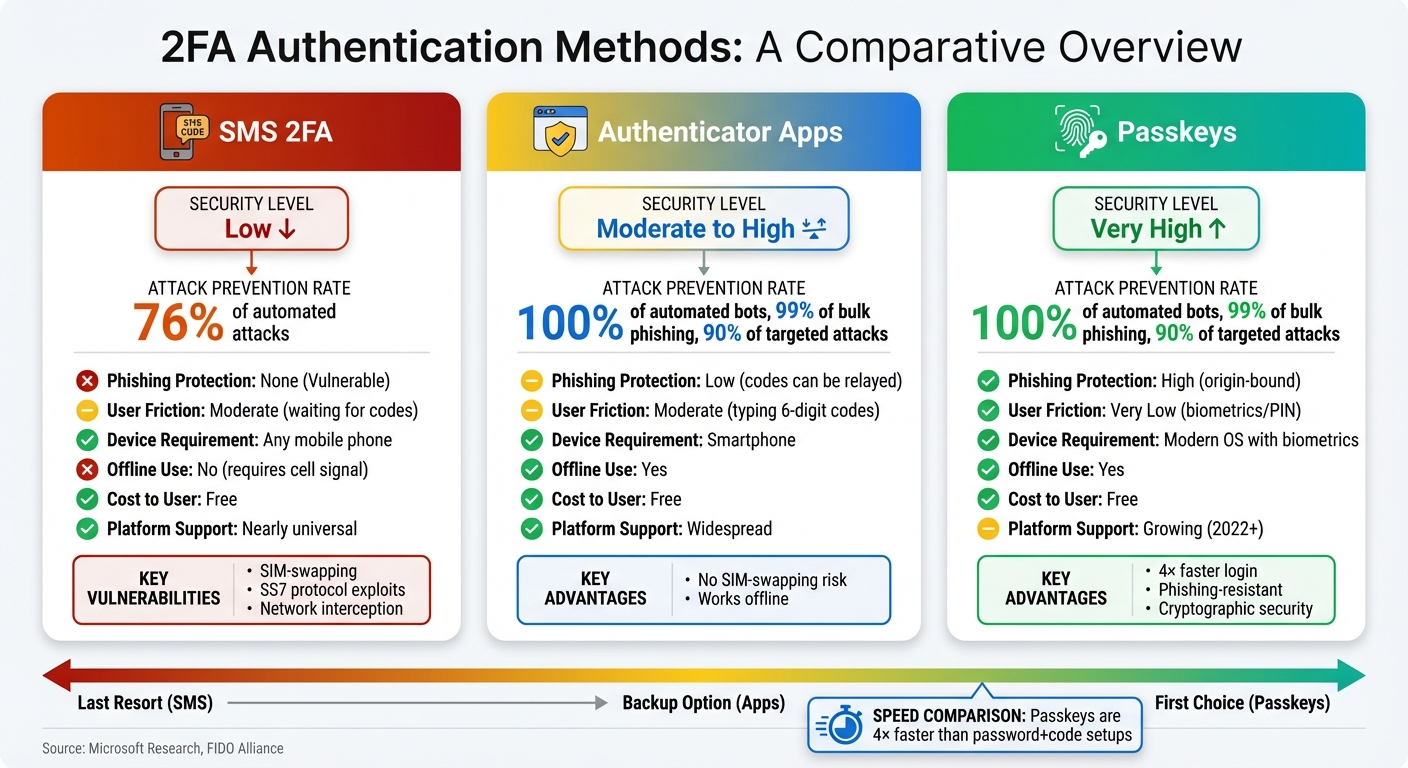
SMS 2FA vs Authenticator Apps vs Passkeys Security Comparison
Comparison Table
Here's a side-by-side look at how these three methods compare on key factors:
| Feature | SMS 2FA | Authenticator Apps | Passkeys |
|---|---|---|---|
| Security Level | Low | Moderate to High | Very High |
| Phishing Protection | None (Vulnerable) | Low (codes can be relayed) | High (origin-bound) |
| User Friction | Moderate (waiting for codes) | Moderate (typing 6-digit codes) | Very Low (biometrics/PIN) |
| Device Requirement | Any mobile phone | Smartphone | Modern OS with biometrics |
| Offline Use | No (requires cell signal) | Yes | Yes |
| Cost to User | Free | Free | Free |
| Platform Support | Nearly universal | Widespread | Growing (2022+) |
Passkeys are up to 4× faster for sign-ins compared to traditional password-and-code setups [3].
Understanding the Trade-offs
Each method has its strengths and weaknesses, and the right choice often depends on the situation.
SMS 2FA is widely supported but is the least secure option. It’s susceptible to SIM-swapping and SS7 protocol attacks. In fact, the U.S. National Institute for Standards and Technology (NIST) has officially discouraged its use due to these vulnerabilities [9]. If you have no choice but to use SMS, consider using a dedicated real-SIM service to reduce the risk of SIM-swap attacks.
Authenticator apps strike a balance between security and accessibility. They don’t rely on a cell signal, making them a great choice for offline use, and they’re free to use. But they require a bit more effort - opening an app and entering a 6-digit code within a short time frame. While more secure than SMS, these codes can still be intercepted during phishing attempts [1][5].
"Security keys are the strongest and the future of MFA. Push MFA offers the best balance of security and UX. TOTP works as a fallback, but its security is limited against targeted attacks." - LoginRadius [5]
Passkeys offer the best of both worlds: top-notch security and a smooth user experience. They completely eliminate phishing risks by tying authentication to the originating website through cryptographic methods. With features like FaceID, TouchID, or Windows Hello, logging in becomes almost effortless. However, passkeys aren’t yet universally supported, and moving them between platforms can be tricky. Hardware security keys, priced between $20 and $70 [5], provide a workaround but add cost and require carrying an extra device.
Practical Advice
For most people, the ideal setup is a mix of these methods:
- Use passkeys whenever they’re available for their superior security and convenience.
- Keep an authenticator app as a backup for situations where passkeys aren’t supported.
- Resort to SMS only when no other option exists. If SMS is unavoidable, a dedicated real-SIM service can improve reliability and reduce vulnerabilities tied to personal numbers.
This layered approach ensures you’re using the most secure and efficient method available while minimizing risks.
How to Use 2FA Effectively
A solid security approach doesn't rely on just one method. Instead, it combines different techniques tailored to what each account supports and how sensitive the information is.
Making SMS 2FA More Secure
While SMS-based 2FA has its flaws, you can strengthen its effectiveness by pairing it with other good practices. Start by using unique, strong passwords for every account. SMS 2FA can block about 76% of automated attacks [1], but it won't protect you from credential stuffing if you reuse the same passwords across multiple sites [6]. If possible, disable SMS-based password resets to prevent attackers from exploiting SIM-swapping techniques to gain control of your account [6].
For added protection, consider using a dedicated real-SIM service instead of your personal phone number for business-related verifications. This keeps your main number private and reduces the chances of targeted SIM-swapping attacks. Be alert to signs like sudden loss of cell service or "SIM not provisioned" errors - these can indicate an ongoing SIM-swapping attempt [7].
Finally, categorize your accounts by their level of sensitivity to decide on the best combination of 2FA methods for each.
Using Multiple 2FA Methods Together
No single 2FA method is perfect, so combining different types can help cover their weaknesses. For your most critical accounts - like banking or financial platforms - use passkeys whenever available. For others, rely on authenticator apps, which are highly effective, blocking 100% of automated bots and 99% of bulk phishing attacks [1]. Reserve SMS-based 2FA for platforms that require it, but never use SMS for both password recovery and 2FA on the same account. This minimizes the risk of an attacker bypassing both layers by intercepting a single message [11].
When setting up any 2FA method, always generate and securely store backup codes. Print them out and keep them in a safe place - they're essential if you ever lose access to your phone or authenticator app [10]. If you use push-based authentication, enable "number matching" to guard against attackers trying to wear you down with repeated approval requests [5][2].
Getting Ready for Passkeys
As you implement 2FA, start preparing for a shift to passkeys. Major platforms like Google, Microsoft, and Apple already support them, and they can make logins up to four times faster than traditional passwords with codes [3]. To manage passkeys across devices, consider using a third-party password manager like 1Password or Bitwarden [8].
"Passkeys are built to replace passwords and outdated forms of two-factor authentication entirely." - Andrew Shikiar, Executive Director and CEO, FIDO Alliance [8]
For each account, register at least two passkeys - one on your phone and another on a hardware security key or a different device. This ensures you won't get locked out if one device is lost [3][4]. It's also a good idea to periodically review how many passkeys are registered to your accounts. If you notice more passkeys than devices you own, investigate and remove any extra ones [3].
Conclusion
Selecting the right 2FA method depends on platform compatibility and your security needs. Passkeys offer resistance to phishing and provide a faster login experience compared to traditional methods [3]. Authenticator apps are highly effective, blocking 100% of automated bots and 99% of bulk phishing attacks [1], making them a great option for most accounts. On the other hand, SMS 2FA is the least secure, but it’s sometimes the only option available.
When SMS verification is unavoidable, using a high-quality, real-SIM number becomes essential. Many platforms reject VoIP services like Google Voice or OpenPhone, but real-SIM services offer carrier-grade numbers that are widely accepted for verification purposes.
To maximize security, consider layering your methods based on risk. For financial accounts, prioritize passkeys. For everyday logins, rely on authenticator apps. Reserve SMS for platforms that require it, and in those cases, strengthen your security by using robust passwords, disabling SMS password resets, and opting for a dedicated real-SIM number. Combining these strategies - passkeys, authenticator apps, and limited SMS use - provides comprehensive protection across various platforms.
FAQs
What security risks should I be aware of when using SMS for two-factor authentication (2FA)?
While SMS-based 2FA offers convenience, it isn't without its flaws. Two major risks stand out: SIM-swapping attacks, where hackers hijack your phone number to intercept verification codes, and the interception of SMS messages sent through unencrypted channels. Attackers can also exploit certain vulnerabilities to steal or tamper with these messages.
To reduce these risks, you can take a few precautions. Use a real-SIM service for better security, keep your phone number private, and set up extra protections like PINs with your mobile carrier. These steps can help make your SMS-based 2FA more secure.
What makes passkeys more secure than SMS or authenticator apps for 2FA?
Passkeys provide a stronger layer of security by doing away with traditional passwords and using cryptographic credentials instead. Unlike SMS codes or authenticator apps, passkeys are designed to resist phishing attempts, replay attacks, and man-in-the-middle attacks. This makes them a safer and more dependable way to secure your accounts.
Why aren’t passkeys widely supported yet?
Passkeys haven't become mainstream yet because the technology is still in its development phase and requires major updates across platforms, browsers, and operating systems. Rolling out such changes takes time as organizations work to build the infrastructure and ensure everything integrates smoothly.
Transitioning from traditional passwords to passkeys isn’t just about technology - it also means reworking authentication processes and educating users about the shift. While passkeys are steadily gaining attention, their widespread use hinges on achieving smooth compatibility across systems and establishing secure, easy-to-use standards. These hurdles are part of the reason universal adoption remains a work in progress.