Building a 2FA Inbox With Webhooks and APIs
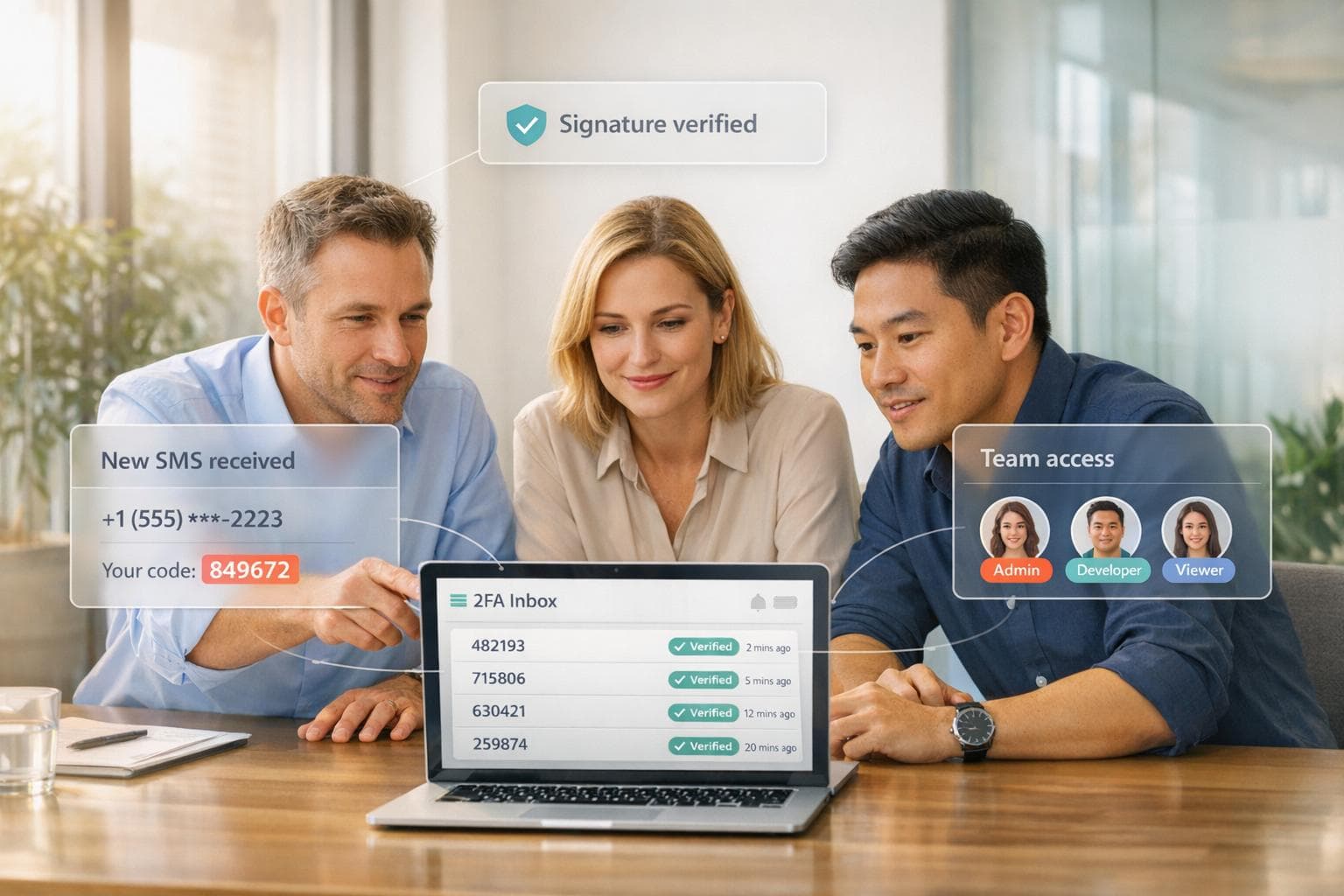
Managing verification codes across multiple accounts can be frustrating and inefficient. A 2FA inbox solves this by centralizing all SMS-based two-factor authentication (2FA) codes into a single, shared system accessible to your team. This eliminates reliance on personal devices and simplifies access while improving security and accountability.
Using JoltSMS, you can set up a system with real-SIM, non-VoIP numbers - ensuring compatibility with platforms like Stripe, AWS, and Coinbase. Webhooks and APIs enable seamless routing of OTPs to dashboards, Slack, or custom channels with features like role-based access and audit trails.
Key Features:
- Reliable SMS Delivery: JoltSMS uses real-SIM numbers for a 99.9% success rate.
- Centralized Management: OTPs are routed to team-accessible dashboards or communication tools.
- Security: HMAC-SHA256 signature validation and role-based access ensure secure operations.
- Ease of Setup: Webhooks and APIs allow instant integration with your backend.
At $50/month per number, this solution supports up to 10 team members, unlimited inbound SMS, and ensures long-term access to critical accounts. Below, we’ll cover how to configure webhooks, extract OTPs, and deploy your 2FA inbox for maximum efficiency.
Setting Up JoltSMS Webhooks and APIs
How to Configure Webhooks in JoltSMS
Once you’ve rented your JoltSMS number (usually provisioned within seconds after payment), head to your dashboard to set up webhook endpoints. Until you configure custom endpoints, incoming OTPs will automatically be sent to the account owner's email. To change this, go to the notifications section and add your callback URL. This URL is where JoltSMS will send real-time POST requests containing incoming SMS data.
JoltSMS protects webhook payloads with HMAC-SHA256 signatures, which your server must verify before processing. The dashboard also allows you to set up multiple notification channels at once, such as custom webhooks, Slack, Discord, or email alerts.
To keep things organized, you can label each number (e.g., "Finance - Stripe" or "Dev AWS Root") for easier management of multiple verification flows. Make sure to configure your endpoints within the first 24 hours of renting a number to avoid losing any OTPs during the initial setup period.
JoltSMS API Basics
JoltSMS relies heavily on webhooks for integration, with plans for a full REST API in the near future. Webhooks operate by sending POST requests to your endpoint as soon as an SMS arrives, which means no need for constant polling. This push-based approach ensures that your 2FA inbox receives codes instantly while keeping server load low.
The current webhook system provides data such as message delivery details, sender information, timestamps, and metadata for the associated number. For security, you’ll use API keys or JWT bearer tokens (depending on your integration setup) to authenticate requests. Additionally, messages are viewable in the JoltSMS dashboard, updated in real-time via Socket.IO, offering a web-based interface alongside your webhook integration.
Before diving in, double-check your server setup to ensure it meets the technical requirements outlined below.
Technical Requirements
Your server must be capable of receiving HTTPS POST requests. This could be a cloud instance (e.g., AWS EC2, DigitalOcean Droplet), a serverless function (e.g., AWS Lambda, Vercel), or even a local development server with a public tunnel during testing. To prevent retries, your endpoint should respond with a 200 OK status within 5 seconds. If your server returns a 5XX error, JoltSMS will attempt redelivery, so it’s essential to design your handler to be idempotent - able to safely process the same message multiple times.
You’ll need experience with languages like Node.js, Python, or PHP to parse JSON payloads and validate HMAC-SHA256 signatures. Additionally, an active JoltSMS subscription is required, priced at $50 per month per number. For those who want specific area codes (like NYC or SF), there’s an optional $3.50 monthly fee. The subscription includes unlimited inbound verification SMS (under fair-use terms), access for up to 10 team members with role-based permissions, and 24/7 support via help.joltsms.com.
| Requirement Category | Specific Requirement |
|---|---|
| Account | Active JoltSMS subscription ($50/mo) |
| Security | Ability to process HMAC-SHA256 signatures |
| Development | Knowledge of Node.js, Python, PHP, or similar languages |
| Infrastructure | Server or serverless function to host webhook endpoint |
Architecture for a 2FA Inbox System
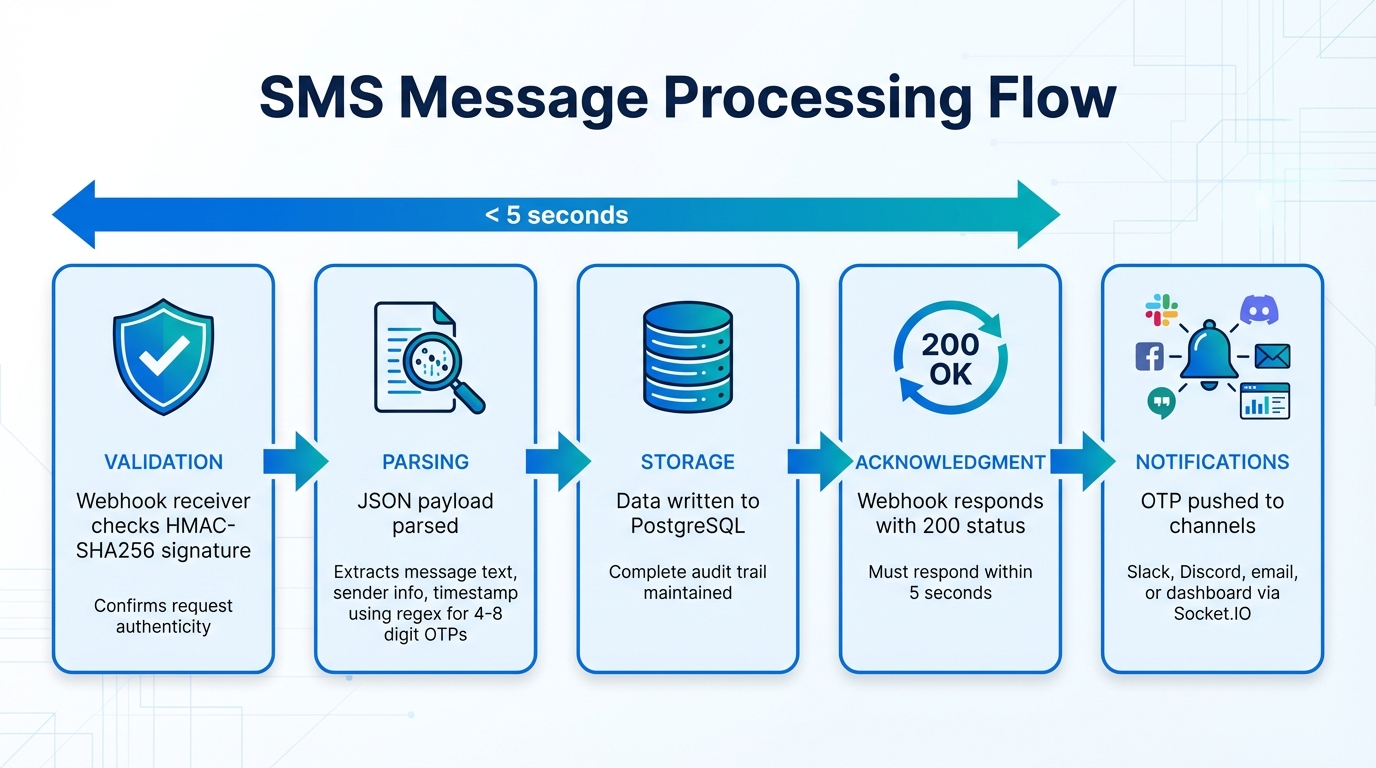
How SMS Messages Flow Through a 2FA Inbox System
Main System Components
To create a reliable 2FA inbox system, you’ll need to integrate several key components into your architecture. Starting with your webhook setup, the system requires four essential parts to function effectively:
- Webhook Receiver: This component handles incoming HTTPS POST requests from JoltSMS. It verifies the authenticity of these requests using HMAC-SHA256 signatures.
- Message Parser: Using regular expressions, this module extracts OTP codes from the SMS text and identifies the sender.
- PostgreSQL Database: Parsed messages, along with timestamps, sender IDs, and associated number labels, are stored here. This ensures compliance, creates an audit trail, and prevents issues like lockouts during re-verification.
- RBAC System: Role-based access control (RBAC) manages permissions for team members. It supports three roles - Owner (full control, including billing), Manager (message reading and webhook setup), and Viewer (read-only access to the inbox).
Here’s a quick breakdown of the components:
| Component | Technical Requirement | Purpose |
|---|---|---|
| Webhook Receiver | HTTPS endpoint for SMS data | Accepts and validates incoming SMS messages |
| Message Parser | Regular expressions for OTPs | Extracts codes and sender details |
| Database | PostgreSQL with indexed fields | Stores messages and audit logs |
| RBAC System | JWT or session-based auth | Manages access for up to 10 team members |
How Incoming SMS Messages Are Processed
When an SMS is sent to your JoltSMS number, the platform triggers a POST request to your webhook. Here’s how the process unfolds:
- Validation: The webhook receiver checks the HMAC-SHA256 signature to confirm the request’s authenticity.
- Parsing: The JSON payload, which includes the message text, sender info, and timestamp, is parsed. Regular expressions are used to locate OTP codes (typically 4-8 digits).
- Storage: The parsed data is written to your PostgreSQL database, ensuring a complete record for future reference.
- Acknowledgment: The webhook endpoint must respond with a 200 status code promptly to prevent the message from being resent.
- Notifications: Once stored, the system can push the extracted OTP to configured channels like Slack, Discord, or email. Real-time updates are also broadcast to connected dashboards using Socket.IO.
This process ensures every incoming message is securely handled, stored, and delivered where it’s needed - all while maintaining responsiveness.
Security and Access Control
Strong security measures are a must for any 2FA system. Here’s how to keep your data and operations secure:
- Authentication: Use JWT Bearer tokens or API keys for communication between the frontend dashboard and backend API. Each team member’s credentials should align with their assigned role: Owners oversee billing and number management, Managers handle webhook configurations and message reading, and Viewers get read-only access.
- Secret Management: Store webhook signing secrets in environment variables, not in your codebase. Rotate these secrets every 90 days to minimize risks.
- Replay Protection: Reject requests with timestamps older than 5 minutes to prevent attackers from reusing intercepted data.
- Quick Validation: Ensure all authentication and validation steps are fast and efficient, so the system remains responsive even under heavy traffic.
Working With Webhook Payloads and Extracting OTPs
Now that your webhook setup and system architecture are in place, let's dive into how to parse incoming webhook payloads and reliably extract OTPs.
JoltSMS Webhook Payload Format
When an SMS lands on your JoltSMS number, the platform sends a POST request to your webhook URL. This request includes a JSON payload containing all the details you need to process the message. Here's an example of what the payload looks like:
{
  "data": {
    "event_type": "message.received",
    "payload": {
      "from": {
        "phone_number": "+13125550001"
      },
      "text": "Your JoltSMS verification code is: 882931",
      "to": [
        {
          "phone_number": "+17735550002"
        }
      ],
      "received_at": "2026-01-29T20:16:07.503Z"
    }
  }
}
The text field is where the magic happens - it contains the SMS body, including the OTP. The from object identifies the sender, often a short code or service number, while the received_at timestamp uses ISO 8601 format. Your webhook endpoint should process and acknowledge the request quickly to maintain reliability.
Let’s move on to some practical examples of extracting OTPs from this payload.
Code Examples for OTP Extraction
To extract OTPs, you'll need to use regex patterns tailored for common formats. OTPs are typically 4-8 digit numbers, though some may use alphanumeric strings. Here’s a simple Node.js example for numeric OTPs:
app.post('/webhooks/joltsms', (req, res) => {
  const { text } = req.body.data.payload;

  // Regex to find 4-8 digit codes
  const otpMatch = text.match(/\b\d{4,8}\b/);

  if (otpMatch) {
    const otp = otpMatch[0];
    console.log(`Extracted OTP: ${otp}`);
    // Save to database or forward to dashboard
  }

  res.sendStatus(200);
});
This approach works well for most cases, but you can improve accuracy by anchoring the regex to keywords like "code", "OTP", or "verification". Here's an enhanced example:
const keywordPattern = /(?:code|otp|verification)[\s:]*(\d{4,8})/i;
const match = text.match(keywordPattern);
const otp = match ? match[1] : null;
This method ensures you’re extracting the right digits, even if the message contains unrelated numbers.
Handling Special Cases
For alphanumeric OTPs, adjust your regex to match patterns like /\b[A-Z0-9]{5,8}\b/. Combine this with keyword anchoring to handle scenarios where multiple codes are present in the message. Always log the full message for debugging and auditing purposes.
sbb-itb-070b8f8
Building and Deploying Your 2FA Inbox
Once you’ve nailed down accurate OTP extraction, the next step is creating a system to process and display those codes effectively.
Backend Implementation
To build a complete 2FA inbox system, you’ll need to set up the backend, frontend, and deploy it for production use.
Your backend should handle webhook POST requests, validate them securely, and store incoming messages for later retrieval. Frameworks like Express.js (Node.js) or Flask (Python) work well for this purpose. Remember, your endpoint must respond with a 200 OK within 5 seconds to confirm receipt. If it doesn’t, the provider will retry delivery up to five times [2][5].
To protect against tampering, verify the HMAC signature as previously outlined. Add replay protection by checking the timestamp in the webhook signature and rejecting requests older than 5–15 minutes [6]. This stops attackers from resending captured webhook data.
Store incoming messages in a database like PostgreSQL or MongoDB. Include fields such as sender number, message body, timestamp, recipient number, and processing status. Design your webhook endpoint to be idempotent - if JoltSMS sends the same webhook multiple times due to network issues, your system should avoid creating duplicate records [3]. For tasks like forwarding codes, use Redis as a message queue to handle them asynchronously after sending the 200 OK response [3].
Lastly, create a real-time dashboard to display and manage these stored OTPs.
Frontend Dashboard
With backend processing in place, the dashboard serves as a live interface for accessing OTPs.
Use frameworks like React or Vue to build a dynamic, real-time dashboard. Display key details such as the sender, message body, timestamp (formatted as MM/DD/YYYY HH:MM:SS AM/PM for US users), and the extracted OTP prominently. Add one-click copying to let users grab codes instantly.
Refine the user experience by implementing auto-focus on search fields and code inputs [7]. Include a search function to filter messages by sender number, date range, or recipient number - an essential feature when managing multiple JoltSMS numbers. Use state management hooks to handle real-time updates, countdown timers for OTP expiration, and loading states during API calls [8][9]. Ensure the dashboard is mobile-responsive with large, touch-friendly elements for easy access on phones [7].
For team collaboration, integrate with your existing authentication system. Mark sessions as "2FA-verified" after successful token validation [10]. Provide clear session details, such as the user’s email, login time, and a visible logout button [7].
Deployment and Scaling
Once the backend and frontend are tested locally, it’s time to deploy.
Package both components in Docker containers to maintain consistent behavior across development, staging, and production environments [11]. Use NGINX as a reverse proxy to handle SSL termination and distribute incoming webhook traffic across multiple backend instances as your system scales.
Leverage Redis for caching frequently accessed codes and enforcing API rate limits. This reduces the load on your main database [10]. Implement a token bucket or leaky bucket algorithm to prevent brute-force attacks on verification endpoints [10]. For monitoring, set up centralized logging tools like the ELK Stack to detect anomalies such as traffic spikes or failed authentications [11][4].
Use infrastructure-as-code tools to manage your setup consistently [11]. This approach prevents configuration drift and simplifies scaling - when traffic increases, you can quickly spin up additional backend instances. If JoltSMS provides static IP ranges, configure your firewall to accept webhook traffic only from those addresses [6].
Troubleshooting Common Issues
Even with careful planning, problems can arise when building a 2FA inbox. Knowing how to identify and resolve these issues is key to keeping everything running smoothly.
Webhook Signature Validation Errors
Signature validation errors occur when the computed hash doesn't match the JoltSMS header signature, often due to encoding or payload mismatches. To debug, log the raw payload, header signature, and computed hash to identify where the discrepancy lies [1].
Make sure you're using HMAC-SHA256 and hashing the raw request body before any parsing or modification. Even minor changes - like an extra space or newline - can disrupt the signature. If your framework automatically parses JSON, work with the raw body buffer instead of the parsed object to avoid issues.
OTP Parsing Problems
Once your signatures validate, the next hurdle is extracting OTPs correctly. If codes are missed, it's likely due to an overly rigid regex pattern. Platforms format OTP messages differently, such as "Your code is 123456" or "123456 is your verification code", so your pattern needs to handle these variations [12][13]. A flexible regex, like /\b\d{4,8}\b/, can capture a wide range of OTP formats [12][13].
"OTP is a small step in your product, but it can make or break onboarding and retention." – Programming Insider [13]
To improve your parser, log any messages that fail to match your regex. Additionally, normalize phone numbers to the E.164 format (starting with "+" and the country code) to prevent routing issues [14]. Before rolling out updates, test your parser with messages from different regions, languages, and providers to ensure it handles diverse scenarios [13].
Once message parsing is reliable, focus on managing API rate limits for smoother performance.
API Rate Limits
API rate limits can impact your system's responsiveness. If you exceed JoltSMS rate limits, use exponential backoff to manage retries: wait 30 seconds after the first failure, then 60 seconds, and then 120 seconds [15]. This gives the rate limit window time to reset. Pair this with a job queue - like Redis with BullMQ - to separate webhook reception from processing and control the flow of API calls.
"Reliability comes from implementing retry mechanisms, exponential backoff strategies, and idempotency keys." – Message Central [15]
Include idempotency keys in every request to prevent duplicate entries when retrying rate-limited calls. Limit retries to five attempts, and flag unresolved messages for manual review after that [15]. Keep an eye on your queue depth - if it grows too large, it may signal slow processing or frequent rate limit hits.
Conclusion
Creating a 2FA inbox with JoltSMS offers the reliability of real SIM cards, which VoIP numbers often can't match. While VoIP apps might handle calls, they frequently fail SMS verification for platforms like banking, fintech, and social media. JoltSMS solves this by using dedicated U.S. mobile numbers tied to physical SIM cards, ensuring compatibility with over 1,000 platforms.
The webhook integration process is simple: set up your endpoint, validate signatures using HMAC‑SHA256, and automate OTP extraction. Notifications can be sent instantly to Slack, Discord, or custom dashboards, giving your team immediate access. At $50 per month per number - supporting up to 10 team members - this solution is scalable and efficient. This setup not only speeds up OTP delivery but also strengthens your security measures.
"JoltSMS is built so multiple people can see and act on OTPs quickly, with a clear audit trail."
- JoltSMS
Retaining numbers long-term ensures that accounts on platforms like AWS, Stripe, and banking services remain accessible, avoiding lockouts during re-verification. This approach - combining webhook reception, secure OTP parsing, and role-based access - provides a robust foundation for managing 2FA needs.
In short, the system you’ve built integrates webhook handling, OTP extraction, secure storage, and role-based access to create a centralized 2FA solution. It’s a more secure and efficient alternative to juggling physical devices, with reliable error handling to process a variety of OTP formats seamlessly.
FAQs
How does JoltSMS work with platforms like AWS and Stripe for SMS verification?
JoltSMS provides dedicated, real-SIM, non-VoIP US phone numbers that work flawlessly with platforms like AWS and Stripe. These numbers are treated as genuine mobile lines, ensuring they’re accepted by more than 1,000 platforms for tasks like SMS verification.
Unlike VoIP services - which are frequently blocked for verification purposes - JoltSMS relies on real-SIM technology. This approach guarantees dependable performance for crucial activities, such as account verification and receiving one-time passwords (OTPs), so your operations stay uninterrupted.
How does JoltSMS ensure the secure handling of OTPs?
JoltSMS takes several steps to make sure One-Time Passwords (OTPs) are managed with the highest level of security and reliability.
Tamper-Proof Audit Trails
Every OTP transaction is logged with detailed metadata, creating a record that ensures traceability and accountability. This continuous monitoring helps maintain security and compliance standards, making it easy to track OTP activities if needed.
Secure Storage Policies
Sensitive OTP data is protected through strict storage policies, preventing unauthorized access. Additionally, retention policies are carefully designed to store OTP-related data only for as long as necessary, striking a balance between privacy and security.
Real-SIM Technology for SMS Delivery
JoltSMS uses real SIM cards instead of virtual or VoIP numbers for sending SMS. This method significantly lowers the chances of OTPs being flagged or blocked by platforms, ensuring they reach their destination securely and reliably.
By combining these measures, JoltSMS prioritizes both the security and successful delivery of OTPs.
Can JoltSMS process alphanumeric OTPs and different message formats?
JoltSMS is fully equipped to manage alphanumeric OTPs and a variety of message formats effortlessly. Thanks to its support for receiving OTPs through webhooks, the platform allows seamless integration with your custom storage and processing systems.
This means that regardless of the structure or complexity of the OTP messages, JoltSMS ensures they are accurately captured and delivered for your needs.