Building a “2FA Runbook” Your Team Can Actually Follow

Losing access to critical accounts because of mishandled two-factor authentication (2FA) is a preventable disaster. A 2FA runbook ensures your team knows exactly how to manage and recover access to shared accounts like AWS, banking platforms, and SaaS tools. Here's the key takeaway:
- Centralize 2FA management: Use shared channels like Slack or Discord for OTPs and assign company-controlled phone numbers.
- Use real-SIM numbers for reliability: Unlike VoIP numbers, real-SIM numbers work across 1,000+ platforms, including banks and fintech services.
- Document everything: Maintain an updated inventory of accounts, phone numbers, recovery codes, and backup methods.
This guide will help you create a clear, actionable plan to handle 2FA for your team, minimizing downtime and security risks.
What Is a 2FA Runbook?
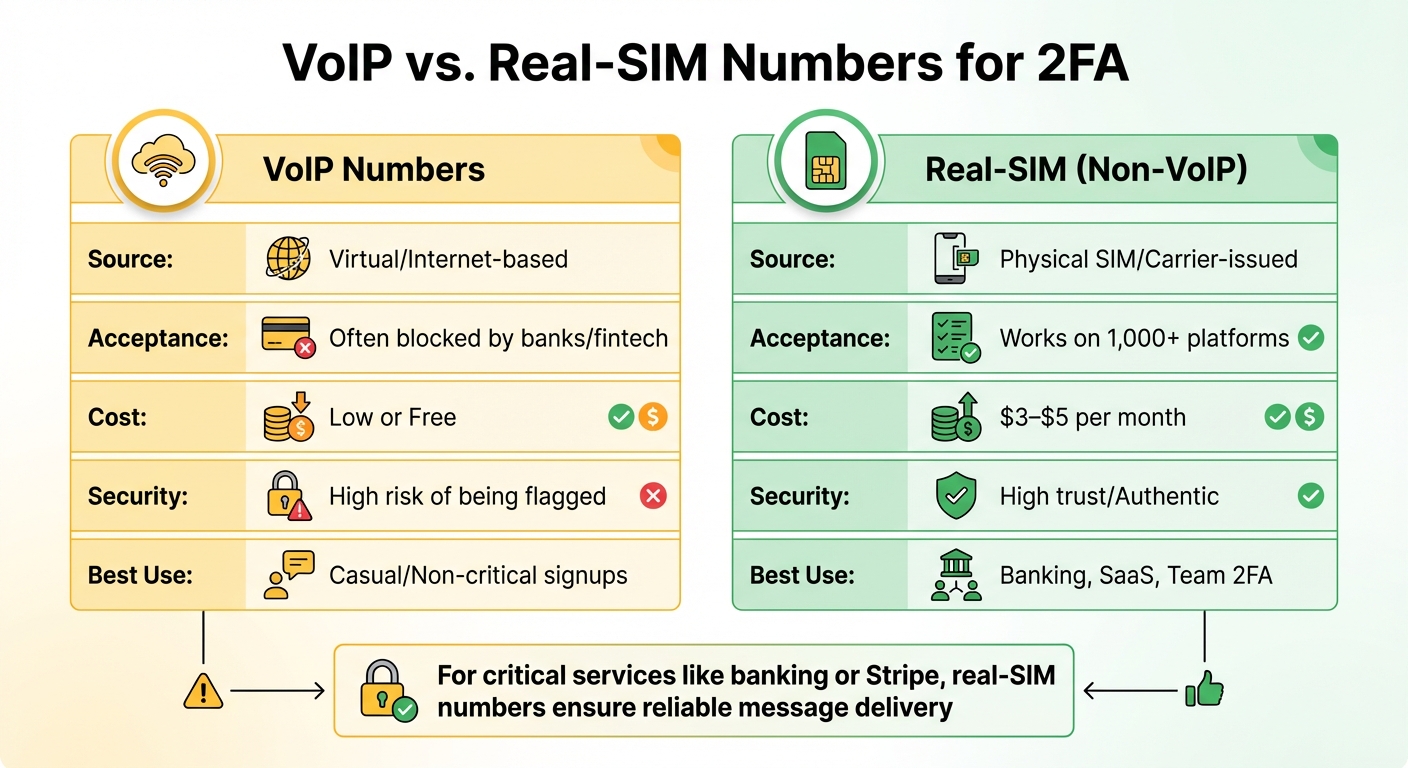
VoIP vs Real-SIM Numbers for 2FA: Feature Comparison
A 2FA runbook is a detailed guide that explains how your team handles SMS-based two-factor authentication (2FA) in both everyday situations and emergencies. It covers everything from managing account access to routing SMS codes and responding to issues.
The runbook simplifies 2FA by centralizing SMS code delivery into shared team platforms like Slack, Discord, or helpdesk systems. This is often done using webhooks or email forwarding, which also creates an audit trail for each one-time password (OTP) - a key component for compliance.
It also establishes a Phone Number Policy, assigning company-owned numbers to high-risk accounts. This makes it easier to recover access during employee offboarding or other transitions.
Why Teams Need a Written 2FA Process
Without a clear process in place, teams can waste valuable time troubleshooting access problems. A written 2FA runbook ensures everyone follows the same steps, minimizing security risks and eliminating confusion.
When an employee or contractor leaves, having a documented process for transferring 2FA access to company-controlled numbers becomes crucial. Microsoft reports that users who enable multi-factor authentication are 99.9% less likely to be compromised[2]. However, that protection only works if your team can reliably access the codes when needed.
VoIP vs. Real-SIM Numbers for 2FA
When it comes to SMS verification, not all phone numbers are equal. VoIP numbers - offered by services like Google Voice, OpenPhone, or RingCentral - are virtual and internet-based. They're cheap and easy to set up in bulk, but platforms like banks, PayPal, and WhatsApp often block them. Why? Because these numbers aren't tied to a physical SIM card and are commonly linked to spam accounts.
Real-SIM numbers, on the other hand, come directly from mobile carriers and use physical SIM cards. They work seamlessly across 1,000+ platforms, showing that there's a legitimate user behind the account. While VoIP numbers are great for everyday business calls, they can fail when it comes to receiving verification codes from platforms with strict requirements.
| Feature | VoIP Numbers | Real-SIM (Non-VoIP) |
|---|---|---|
| Source | Virtual/Internet-based | Physical SIM/Carrier-issued |
| Acceptance | Often blocked by banks/fintech | Works on 1,000+ platforms |
| Cost | Low or Free | $3–$5 per month |
| Security | High risk of being flagged | High trust/Authentic |
| Best Use | Casual/Non-critical signups | Banking, SaaS, Team 2FA |
This comparison highlights why your runbook should outline when to use each type of number for maximum security. For critical services like banking or Stripe, real-SIM numbers are a safer bet to ensure reliable message delivery. Meanwhile, VoIP numbers can handle routine calls. Services like JoltSMS can complement your VoIP setup, offering a reliable solution for verification codes without replacing your existing tools.
Next, we’ll dive into how to incorporate these practices into a well-rounded 2FA runbook. For more insights on SMS management and best practices, explore our latest guides.
sbb-itb-070b8f8
How to Build Your 2FA Runbook
Start by setting up a shared document in a tool like Google Docs, Notion, or Confluence. This will serve as your central reference for all routine and emergency 2FA-related tasks.
Create an Account and Phone Number Inventory
Compile a comprehensive list of every account that relies on SMS-based 2FA. For each account, include the following details:
- Account Name: Examples might be "Company Stripe Account" or "AWS Root."
- Phone Number: The number receiving 2FA codes.
- Primary Owner: The person responsible for the account.
- Backup Contact: A secondary point of contact.
Failing to maintain this list can result in lockouts during staff transitions. To avoid confusion, use clear and consistent naming conventions. For example, instead of "John's LinkedIn" or "Marketing FB", opt for names like "LinkedIn - Corporate Marketing" or "Facebook Ads - Main Account."
For critical accounts, assign company-controlled real-SIM numbers. This ensures your organization retains access, even if employees leave.
| Runbook Component | Action Items |
|---|---|
| Inventory | List Account Name, Associated Phone Number, Primary Owner, and Backup Owner. |
| Backup Methods | Document Recovery Code location, Emergency "Break-Glass" accounts, and secondary email/phone factors. |
| Onboarding Checklist | 1. Assign Number; 2. Enable 2FA; 3. Test Code Delivery; 4. Save Recovery Codes; 5. Update Master Inventory. |
Once your inventory is ready, move on to establishing backup access methods.
Set Up Backup Access Methods
During account setup, generate recovery codes and store them securely - either in a physical safe or an encrypted digital vault. Rely on multiple backup methods for added security. Microsoft advises maintaining at least two emergency admin accounts exempt from standard MFA requirements to prevent complete lockouts [3].
For team environments, designate at least one "super administrator" who can create bypass codes for locked-out users [1]. If you're using hardware security keys, enroll a spare key and store it in a separate location. Additionally, ensure that codes are sent to shared channels accessible by your team.
With your inventory and backup methods established, you can now focus on formalizing account onboarding procedures.
Write Standard Procedures for Adding New Accounts
Develop a straightforward checklist that your team can follow when setting up new accounts with 2FA. This checklist should include:
- Selecting the appropriate phone number (e.g., real-SIM for banking or fintech accounts, VoIP for lower-risk services).
- Enabling 2FA on the platform.
- Testing SMS code delivery to confirm it works correctly.
- Saving recovery codes in a secure location.
- Updating the master inventory with all relevant details.
For high-risk accounts, use a dedicated real-SIM number from a provider like JoltSMS. Test the entire setup process thoroughly. Send a test verification code to ensure it arrives within 30 seconds, and verify any webhook or forwarding rules. Only mark the account as "production ready" after successful testing.
Document any quirks specific to the platform. For instance, some services send codes from short numbers, others from long ones, and some may require a "YES" reply to confirm. Recording these details will save your team significant troubleshooting time down the line.
Handling Common 2FA Problems
Even with a well-prepared runbook, real-world challenges can crop up. Here's how to tackle some of the most common two-factor authentication (2FA) issues effectively.
What to Do When SMS Codes Don't Arrive
If SMS codes aren't coming through, start by checking your JoltSMS dashboard to confirm whether the code was received on the backend. If the code is logged there but hasn’t reached your team, the problem likely lies in your webhook or forwarding settings, not with the sender.
Double-check that the phone number is formatted correctly in the international E.164 standard (e.g., +1AAABBBCCCC). Errors like missing country codes or extra characters can prevent delivery. Also, remember to wait at least 30 seconds between code requests to avoid triggering rate limits or blocks.
Still no luck? Head over to the JoltSMS FAQ for platform-specific troubleshooting tips. Some services use short numbers that require special routing, while others might face temporary delays. Persistent problems? Consult the common SMS delivery issues guide or reach out to JoltSMS support at help.joltsms.com. Be sure to include your account name and the timestamp of the failed attempt.
If all else fails and you suspect a security issue, follow the steps below to secure the compromised account.
Responding to a Compromised Account
The moment you spot an unusual login, treat it as a potential breach and act fast. Start by updating the account password and disabling the compromised phone number in your JoltSMS dashboard.
Next, contact the platform’s security team through their dedicated support channel. Share detailed access logs, including the location and timestamp of the unauthorized login. Once the platform confirms the account is secure, assign a new real-SIM number to the account instead of reusing the compromised one. This ensures a clean slate for account security.
Update your runbook inventory with the new number and mark the old one as "retired", adding a note explaining why it was replaced. This documentation will help your team track the account’s history if questions arise in the future.
Transferring 2FA When Someone Leaves
Employee departures can create access challenges, so it's crucial to have a clear offboarding process. Focus on three key steps: reassign account ownership, transfer phone numbers, and update your records.
Start by reviewing your account inventory to identify all services managed by the departing employee. For each account, transfer the associated phone number to a new owner via your JoltSMS dashboard before the employee leaves. If codes are delivered through shared Slack or Discord channels, ensure the new owner has access to those as well.
For enterprise platforms like Google Workspace, administrators with "User Management" privileges can generate temporary backup verification codes for the new owner. These codes allow the new owner to log in and reset authentication methods. Store these backup codes securely in your team’s password manager.
Finally, schedule a post-departure review of your runbook to confirm all transfers are complete and properly documented. This ensures your team maintains control and security over all accounts.
Keeping Your 2FA Runbook Current
A neglected runbook can become useless faster than you think. Phone numbers get updated, team members change roles, and platforms revise their security protocols. To keep everything running smoothly, set a quarterly review schedule - every three months. Use this time to check that account details, phone numbers, and team assignments align with your current setup. Be sure to review your JoltSMS dashboard during these audits to confirm everything is up to date, or consult our JoltSMS Docs & Help Center for specific platform guides.
Stay on Top of Regular Runbook Reviews
During your quarterly check-in, go through your account inventory carefully. Remove access for former employees, update any outdated phone numbers, and ensure every entry in your runbook reflects the current state of your JoltSMS account. If you've added new services or retired old ones, update your documentation right away. This helps you avoid situations where someone urgently needs access but finds outdated contacts or references to team members who left months ago. Regular reviews keep your runbook dependable and ready for action.
Test Your Team with Practice Scenarios
Practice makes perfect, especially when it comes to critical security procedures. Run quarterly drills to ensure your team can handle emergencies under pressure. For example, simulate an SMS failure by disabling a webhook and have a team member follow the troubleshooting steps. Test account recovery by generating backup codes and confirming secure access through your password manager. For essential accounts - like banking, AWS, or other key SaaS platforms - double-check that your real-SIM numbers still receive verification codes. Platforms often update their blocking lists and may reject VoIP numbers without notice. These simulations not only validate your procedures but also reinforce the value of your runbook in maintaining secure operations.
Real-SIM vs. VoIP: What You Need to Know
For critical accounts, always opt for real-SIM numbers instead of VoIP. Real-SIM numbers deliver 99.9% reliability because they rely on physical carrier verification, while VoIP services are frequently blocked. Make sure this distinction is clearly documented in your runbook so your team knows which number type to use when adding new accounts. This small detail can save you from major headaches down the line.
Conclusion: Building a 2FA Runbook That Works
To create an effective 2FA runbook, start by documenting every account and its associated verification number. Use company-owned real-SIM numbers - especially for high-risk accounts - to avoid disruptions during transitions. Critical accounts, such as AWS, banking platforms, and Stripe, should always be linked to these real-SIM numbers rather than personal phones. This ensures better control and reduces the risk of lockouts.
Leverage the core components of your runbook to focus on reliability and seamless operations. Real-SIM numbers are essential for accounts where verification failure is not an option. Many platforms, including WhatsApp, PayPal, and most banks, block VoIP numbers due to their vulnerability to misuse. Real-SIM numbers from carriers like AT&T or T-Mobile, on the other hand, consistently meet strict verification standards, offering the stability your critical accounts require.
Regularly review and update your runbook - quarterly is a good benchmark - to keep up with team changes and platform updates. A runbook that doesn’t evolve loses its effectiveness. Include clear, step-by-step instructions for adding accounts, troubleshooting failed codes, and managing compromised credentials. Make sure at least two super-administrators can generate codes for each other to ensure operational continuity.
FAQs
What makes real-SIM numbers better than VoIP numbers for 2FA verification?
The key distinction between VoIP numbers and real-SIM numbers for two-factor authentication (2FA) lies in their reliability and acceptance for SMS verification. VoIP numbers - offered by services like OpenPhone or Google Voice - work well for business calls but often face restrictions from platforms like WhatsApp, banks, or Stripe. These platforms typically block VoIP numbers because they don't classify them as "real" phone numbers.
In contrast, real-SIM numbers operate through physical SIM cards, making them widely recognized and accepted by most verification systems. This means they deliver higher success rates for receiving one-time passcodes (OTPs) and help avoid the frustration of rejected codes. For a dependable 2FA experience, real-SIM numbers are the better choice.
How does a 2FA runbook simplify managing employee transitions?
A 2FA runbook takes the guesswork out of managing employee transitions by offering clear, step-by-step guidance for adjusting account access when employees leave or shift roles. By detailing how to revoke or transfer access to systems protected by two-factor authentication (2FA), it helps ensure these critical systems remain secure. This approach minimizes the chances of unauthorized access and keeps your organization’s security intact.
Beyond transitions, a well-thought-out runbook equips your team to handle incidents like compromised accounts. It lays out procedures for confirming breaches, disabling impacted accounts, and starting recovery steps. This ensures your team can act quickly and consistently during security events. By documenting these processes, businesses can reduce errors, simplify onboarding and offboarding, and maintain strong security practices without unnecessary hassle.
Why should you regularly update and review your 2FA runbook?
Keeping your 2FA runbook updated and regularly reviewed is key to maintaining robust security and ensuring your team is equipped to handle any challenges. As cyber threats and attack techniques continue to evolve, an up-to-date runbook helps pinpoint weaknesses and adjust processes to tackle them effectively.
A well-maintained runbook clarifies essential tasks like adding new accounts, managing failed authentication codes, addressing compromised accounts, and handling employee offboarding. Clear and current documentation not only streamlines incident response but also ensures compliance requirements are met and audit preparation is seamless.
By staying ahead with regular updates, you empower your team to manage emerging risks efficiently, boosting both security and day-to-day operations.