Designing a Phone Number Policy for Your Company (So You Don’t Lose Accounts)
Managing phone numbers for business accounts is often overlooked - but it’s critical. Without a clear policy, you risk losing access to vital platforms when employees leave or numbers get compromised. Here’s what you need to know:
- High-risk accounts (like AWS, Stripe, or banking apps) should always use company-owned real-SIM numbers for reliable verification and company control.
- Personal numbers are risky for important accounts due to potential loss of access and security vulnerabilities.
- VoIP numbers (like Google Voice) may work for some accounts but often fail verification on key platforms.
- Implement a clear offboarding process to reassign numbers and prevent lockouts when employees leave.
- Use tools like Slack or Discord to securely share verification codes via webhooks, ensuring team access without exposing credentials.
The key takeaway: Assign company-owned numbers to critical accounts, regularly review access, and act quickly during offboarding to avoid disruptions. A solid phone number policy minimizes risks and keeps your business running smoothly.
How to Assess Phone Number Requirements by Account Type
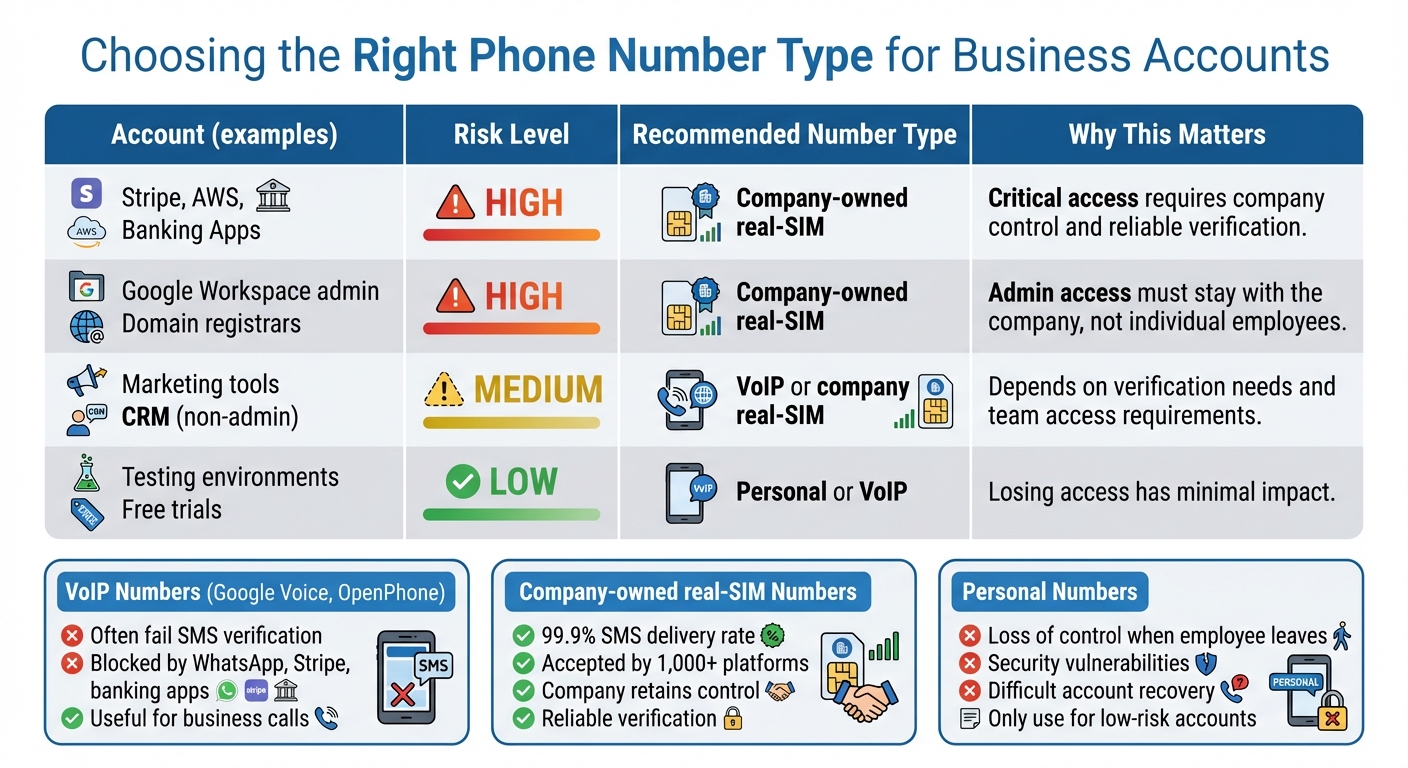
Phone Number Types Comparison for Business Account Security
Not all accounts are created equal - some are more critical than others. For example, messaging apps have different stakes compared to billing systems. To craft an effective phone number policy, start by categorizing accounts by their risk level and then align them with the appropriate type of phone number.
Take stock of all your SaaS accounts and evaluate the consequences of losing access to each. This process will help you decide whether a personal number, a VoIP number, or a company-owned real-SIM number is the best fit. This evaluation sets the stage for informed decisions about number allocation and policy rules.
How to Categorize Accounts by Risk Level
High-risk accounts include those tied to billing, production systems, administrative access, or sensitive data. Examples include Stripe, AWS, Google Workspace admin accounts, banking platforms, or domain registrars. If losing access to an account would result in financial loss, operational downtime, or data breaches, it’s considered high-risk.
Low-risk accounts, on the other hand, involve testing, non-critical tools, or services with minimal impact. A staging environment for a marketing tool or a free trial account are good examples. These accounts allow for greater flexibility when it comes to phone number management.
How to Choose the Right Phone Number Type
Once you’ve categorized accounts by risk level, the next step is to pair them with the right type of phone number. Here’s how:
- Personal numbers: Best for low-risk accounts where convenience outweighs strict control.
- VoIP numbers: Services like Google Voice or OpenPhone are useful for business calls but often face issues with SMS verification. Platforms like WhatsApp, Stripe, and banking apps frequently block these numbers.
- Company-owned real-SIM numbers: These are the gold standard for reliability. They use carrier-grade SIM hardware, ensuring successful verification on over 1,000 platforms. These numbers remain under the company’s control, even if an employee leaves.
Here’s a quick framework to summarize the findings:
| Account | Risk Level | Number Type | Why |
|---|---|---|---|
| Stripe, AWS, banking apps | High | Company-owned real-SIM | Critical access requires company control and reliable verification. |
| Google Workspace admin, domains | High | Company-owned real-SIM | Admin access must stay with the company, not individual employees. |
| Marketing tools, CRM (non-admin) | Medium | VoIP or company real-SIM | Depends on verification needs and team access requirements. |
| Testing environments, free trials | Low | Personal or VoIP | Losing access has minimal impact. |
VoIP numbers, while convenient, often fail SMS verification on platforms like WhatsApp, Stripe, and banks. This is where real-SIM numbers, such as those offered by JoltSMS, shine - they consistently pass verification checks. By categorizing accounts based on risk, you lay the groundwork for effective number assignment and protocols for ownership and offboarding, which will be detailed later.
How to Set Rules for Personal vs. Company-Owned Numbers
Once you've categorized risks, the next step is setting clear rules about when employees can use personal numbers versus company-owned ones. This step is crucial to protect your business from access issues and security risks.
Here’s the rule of thumb: high-risk accounts should always use company-owned numbers. Accounts tied to billing, production systems, administrative access, or sensitive data should never rely on an employee’s personal number. For lower-risk accounts, like testing environments or free trials, personal numbers might be acceptable. These rules build on the risk-based approach discussed earlier.
Why Personal Numbers Can Be Problematic
Personal numbers come with two main risks: loss of control and vulnerabilities caused by employee turnover. These risks highlight why personal numbers are unsuitable for high-risk accounts.
When employees leave, accounts tied to their personal numbers can become inaccessible. Recovery processes are often slow, and some platforms make it nearly impossible to regain access without the original number.
Research shows that 87% of consumers expect strong security measures, and 38% would stop doing business with a company after a security breach [4]. If critical accounts are linked to personal numbers, your business could face serious consequences from just one employee departure.
Additionally, personal numbers increase the risk of shared codes being sent through insecure channels. This weakens two-factor authentication and compromises audit trails - especially in industries with strict compliance requirements.
Why Company-Owned Real-SIM Numbers Are a Better Choice
Company-owned real-SIM numbers provide a reliable solution to these challenges.
With company-owned numbers, your organization retains control. Unlike VoIP services, which often fail SMS verification, real-SIM numbers rely on carrier-grade hardware that’s accepted by over 1,000 platforms, including banks, Stripe, AWS, and WhatsApp.
This distinction matters because two-thirds of consumers say fraud incidents erode their trust and loyalty [4]. If your verification process fails due to an unsuitable number, you risk operational disruptions and losing customer confidence. Real-SIM numbers minimize this risk with a 99.9% SMS delivery rate and wide platform compatibility.
Another key advantage is secure team access. Services like JoltSMS allow integration with tools like Slack or Discord, ensuring verification codes are securely shared with your team. By using company-owned numbers, your organization maintains control, ensures uninterrupted access, and significantly reduces security vulnerabilities.
How to Secure Account Access During Offboarding
When an employee leaves, swift action is crucial to protect sensitive accounts and ensure smooth transitions. Delays can result in orphaned accounts - those left inaccessible because they’re tied to the former employee. The solution? Act fast and reassign responsibly. The moment an employee’s departure is confirmed, revoke their access to connected systems and reassign ownership of any phone numbers tied to critical accounts. This prevents former employees from receiving verification codes or regaining access through recovery methods. Let’s dive into how to efficiently handle phone number reassignment to maintain uninterrupted access.
How to Reassign Phone Numbers During Offboarding
Start by identifying all accounts linked to the departing employee's phone number. If the number is company-owned and managed through platforms like JoltSMS, the process is straightforward. Use the admin dashboard to redirect SMS codes to another team member. Tools like Slack or Discord can help streamline this redirection process.
For personal numbers, proceed with extra care. Update the security settings on each account to replace personal numbers with company-owned ones. Reset passwords and disable any recovery options tied to the employee’s personal email or phone number. This ensures they can’t regain access after they leave [6][7].
If your company uses a communication platform to manage numbers, the steps are typically simple. Navigate to Settings → Members, remove the departing employee, and reassign their phone numbers and conversation history to another team member. This ensures critical verifications continue without interruption [2].
How to Avoid Orphaned Verifications
To prevent verification issues, create a verification audit checklist before the employee’s final day. List every SaaS account, banking platform, payment processor, and administrative system tied to their number for two-factor authentication. This checklist ensures verification codes aren’t sent to obsolete numbers.
Work through the checklist methodically. Log into each account using admin credentials, update the security settings, and reassign the number to a master company-owned line. For high-priority accounts - like AWS root users, Stripe, or Google Workspace administrators - complete this process at least 48 hours before the employee’s departure. This allows time to handle any verification delays or security holds [5][6].
Once the reassignment is complete, suspend or terminate any company-managed accounts linked to the old number. Be sure to delete personal information from records in line with your retention policies [3]. For personal numbers, advise the departing employee to contact their mobile provider to set up a PIN or password and request a port freeze. This prevents unauthorized transfers and protects both parties from potential security issues after the employment relationship ends [1].
sbb-itb-070b8f8
How to Establish Master Number Ownership
After implementing secure offboarding practices, ensuring clear ownership of master numbers is just as important. These numbers - tied to critical accounts like AWS root access, Stripe, or Google Workspace - must have designated oversight to avoid confusion, delays in verification, or even lockouts during emergencies. To maintain continuity, assign ownership to a specific team or role rather than an individual.
Assigning Responsibility for Master Numbers
Access to master numbers should be limited to 2–3 trusted IT or security administrators. Clearly define responsibilities:
- Owners: These individuals should have full control over billing, number assignments, and role management.
- Admins: They can manage daily tasks, such as reassigning numbers or updating settings, but should not have access to billing or the ability to add new owners.
- Members: They use only their assigned numbers and have no administrative privileges.
Follow the principle of least privilege, granting access strictly based on job roles. Keep a detailed record of which team or group is responsible for each master number, and review these assignments every quarter. If someone with admin access leaves the team, revoke their privileges immediately and rotate any shared credentials. To simplify management, consider automating team access to master numbers.
Using Webhooks and Automation for Team Access
Webhooks can solve a common problem: how to share verification codes with multiple team members without exposing login credentials. By routing codes directly to secure channels like Slack or Discord, you can ensure that only authorized members have access.
For example, JoltSMS allows you to set up webhooks that push incoming SMS messages to your team’s communication platform in real time. Create a private channel (e.g., #verification-codes or #master-numbers) and limit access to only those who need it. When a verification code arrives, all authorized members are notified instantly, enabling quick action during emergencies or when the primary admin is unavailable.
Conclusion: Protect SaaS Accounts with a Phone Number Policy
Establishing a solid phone number policy is a key step in safeguarding critical accounts and avoiding access issues. Start by categorizing accounts based on their risk level. For high-risk systems like AWS, Stripe, or Google Workspace, assign company-owned real-SIM numbers. These numbers should be exclusively used for mission-critical accounts, forming the foundation of a secure offboarding process and effective master number management.
Once you've assessed risks and assigned numbers, ensure your offboarding process is airtight. Plan every step in advance. This includes immediately reassigning numbers and rotating credentials when employees leave. Keep track of who manages each master number, restrict access to just 2–3 trusted administrators, and securely share verification codes using tools like Slack or Discord via webhooks. Automating these processes can streamline communication and prevent former employees from accessing sensitive systems.
Why use real-SIM numbers? Platforms often block VoIP numbers, but real-SIM numbers - such as those from JoltSMS - are widely accepted. These numbers ensure nearly perfect SMS delivery (99.9%) and compatibility with over 1,000 platforms. They also eliminate errors like "This number cannot be used for verification", which can disrupt critical logins. Phone number validation services can confirm whether a number is mobile, landline, or VoIP, helping you avoid potential issues with non-legitimate numbers.
Make it a habit to review your phone number assignments quarterly. Remove inactive team members promptly, audit who has access to master numbers, and double-check that all high-risk accounts are tied to company-controlled numbers. The cost - about $50 per month for a dedicated number - is a small price to pay compared to the risks of losing access to essential services like payment processors or cloud infrastructure due to a disconnected personal number.
FAQs
Why should high-risk accounts use company-owned real-SIM numbers?
Using company-owned real-SIM numbers for high-risk accounts provides a more secure and reliable way to protect your business from fraud. Unlike virtual or VoIP numbers, real-SIM numbers are widely accepted for SMS verification and offer the kind of carrier-grade reliability that ensures smoother operations.
Another key advantage is the control it gives your company over account access. This becomes especially important during employee transitions or offboarding. By keeping ownership of these numbers centralized, you can avoid disruptions and ensure that access to critical accounts remains secure and uninterrupted.
How can companies securely manage phone numbers when employees leave?
To keep offboarding secure, start by pinpointing all SaaS accounts tied to phone numbers. This includes personal numbers, company-issued numbers, or shared "master" numbers used for verification codes. Once an employee departs, promptly revoke their access, remove them from team accounts, and either reassign or deactivate any connected phone numbers.
Make sure to update your records with details about the ownership of all company-managed phone numbers. Collect any company-issued devices, transfer any business-related personal numbers to the company if necessary, and move unused numbers into a quarantine pool to avoid accidental use. These actions should align with your company’s Identity and Access Management (IAM) policy to maintain consistency across the board.
By structuring this process and keeping thorough documentation, you can block former employees from accessing sensitive accounts and shield your business from potential security threats.
What are the risks of using personal phone numbers for company accounts?
Using personal phone numbers for business accounts opens the door to major security threats like phishing attempts, robocalls, and potential data breaches. Beyond that, it puts employee privacy at risk and intertwines your company’s reputation with an individual - an issue that becomes especially tricky if that employee leaves the organization.
Relying on personal numbers also makes it harder to scale communication effectively, limits control over who can access accounts, and blurs the line between work and personal life. This lack of separation can hurt professionalism and even lead to losing access to critical business accounts. Establishing a clear, company-wide phone number policy can help sidestep these risks and safeguard your business.