Scaling SMS Code Retrieval with Webhooks

If you still poll for SMS codes every few seconds, you're wasting requests and adding delay. A webhook-first setup cuts code retrieval from up to 60 API checks per verification to 1 event per message, which helps you avoid rate limits and move the code to the right system with less wait time.
Here’s the short version: I’d use a real-SIM number, send inbound SMS to a public HTTPS webhook, verify the request with HMAC-SHA256 on the raw body, store message_id for dedupe, push work to a queue, and return 2xx fast. If the webhook event does not show up after about 25 to 30 seconds, I’d then fall back to polling.
What matters most:
- Webhooks beat polling for OTP retrieval because they cut request volume and trim delivery lag.
- Number type matters: many platforms reject VoIP numbers for verification SMS.
- Handler speed matters: validate, save, queue, and reply in under 30 seconds.
- Deduping matters: providers may retry the same event if your endpoint fails.
- Monitoring matters: watch queue depth, retry rate, extraction misses,
401errors, and DLQ volume. - Verification APIs are different: tools like Twilio Verify are for sending your own codes, not receiving third-party ones.
Quick comparison
| Option | Main use | Can receive third-party verification codes? | Common issue |
|---|---|---|---|
| Real-SIM number | Inbound OTP receipt | Yes | Fewer blocks than VoIP |
| VoIP business number | Calls and general messaging | Often no | Many services reject it |
| Verification API | Send OTPs from your app | No | Wrong tool for inbound codes |
So if I had to boil the whole article down to one point, it’s this: the webhook code is only half the job. The number type, request validation, queue flow, and retry plan are what keep SMS retrieval working when volume goes up.
sbb-itb-070b8f8
Set Up Your Receiving Number and Inbound Webhook
After the prerequisites, the next step is picking a number that can actually receive verification codes and connecting its inbound webhook.
Use a Real-SIM Number Instead of a VoIP Line
The type of number you use can decide whether codes show up at all. Many platforms, including WhatsApp and banks, reject VoIP numbers for verification[4]. So if your business uses a VoIP line for calls, that may be the reason verification keeps failing. It’s often not a delivery problem.
To receive verification codes with fewer issues, use a dedicated real-SIM number. JoltSMS provides dedicated U.S. real-SIM numbers for verification, with webhook delivery and private ownership during the rental period[4]. You can still keep your VoIP line for calls and use the real-SIM number just for verification.
Once the number is active, register the endpoint and make sure delivery hits your server in real time.
Register Your Webhook Endpoint and Test Delivery
Registering the endpoint is what turns inbound SMS into an automated retrieval flow. In the JoltSMS dashboard, go to Notifications → Add Endpoint, choose Webhook, and enter your HTTPS endpoint URL[1]. Then enable the SMS Received event, either for the whole account or for one specific number[1][2].
Before you point this at production, test it locally. Run ngrok to expose your local endpoint, then send a test SMS from another phone[1]. A test delivery returns a payload like this:
| Field | Description | Example |
|---|---|---|
event |
The trigger type | sms.received |
message_id |
Unique ID for idempotency | msg_01HXXX... |
detected_code |
Pre-parsed OTP if available | 266800 |
received_at |
UTC timestamp of receipt | - |
On the first test, log the payload, message_id, received_at, and response time. What are you looking for? A fast 2xx response and a payload that lands in your logs. If your endpoint does not return 2xx, the provider retries and may resend the same message[3].
After that, confirm the endpoint by checking the successful test delivery in the dashboard. If the test passes, you’re ready for handler validation and response logic.
Build a Fast and Secure Webhook Handler
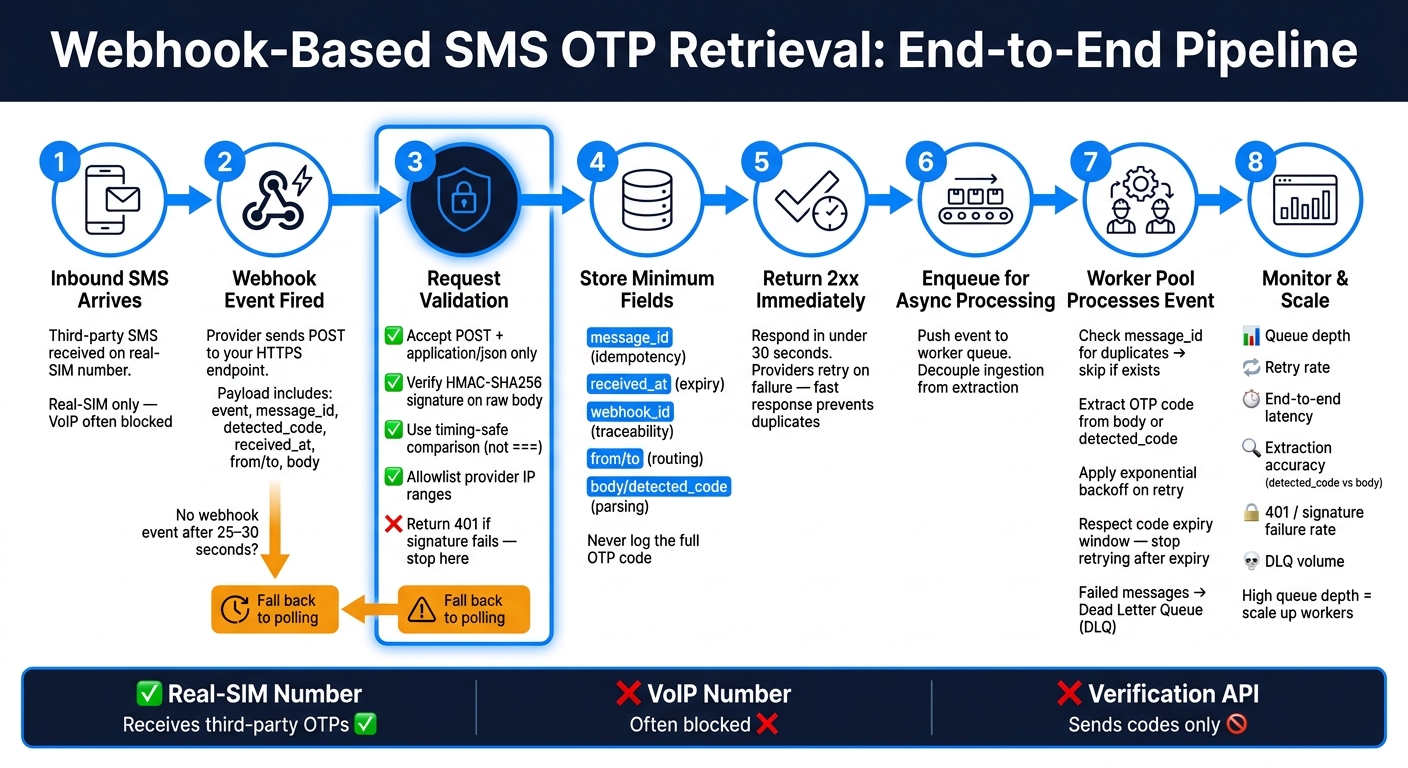
Webhook-Based SMS OTP Retrieval: End-to-End Pipeline
Once the endpoint is live, lock down the handler before you trust it with live codes. Keep this part small: validate the request, save the minimum, and return fast. Push extraction to a worker.
Validate Requests Before Processing Any SMS Data
Only accept POST requests over HTTPS with application/json. Reject anything else with 400 or 401. Then verify the provider's HMAC-SHA256 signature, usually sent in a header like X-Signature, with your shared secret [2][5].
One detail matters a lot here: verify the signature against the raw request body. If you verify a parsed or reformatted version, the check can fail even when the request is valid.
Use a timing-safe comparison function like crypto.timingSafeEqual when you compare signatures. Don't use === for this. It can leak timing information [5]. If the signatures don't match, return 401 and stop right there.
You should also allowlist the provider's published IP ranges at the firewall or load balancer [5]. And for logs, keep them lean: record message_id and timestamp only. Never log the full code [1].
After you've established trust, save only what you need for routing and idempotency.
Store Identifiers and Return a Success Response Quickly
After validation, store the payload and return 2xx right away. Providers expect a response within 30 seconds, and they retry failed deliveries on a backoff schedule [5].
At ingestion time, keep only the fields you need to trace, dedupe, and route the message:
| Field | Why You Need It |
|---|---|
message_id |
Idempotency |
received_at |
Expiry checks |
webhook_id |
Traceability |
from / to |
Routing |
body / detected_code |
Preserve raw message before parsing |
Save the record, enqueue the event, and return 2xx. Run extraction and downstream processing asynchronously [5]. That's how you keep ingestion fast, even when traffic spikes.
With the handler isolated, the next bottleneck is duplicate handling and observability.
Scale Processing with Queues, Idempotency, and Monitoring
Once ingestion is in place, the next choke point is processing at scale. If one app server handles verification messages inline, traffic spikes can swamp it fast. A queue-backed worker pipeline fixes that: use a stateless ingress service, a queue, a worker pool, a durable store, and a DLQ. With ingestion split out, the main jobs left are dedupe, retries, and visibility.
Prevent Duplicates and Expired-Code Failures
Start by deduplicating on message_id before processing. That way, repeated events get skipped, and only new ones move forward, so the right code reaches the right account one time. If it exists, skip it; if not, store it and continue [1][5].
Verification codes expire fast, so your queue TTL should match that reality. Use exponential backoff for retries, stop retrying once the code window has expired, and push failed messages to the DLQ [5]. Otherwise, stale verification messages can pile up and jam the pipeline.
Monitor Latency, Retries, and Extraction Accuracy
Don't just watch uptime. Track queue depth, end-to-end latency, duplicate rate, extraction failures, and DLQ volume. In many systems, a climbing queue depth is the first warning that the worker pool needs to scale up [5].
Structured logs matter here. Add correlation IDs - especially message_id - so you can trace one verification message from ingress through queue processing, code extraction, and delivery [5]. Also compare detected_code with the raw body field to measure extraction accuracy over time [1]. On top of that, watch for signature validation failures (401 responses) and provider-side delivery errors, so you can tell authentication issues apart from downstream processing problems [5].
Queued processing helps absorb spikes and gives retries room to work. If queue depth stays high, autoscale workers. Those metrics should guide your scaling decisions.
Choose the Right SMS Integration Model
Pick the integration model first. You can either use a dedicated inbound number to receive third-party verification codes, or use a verification API to send codes from your own app. At scale, the wrong number type causes more failures than the webhook code itself.
Once your webhook pipeline is set up, the last call is simple: choose a number type that can actually receive the codes.
Inbound Receiving vs. Verification APIs vs. VoIP Business Numbers
Verification APIs such as Twilio Verify are built for sending codes from your app. They are not meant for receiving OTPs from Google, WhatsApp, Coinbase, or Stripe.
That means the main constraint is usually the number type, not the webhook.
A common mistake is using a VoIP business number for verification. VoIP numbers are fine for calls and general messaging, but many platforms block them for verification. Real-SIM numbers are accepted far more often for SMS codes. JoltSMS uses real-SIM numbers with inbound webhook delivery.
| Feature | Real-SIM Number (e.g., JoltSMS) | VoIP Business Number (e.g., Google Voice) | Verification API (e.g., Twilio Verify) |
|---|---|---|---|
| Primary Purpose | Receiving third-party verification codes | Business calls and general messaging | Sending codes to your own app users |
| Suitability for Third-Party Codes | Excellent | Poor | Not applicable |
Key Takeaways for a Reliable Webhook-Based Code Pipeline
Use real-SIM numbers for third-party codes, verification APIs for sending codes, and VoIP only for business calls. Get this choice right now, and your webhook pipeline has a much better shot at scaling cleanly.
FAQs
When should I use polling as a fallback?
Use polling for simple scripts or small workloads with fewer than 20 concurrent activations.
A good rule of thumb is to poll every 2 to 5 seconds. If no SMS shows up after 30 seconds, switch to exponential backoff. That helps cut down on extra requests and keeps your script from hammering the API for no reason.
Once you go above 20 concurrent activations, move to webhooks or WebSockets. At that point, polling can run into rate limits, including HTTP 429 errors.
If the API sends a Retry-After header, follow it every time.
How do I stop duplicate webhook events?
Make your endpoint idempotent. JoltSMS may retry requests after network hiccups or short-lived failures, so your code should check whether the event has already been processed before doing anything with it.
A simple way to handle this is to use a unique identifier such as message_id. If that value is already in your database, treat the request as a duplicate, skip processing, and return 200 OK to confirm that it was handled.
What should I monitor as volume grows?
As SMS volume grows, keep a close eye on responsiveness and reliability so you can spot bottlenecks before they turn into bigger problems.
Watch queue depth for signs of slow processing or rate-limit hits. Review webhook logs for failed, timeout, or circuit broken statuses. Those signals can tell you pretty fast when the system is starting to strain.
It also helps to track endpoint response time, use idempotency keys to avoid duplicates during retries, and manage configurations with infrastructure-as-code as you add backend instances.