Keep Your LinkedIn Recruiter License When a Recruiter Leaves
At $900+ per month, a LinkedIn Recruiter seat is too expensive to lose to a recruiter's personal phone. When someone leaves, their 2FA number leaves with them — and your team loses access to a license you're still paying for. JoltSMS gives your agency a dedicated, real-SIM verification number the agency owns, so the account stays accessible through every hire and departure.
- Dedicated US real-SIM number the agency owns — not tied to any individual recruiter
- Shared inbox so the whole team sees LinkedIn, Indeed, and ATS verification codes instantly
- Slack and email fan-out means nobody blocks on one person being available to read a code
- Real-SIM number that passes LinkedIn's carrier detection — not a VoIP number that gets rejected

Verification codes land in a shared agency inbox — visible to whoever needs to act, not locked to one recruiter's phone.
How recruiting teams accidentally make phone verification a single point of failure
It starts the way it always does. A recruiter sets up the agency's LinkedIn Recruiter account using their personal mobile as the 2FA number. Nobody thinks twice — it works. Then that recruiter leaves. At 25% annual turnover in the staffing industry, this happens constantly. The agency's LinkedIn Recruiter license — which costs $900+ per month — is now gated behind a personal phone number that has been ported, reassigned, or wiped. Recovery requires LinkedIn support, which can take days. Meanwhile, candidate pipelines stall, client engagements pause, and the license clock keeps running on a seat nobody can access.
| Problem | What it looks like for recruiting & staffing agencies |
|---|---|
| Recruiter departure access lockout | A recruiter leaves on a Friday. On Monday, the team discovers the agency's LinkedIn Recruiter license requires a 2FA code sent to that recruiter's personal number — a number they've already ported to their new employer. The agency spends 3-5 days in LinkedIn support, with active candidate submissions on hold. |
| LinkedIn rejects VoIP and virtual numbers | The agency tries using Google Voice or a virtual number to avoid personal-phone dependency. LinkedIn detects the non-real-SIM number and rejects it for verification. The workaround fails, and the agency is back to using a personal phone as a temporary measure. |
| On-call code problem: one person blocks the whole team | LinkedIn 2FA is tied to the senior recruiter's phone. When they're in interviews, traveling, or unavailable, nobody else can complete a login. The team waits. Candidates wait. |
| Indeed multi-account complexity | The agency manages separate Indeed employer accounts for each client vertical. Each account requires its own phone number for mandatory SMS 2FA. Personal phones become a patchwork — one recruiter holding two or three account numbers, creating chaos when they leave. |
| ATS stack compounds the problem | A staffing firm uses LinkedIn Recruiter, Indeed, Greenhouse ATS, and Zoom — all requiring phone-based 2FA. That's four platforms tied to individual recruiter phones. One departure can break access to the entire engagement stack simultaneously. |
Turn verification from a recruiter's personal phone into an agency asset
JoltSMS provides your agency with a dedicated, non-VoIP, real-SIM US number that the agency owns and controls. Register it as the 2FA number on LinkedIn Recruiter, Indeed employer accounts, your ATS, and every other platform where your team needs stable, persistent access. When recruiters join or leave, nothing changes — the number is yours.
- Dedicated US real-SIM number registered to the agency — not any individual recruiter — so it persists through every hire and departure without account recovery
- Non-VoIP carrier detection pass — LinkedIn, Indeed, and ATS platforms accept real-SIM numbers where Google Voice and other virtual numbers are rejected
- Shared inbox with role-based access so senior recruiters, coordinators, and operations staff each see the codes they need
- Complete message history for every received code — useful for demonstrating MFA compliance during client security reviews or audits
- Instant Slack, Discord, email, or webhook delivery so verification codes reach whoever is available, not whoever set up the account

One agency-owned number. Stable across every recruiter transition.
Common ways recruiting agencies use JoltSMS
The Departing Recruiter Scenario
A senior recruiter leaves mid-engagement. With JoltSMS, the LinkedIn Recruiter 2FA is registered to the agency's number — not the recruiter's iPhone. The operations lead simply removes the departing recruiter's JoltSMS team access. The license stays fully accessible. No LinkedIn support ticket, no stalled candidate pipeline, no awkward call asking a former employee for a verification code. Marketing and creative agencies use the same approach for their shared platform accounts.
The Distributed Team Problem
A staffing firm with recruiters across three time zones uses LinkedIn Recruiter under a shared employer account. When LinkedIn triggers a 2FA check, it fires a code to a single number. With JoltSMS Slack integration, the code posts to a shared recruiting channel instantly — whoever is available at that moment can complete the login, regardless of where they are.
Multi-Account Indeed Management
A mid-size staffing agency manages separate Indeed employer accounts for its technology, healthcare, and finance verticals. Each account requires its own verified phone number. With JoltSMS, each vertical account gets its own dedicated agency-owned number. Codes are routed to the recruiting team lead for each vertical — organized, stable, and unaffected by recruiter changes.
How a recruiting agency typically rolls out a company verification number
Provision an agency-owned number
Sign up for JoltSMS and provision a dedicated US real-SIM number. This becomes the agency's permanent verification number — not tied to any recruiter.
Update LinkedIn Recruiter and other platform accounts
Log into each platform — LinkedIn Recruiter, Indeed employer accounts, your ATS, Zoom — and update the 2FA phone number from personal cell phones to the JoltSMS agency number. This is a one-time migration per account.
Invite your team and assign roles
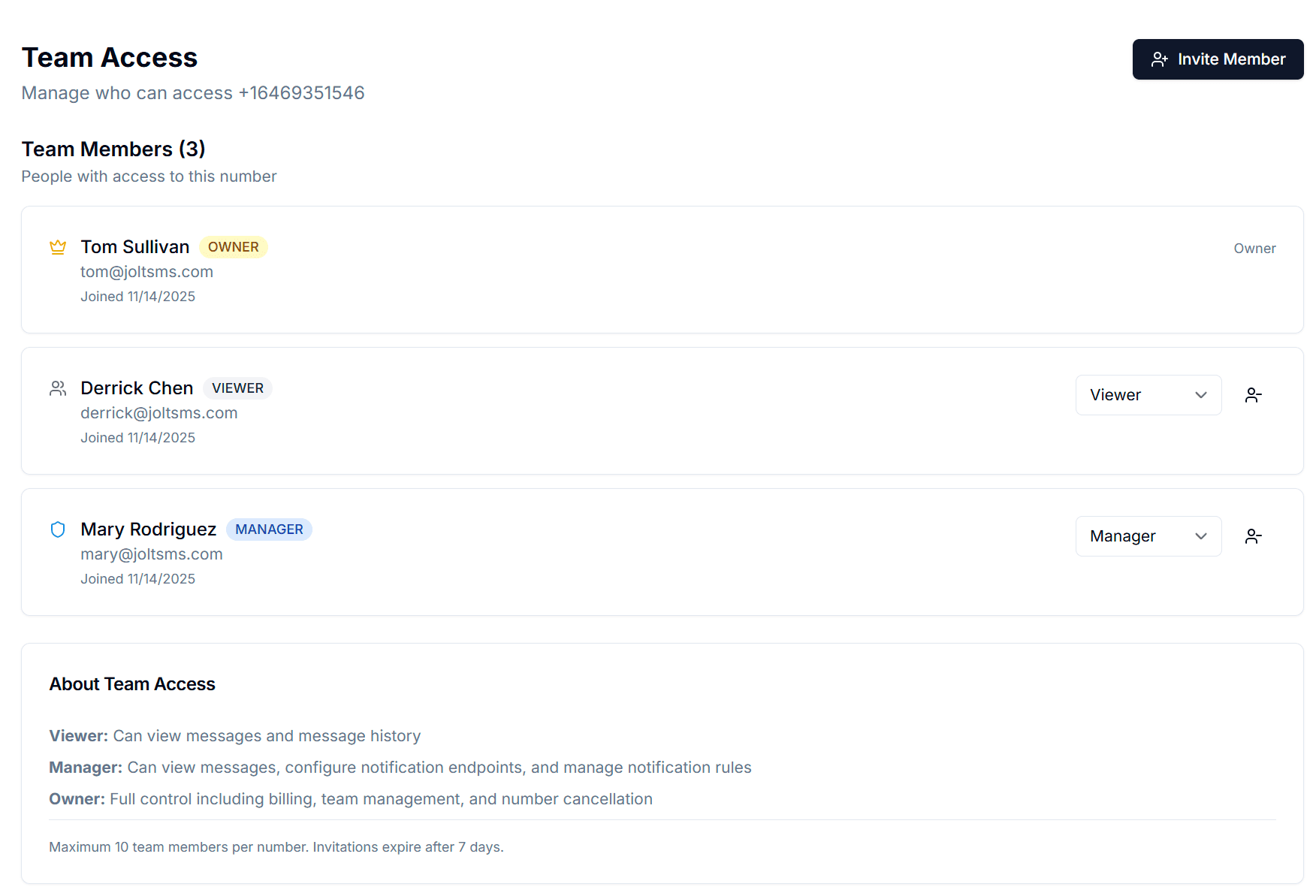
Invite recruiters, operations staff, and coordinators to the JoltSMS team. Owners control billing and access. Managers configure notification routing. Viewers receive codes in the shared inbox. Remove access instantly when someone departs.
Route codes to Slack or email
Connect JoltSMS to your recruiting team's Slack workspace. Incoming 2FA codes post to a shared channel instantly — whoever is available acts on the code, with no dependency on a single person's phone.
Add recruiter offboarding to your standard process
When a recruiter leaves, remove their JoltSMS access as part of offboarding. The agency number remains unchanged. LinkedIn Recruiter, Indeed, and every other platform stays accessible. No support tickets, no recovery delays.
Role-based access that matches how recruiting teams actually work
Recruiting teams have a natural hierarchy: operations leads manage accounts, senior recruiters handle day-to-day sourcing, and coordinators process logistics. JoltSMS Team Access maps directly to that structure — so the right people see verification codes without giving everyone access to agency billing and settings.
- Owner role — Assigned to the agency operations lead or principal. Controls billing, number provisioning, and full team access. The number is definitively agency property at this level.
- Manager role — Assigned to team leads and senior recruiters. Can configure notification routing and manage team members for their desk or vertical, without touching billing or account settings.
- Viewer role — Assigned to recruiters and coordinators who need to receive 2FA codes. Read-only inbox access — they see codes but cannot change agency settings or provision new numbers.
- Invite team members by email with a 7-day expiry link. When someone leaves, one click removes their access — the agency number and all platform registrations stay exactly as they are.
Get verification codes where your recruiting team already works
Recruiting teams move fast and rarely sit at a dashboard. JoltSMS delivers LinkedIn Recruiter and Indeed 2FA codes directly to Slack, email, or any communication channel your team uses — so a time-sensitive code never sits unseen while a recruiter is on a candidate call.
- Slack — Route LinkedIn Recruiter and Indeed codes to a private agency Slack channel. The recruiter who needs the code sees it instantly without switching apps mid-workflow.
- Discord — For agencies using Discord as an internal coordination tool, codes post directly to the relevant channel — useful for distributed or remote-first recruiting teams.
- Email — Forward all incoming verification codes to an operations email address or a team distribution list. Every code becomes a timestamped record — useful for tracking access patterns across platform accounts.
- Webhooks — For agencies with custom ATS integrations or automated sourcing workflows, codes can be HTTP-posted to any endpoint for programmatic handling.

Recruiting agency verification — common questions
If the SMS 2FA on your LinkedIn Recruiter account is registered to that recruiter's personal phone, your agency loses SMS access to the license when they leave. Account recovery through LinkedIn support typically takes several business days — days during which your team cannot log in, candidate pipelines stall, and you're paying $900+ for a seat nobody can use. The fix is to register LinkedIn Recruiter's 2FA to a JoltSMS number the agency owns. When a recruiter departs, you remove their JoltSMS access and the LinkedIn license stays fully accessible — no support ticket required.
Give your agency a verification number that outlasts every recruiter
Stop tying $900/month LinkedIn Recruiter licenses to someone's personal phone. One agency-owned JoltSMS number keeps LinkedIn, Indeed, and your ATS accessible through every hire and departure.