A 2FA Playbook for Finance & Ops Teams Managing Banks and Credit Cards
Managing 2FA for financial accounts like banks, Stripe, or PayPal can be frustrating, especially when platforms reject VoIP numbers (e.g., Google Voice) or when access depends on one person’s device. This guide simplifies 2FA management, helping teams avoid account lockouts and improve access sharing.
Key Takeaways:
- Avoid VoIP Numbers: Use real-SIM numbers (AT&T, Verizon) for SMS verification to prevent rejection by financial platforms.
- Centralize 2FA Codes: Route codes to tools like Slack or Discord for team access without sharing passwords.
- Backup Plans: Register multiple real-SIM numbers to ensure account recovery during emergencies.
- Document Everything: Create a master list of accounts, numbers, and recovery steps to stay organized.
By following these steps, your team can maintain secure, uninterrupted access to critical financial accounts while meeting compliance requirements.
Step 1: List All Financial Accounts and Their 2FA Requirements
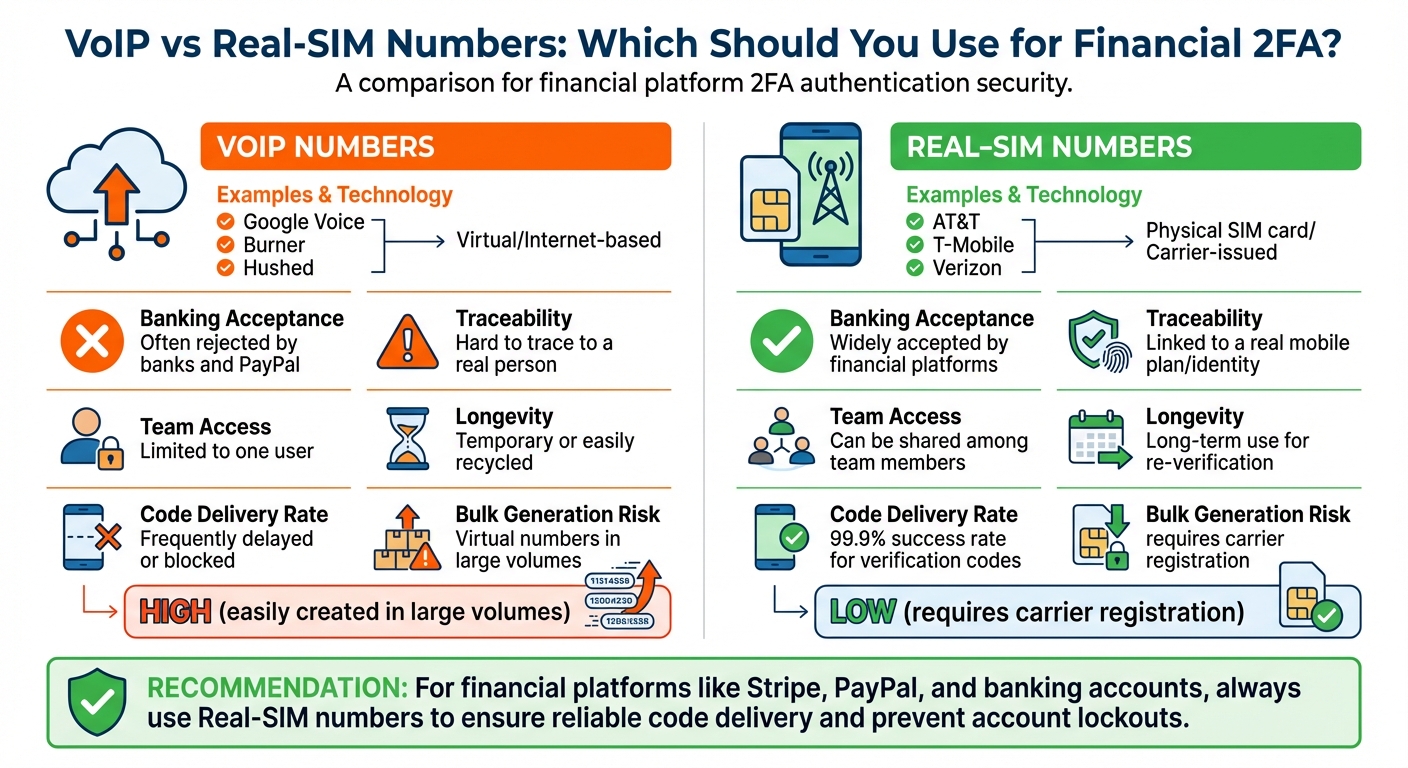
VoIP vs Real-SIM Numbers for Financial 2FA Authentication
Create a Master List of Financial Accounts
Start by compiling a detailed list of all financial accounts that require two-factor authentication (2FA). This should include banks, corporate card providers, and payment processors like Stripe and PayPal. Focus solely on financial accounts to keep the list manageable and relevant.
For each account, document the assigned phone number or authentication method using JoltSMS step-by-step guides. Note whether the platform supports TOTP (time-based one-time password) apps or hardware security keys, or if it relies exclusively on SMS verification. This record will be essential for managing access, particularly when employees leave or during re-verification processes. Without this documentation, you could face permanent lockouts if a platform requests verification weeks or months later and the original phone number is no longer active [1][2].
It’s also important to understand why some platforms reject VoIP numbers and why using real-SIM numbers is often a better choice for smooth verification.
Why VoIP Numbers Are Problematic for Financial Platforms
Banks and financial platforms tend to block VoIP numbers because they are virtual, internet-based, and lack a physical connection to a specific identity. Services like Google Voice, Burner, Hushed, or TextNow use VoIP technology, which makes them easier to generate but harder to trace. This makes them a target for scammers, who often use them to create fake accounts [3].
In contrast, real-SIM numbers are issued by major carriers like AT&T, Verizon, or T-Mobile and are tied to physical SIM cards. These numbers are considered more secure and reliable. Even when VoIP numbers aren’t explicitly blocked, they often experience issues like delayed or undelivered 2FA codes due to platform-side filtering or rate-limiting [3]. If you’ve ever seen an error message like “VoIP numbers are not accepted” or struggled to receive codes, this is likely the reason.
Here’s a quick comparison between VoIP and real-SIM numbers:
| Feature | VoIP Numbers (Google Voice, Burner) | Real-SIM Numbers (AT&T, T-Mobile, Verizon) |
|---|---|---|
| Technology | Virtual/Internet-based | Physical SIM card/Carrier-issued |
| Banking Acceptance | Often rejected by banks and PayPal | Widely accepted by financial platforms |
| Traceability | Hard to trace to a real person | Linked to a real mobile plan/identity |
| Team Access | Limited to one user | Can be shared among team members |
| Longevity | Temporary or easily recycled | Long-term use for re-verification |
Step 2: Select Reliable 2FA Methods for Financial Accounts
Real-SIM Numbers vs. VoIP for SMS Verification
When it comes to securing financial accounts, picking the right 2FA method is crucial. One key decision is choosing between real-SIM numbers and VoIP numbers for SMS verification. The distinction between the two can significantly impact reliability, especially for banking platforms.
Real-SIM numbers are tied to physical SIM cards provided by carriers like AT&T, Verizon, or T-Mobile. These numbers are trusted by banks because they’re linked to verified identities or paid contracts, making them much harder to abuse. On the other hand, VoIP numbers - offered by services like Google Voice, Burner, or TextNow - are entirely virtual. They can be created instantly and don’t require a physical address, which is why financial platforms often flag them as risky.
Banks actively screen for VoIP numbers, often blocking them or rejecting their use for verification codes. This is a deliberate measure to prevent fraud. The table below highlights the key differences that make real-SIM numbers a better choice for financial accounts:
| Feature | VoIP Numbers (Google Voice, Burner) | Real-SIM Numbers (AT&T, T-Mobile, Verizon) |
|---|---|---|
| Code Delivery Rate | Frequently delayed or blocked | 99.9% success rate for verification codes |
| Team Sharing | Limited to app access | Can forward codes to Slack, Discord, or webhooks |
| Long-Term Reliability | Prone to recycling or blocking | Ideal for repeated verifications |
| Bulk Generation Risk | High (easily created in large volumes) | Low (requires carrier registration) |
For businesses managing accounts on platforms like Stripe, PayPal, or corporate banking, real-SIM numbers ensure seamless verification. Tools like JoltSMS offer dedicated real-SIM numbers starting at $50/month. For those on tighter budgets, options like Ultra Mobile PayGo provide physical SIM cards for as little as $3/month on T-Mobile’s network.
Why TOTP Apps Don't Solve Team Access Problems
While SMS verification with real-SIM numbers is often the best solution, some teams consider alternatives like TOTP (Time-Based One-Time Password) apps. These apps, including Google Authenticator and Authy, offer certain advantages - they don’t rely on cellular networks, work offline, and are immune to SIM swap attacks. However, they come with a major drawback for shared access: device dependency.
TOTP apps store a unique seed on a single device. This creates a bottleneck for teams, as access depends entirely on the availability of the device owner. If that person is unavailable - whether they’re on vacation, out sick, or leave the company - it can lock the entire team out of critical accounts.
"TOTP apps... are more reliable than SMS - especially for locations outside the US... because they do not rely on incoming text messages." - Braintree/PayPal [5]
While TOTP apps are excellent for personal security, they fall short when it comes to team accessibility. By contrast, SMS verification with real-SIM numbers allows codes to be routed to shared platforms like Slack or Discord using webhooks. This ensures that any authorized team member can retrieve the code instantly, without needing to access a specific device or wait for someone to forward it.
For financial accounts that require team access, real-SIM numbers provide a practical solution for SMS-based 2FA. They’re also essential for platforms like PayPal, which often mandate SMS verification during account setup. While TOTP apps can be added later as an extra layer of security, real-SIM numbers remain the foundation for reliable and accessible verification.
Step 3: Give Teams Access Without Sharing Passwords
Sharing passwords to retrieve 2FA codes puts your account security at risk. When multiple people have access to sensitive accounts, it becomes impossible to track who logged in and when. The solution? Keep 2FA access separate from account credentials.
Use Dedicated Real-SIM Numbers for Team 2FA Codes
Instead of linking 2FA codes to someone's personal phone, set up a dedicated real-SIM number that the entire team can access through a shared dashboard. With a US-based real-SIM number, you can assign role-based access levels. Here's how it works:
- The "Owner" manages billing and setup.
- "Managers" control where codes are sent.
- "Viewers" can see incoming codes but have no administrative privileges.
This structure ensures that, for example, a junior accountant can retrieve a PayPal verification code without being able to alter critical account settings.
The biggest benefit is continuity. If your finance director is out on vacation or leaves the company, the team won’t lose access to essential accounts. The same number remains active for both initial verifications and future password resets. Plus, labeling helps you quickly identify which code belongs to which platform. This setup ensures your team has secure, uninterrupted access to financial accounts.
Send 2FA Codes to Slack or Discord with Webhooks
Once you’ve set up dedicated numbers, make the process even smoother by integrating 2FA codes into your team’s communication tools. Using webhooks, you can route codes directly to Slack or Discord, so they appear instantly in a private channel where authorized team members are already working.
Here’s how to get started with Slack:
- Create a private channel, such as
#finance-2fa-codes. - Generate an incoming webhook URL for the channel.
- Paste the webhook URL into your SMS provider’s notification settings.
Now, when a verification code arrives, it’s automatically posted to the channel, complete with the sender’s name and message content. This ensures the right person sees the code without delay [1].
For added security, choose providers that support HMAC-SHA256 signing secrets. This cryptographic signature ensures that the incoming webhook data is authentic and hasn’t been tampered with - critical when dealing with sensitive codes for corporate bank accounts [1].
Another perk of this approach is the built-in audit trail. Every code delivery is timestamped in your Slack history, so you can track exactly when codes were received and who had access to them. This level of visibility is invaluable for compliance reviews and troubleshooting issues like missed password reset codes.
"Starting in September 2023, 2FA is required for all Braintree users, and each user must enable 2FA to access Control Panel." - Braintree/PayPal [5]
Avoid routing financial 2FA codes through public channels or free SMS verification sites. These services make messages publicly visible, and their numbers are often blacklisted by major banks [3][4]. Keep webhook URLs private, restrict channel access to authorized finance and operations staff, and protect these codes just as you would account passwords.
sbb-itb-070b8f8
Step 4: Set Up Backup Plans to Prevent Lockouts
Once your primary two-factor authentication (2FA) is in place, it’s crucial to ensure your team can maintain access, even if something goes wrong. A single failure could leave your finance team locked out during critical moments.
Register Multiple Real-SIM Numbers as Backups
Many financial platforms let you register more than one phone number for 2FA. Use this feature to add a secondary real-SIM number to all essential accounts. Major platforms like Chase, Stripe, and PayPal support multiple numbers for account recovery.
Stick to real-SIM numbers from established carriers rather than VoIP services. Delays in access can disrupt operations, especially in finance, so having reliable backups is essential.
Keep these backup numbers active for the long term. Providers like Ultra Mobile PayGo or Tello Mobile offer real-SIM plans for as little as $3–$5 per month, making this a low-cost insurance policy against lockouts. Be sure to label each backup number clearly (e.g., "Backup – Chase") to avoid confusion [1][2].
Platforms like Braintree and PayPal follow a specific security hierarchy for 2FA: hardware security keys are prioritized, followed by authenticator apps, and finally SMS codes [5]. If SMS is your fallback option, ensure both your primary and backup numbers are real-SIM numbers that won’t fail you during a recovery scenario.
Document and Test Your Lockout Recovery Process
Backup numbers are only effective if your team knows how to use them during emergencies. Create a written recovery process that’s accessible outside your usual systems. This could be a printed document or a secure entry in your password manager, listing account names, backup phone numbers, and step-by-step instructions for regaining access.
Assign an Account Admin to oversee 2FA resets in case of lockouts [5]. This person should have access to all backup numbers and understand which platforms allow admin-level resets versus those requiring customer support.
Regularly test your recovery plan. Once a quarter, simulate a lockout on a non-critical account by attempting to log in using only the backup number and documented steps. If the process takes longer than 15 minutes, update your documentation. Emergencies often occur at the worst times, like during month-end closings or just before wire transfers.
Additionally, make use of offline backup codes whenever they’re available. For example, Braintree provides one-time recovery codes that can be used even if all phone numbers fail [5]. Print these codes and store them securely in a physical location that authorized team members can access 24/7. Relying solely on digital backups can be risky if you lose access to your email or password manager.
Step 5: Monitor 2FA Activity and Meet Compliance Requirements
Once you’ve secured your 2FA setup, the next step is to monitor all activity and ensure compliance with industry regulations. Keeping a close eye on login attempts helps you detect unauthorized access quickly while aligning your security efforts with compliance standards.
Keep Tabs on 2FA Attempts with Real-Time Monitoring
A centralized dashboard is key to managing 2FA verification codes. It allows you to filter codes by platform, phone number, message, or date, creating a detailed audit trail. This is especially helpful during compliance reviews or security investigations. For example, if your team handles multiple accounts with Stripe, PayPal, and banking platforms, a unified view of all 2FA activity eliminates the hassle of flipping between separate phone logs.
To stay ahead of suspicious activity, set up real-time notifications through tools like Slack, Discord, or email. Imagine a scenario where someone tries to log in to your Chase business account at 2:00 AM on a Saturday - your on-call manager will get an alert within seconds, allowing for an immediate response. These notifications, paired with a dedicated real-SIM setup and shared account access, provide an extra layer of security for financial accounts.
For deeper integration, configure webhooks to send POST JSON data secured with HMAC-SHA256. This ensures data integrity and makes it easier to integrate with SIEM systems, creating a long-term audit trail.
Another best practice is implementing role-based access control. Assign roles like "Viewer" for those who only need to see codes and "Manager/Owner" for those handling configurations and billing. Documenting these roles ensures clarity during audits. Additionally, label each phone number by its financial platform (e.g., "Stripe Primary" or "PayPal Ops"). This makes it effortless to retrieve records during compliance reviews. For instance, if auditors require details about a transaction on September 15, 2025, you’ll have the information at your fingertips.
Meeting 2FA Compliance Standards for Financial Platforms
Real-time monitoring is just one piece of the puzzle. It’s equally important to understand and meet the specific 2FA requirements of each financial platform. For instance, as of September 2023, Braintree mandates 2FA for all users accessing its Control Panel [5]. Similarly, Stripe allows administrators to enforce two-step authentication across their teams, eliminating weak links in the security chain [6].
| Platform | 2FA Requirement | Supported Methods | Compliance/Audit Features |
|---|---|---|---|
| Stripe | Admin-enforceable for teams | SMS, Authenticator apps, Hardware keys, Touch ID [6] | Admins can mandate 2FA for all team members [6] |
| Braintree (PayPal) | Mandatory (since Sept 2023) | SMS, TOTP apps (Google Authenticator, Authy), Hardware keys (FIDO U2F) [5] | Admins can reset or disable 2FA for locked-out users [5] |
| JoltSMS | Optional for account access | Real-SIM SMS delivery to Dashboard, Slack, Discord, Webhooks | Role-based access, HMAC-SHA256 webhook signatures, searchable message history |
When selecting 2FA methods, prioritize real-SIM numbers over VoIP services. Financial platforms tend to reject VoIP numbers, like those from Google Voice, because they’re not tied to physical SIM cards or major carriers. Real-SIM numbers, on the other hand, are harder to fake and more traceable, making them the preferred choice for banks and payment processors.
For PCI DSS compliance, maintain detailed logs of every 2FA attempt. Set up custom webhooks to automatically send POST JSON data for each verification code to your internal compliance dashboard or SIEM tool. This creates a permanent, searchable record that auditors can access without the need for manual data collection.
Conclusion
Securing financial operations with two-factor authentication (2FA) doesn't have to be complicated, but it does require careful planning. A key takeaway is to always use real-SIM numbers for 2FA instead of VoIP numbers. Why? Because financial platforms trust real-SIM numbers as legitimate, while VoIP numbers often raise red flags [3].
"Using two-factor authentication is like using two locks on your door - and is much more secure." - Federal Trade Commission [7]
The five-step approach outlined earlier helps protect against unauthorized access and minimizes the risk of account lockouts. For instance, centralizing 2FA codes in communication platforms like Slack or Discord ensures that no single person holds exclusive access. Additionally, registering multiple real-SIM numbers as backups creates a reliable safety net for seamless recovery.
Consistency is key when it comes to number retention. Many financial platforms require re-verification weeks or even months after the initial setup. If a disposable number was used during account creation, you could find yourself permanently locked out when a security code is requested 30 days later [1][3]. Services like JoltSMS or affordable options like Ultra Mobile PayGo can help you maintain the same number over time, ensuring uninterrupted access.
Finally, document everything. Assign role-based access to team members, label numbers clearly for each platform (e.g., "Chase Primary" or "Stripe Backup"), and test your recovery process before it's needed. These steps not only prevent disruptions but also provide the audit trail necessary for PCI DSS compliance and internal security reviews.
FAQs
Why are real-SIM numbers better than VoIP numbers for financial 2FA?
Real-SIM numbers are regarded as genuine mobile lines, making them a trusted option for two-factor authentication (2FA) with financial services such as banks, Stripe, and PayPal. These platforms rely on Real-SIM numbers because they go through more rigorous identity checks, ensuring a 99.9% success rate for receiving one-time passwords (OTPs).
On the other hand, VoIP numbers are much easier to acquire but come with significant drawbacks. They lack thorough identity verification, are frequently blocked for SMS verification, and can result in failed verifications or restricted access. For secure and reliable access to financial accounts, Real-SIM numbers are the smarter choice.
How can finance teams securely share 2FA codes for bank and payment accounts?
To securely manage and share two-factor authentication (2FA) codes, finance teams should rely on a centralized, dedicated phone number owned by the organization. Stay away from personal or VoIP numbers, as these are frequently blocked by platforms like banks, Stripe, and PayPal. Instead, opt for a real-SIM U.S. number, which works seamlessly with over 1,000 platforms. This number can be linked to a shared inbox, allowing authorized team members to access codes instantly without needing to share personal devices.
For added security, implement role-based permissions for the shared inbox. Require multi-factor authentication (MFA) for access, and restrict full administrative rights to senior staff members. Use logging and timestamps to monitor code requests and flag any suspicious activity. Only rotate numbers if a platform requires it, and always maintain a backup number to avoid lockouts during maintenance or re-verification processes.
By using a dedicated real-SIM number alongside controlled access and robust security practices, finance teams can simplify 2FA management while safeguarding accounts from unauthorized access.
How can finance teams avoid getting locked out of accounts due to 2FA issues?
To avoid 2FA-related account lockouts, finance teams should prioritize redundancy, secure storage, and reliable phone numbers. Start by setting up two independent 2FA methods for every financial account. For example, pair an authenticator app like Google Authenticator or Authy with a hardware security key or SMS codes. Always store backup codes securely in a password manager or an encrypted vault. If you're using SMS-based 2FA, steer clear of VoIP or temporary numbers, as platforms like Stripe, PayPal, and many banks often block them. Instead, opt for a dedicated real-SIM number that is widely accepted and reliable for receiving one-time passcodes.
It's also vital to establish safeguards that remain effective even during personnel changes. Keep all recovery codes, backup keys, and phone credentials in an encrypted vault with restricted access to key team members. Register a secondary recovery phone number (real-SIM) on all accounts as a backup in case the primary number becomes unavailable. Document your recovery process in an internal guide, test it periodically, and consider having an offline recovery option like a hardware security key or securely stored printed codes. Following these steps ensures uninterrupted access to essential financial accounts, such as corporate cards, bank accounts, Stripe, and PayPal.