Your project manager just left. Can you still approve Procore Pay disbursements?
Construction firms use JoltSMS to keep Procore Pay, Buildertrend, and certified payroll portals accessible — tied to the company, not whoever's phone was registered at setup.
- Dedicated non-VoIP real-SIM number that stays with the company — survives any PM or office manager transition
- Procore Pay disbursement MFA delivered to a shared inbox your whole team can see
- Certified payroll portals (LCPtracker, eCPR, DIR) stay accessible even during high-turnover periods
- Slack and email alerts push verification codes the moment they arrive — no scrambling for someone's phone

Procore Pay MFA codes land in your shared inbox — visible to everyone who needs them, the moment they arrive
How construction firms accidentally make Procore Pay and payroll portals a single point of failure
Construction is the highest-turnover industry in the United States — 68.2% annually industry-wide, 73.1% in skilled trades. That means a 10-person GC cycles through roughly 7 employees per year. Every time the person who registered a Procore account, a certified payroll portal login, or a QuickBooks MFA walks out the door, your team loses access to something operationally critical. Most construction firms have no formal IT offboarding process, and the research shows that 38% of departing employees have accessed a former employer's accounts after leaving. A dedicated company-owned verification number eliminates both problems in one step.
| Problem | What it looks like for construction firms & general contractors |
|---|---|
| Procore Pay disbursement blocked | A subcontractor payment run can't be authorized because the MFA code goes to a project manager who resigned last week. The entire disbursement cycle stalls until IT can recover Procore access — usually 1–2 business days your subs can't afford to wait. |
| Certified payroll portal lockout | Davis-Bacon or state prevailing wage portal (LCPtracker, eCPR, DIR) requires MFA to submit certified payroll — but the registered phone left with a former estimator. Compliance submissions miss their deadline while you chase an IT recovery ticket. |
| Buildertrend inaccessible during project handoff | The departing superintendent was the only person with the phone on file for Buildertrend login — residential builds stall waiting for IT to reset access. Every day of delay compounds schedule risk on active projects. |
| Sage 300 CRE or Foundation Software cloud MFA goes to a personal phone | Your construction accounting platform requires MFA for cloud access; the controller's personal number was used at setup and they've moved on. Cloud ERP access is blocked until support resolves the account recovery. |
| Field staff device churn generates repeated re-verification | Workers on job sites switch phones, lose devices, or share tablets — every change triggers a new verification event that bottlenecks through whoever's number is registered. High-turnover crews turn this into a daily IT burden. |
Turn verification from a personal phone problem into a company system
JoltSMS gives your construction firm a dedicated, real-SIM non-VoIP number that you register on Procore Pay, Buildertrend, Sage 300 CRE, certified payroll portals, and every other platform you rely on. When an MFA code arrives — whether it's a disbursement authorization or a Davis-Bacon portal login — it lands in a shared inbox your office manager, project coordinator, and operations director can all see instantly. No one person's phone is the gatekeeper.
- One company-owned number registered across all construction platforms — Procore Pay, Buildertrend, Sage 300 CRE, Viewpoint, Foundation Software, QuickBooks
- Real-SIM non-VoIP number that passes carrier checks where Google Voice and virtual numbers are rejected
- Shared inbox so your entire back office sees every verification code the moment it arrives
- Instant Slack and email alerts push codes to your team — no one needs to be watching the dashboard
- Number stays with the company forever — staff turnover never creates a platform lockout again

One number registered across all your construction platforms — owned by the company, accessible to the whole team
Common ways construction firms use JoltSMS
Procore Pay disbursement authorization
Every subcontractor payment run requires MFA on Procore Pay. With JoltSMS, that code goes to a shared inbox — your office manager, project coordinator, or owner can authorize the disbursement without waiting for a specific person's phone.
Certified payroll portal compliance
Federal Davis-Bacon and state prevailing wage portals require MFA-secured logins to submit certified payroll. A company-owned JoltSMS number means your compliance submissions never stall because the estimator who set up the account left the firm.
Project manager and superintendent transitions
Construction has 68% annual turnover. When a PM or super leaves mid-project, every SaaS platform they registered needs immediate access recovery. With JoltSMS, that recovery is instant — the number was never theirs to begin with.
How a construction firm typically rolls out a company verification number
Provision the number
Sign up for JoltSMS and get a dedicated real-SIM U.S. phone number assigned to your company within minutes. No contracts, no hardware required.
Register it on your critical platforms
Update the MFA phone number on Procore Pay, Buildertrend, Sage 300 CRE (or Viewpoint / Foundation), certified payroll portals, and QuickBooks. This typically takes 30–60 minutes across all platforms.
Invite your back-office team
Add your office manager, operations director, and any project coordinators to your JoltSMS workspace. Each person gets access to the shared inbox based on their role.
Connect Slack or email alerts
Set up notification routing so verification codes are pushed to your team's Slack channel or directly to email the moment they arrive. No one needs to check a dashboard.
Rotate out old personal numbers
Remove individual employees' personal phones from platform MFA settings. From now on, every verification event goes through your company number — regardless of who comes or goes.
Set access levels that match your org chart — not everyone needs to see everything
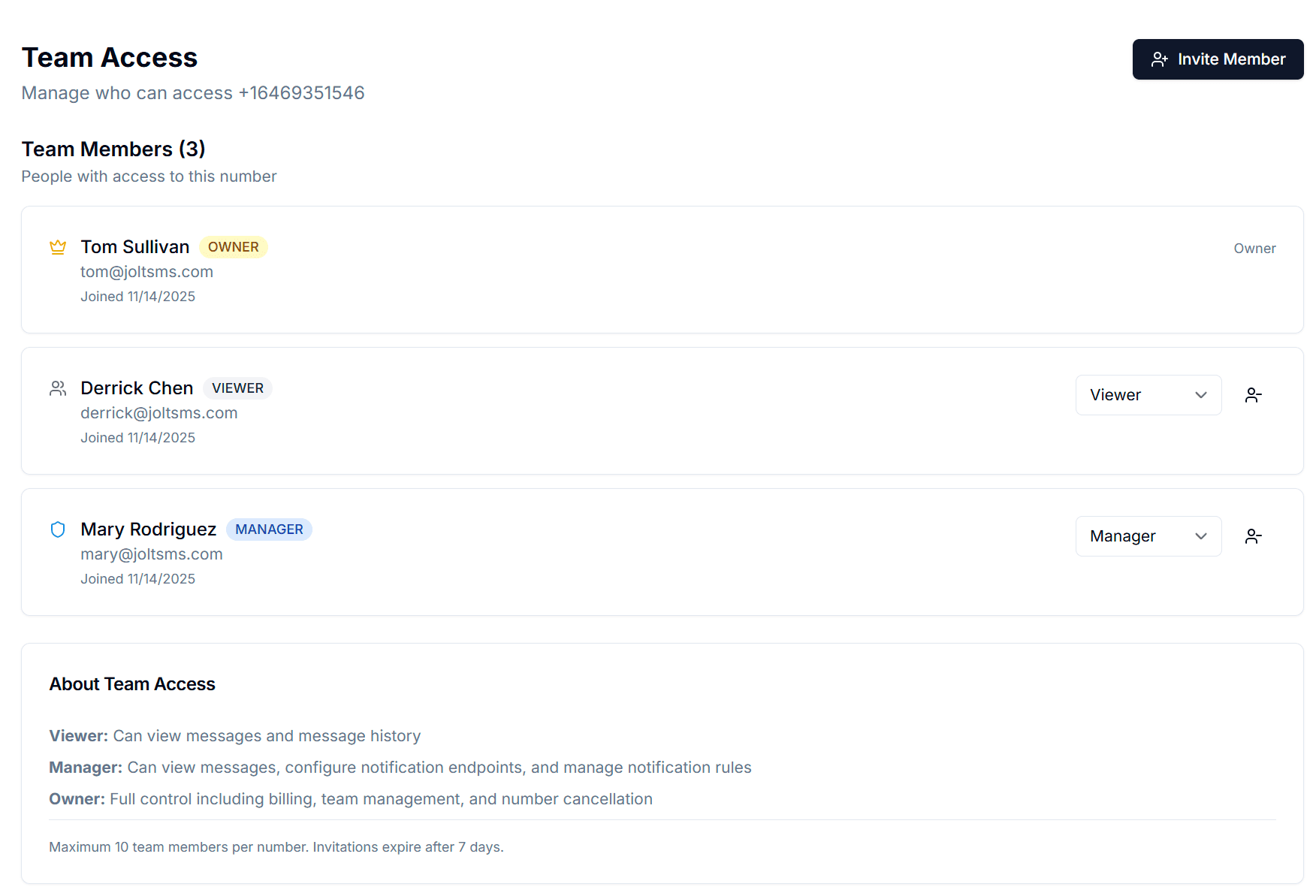
JoltSMS Team Access lets you match verification access to your real org chart. The owner or principal controls billing and has full administrative access. Office managers and operations directors can be added as Managers to configure notifications and manage team members. Project coordinators who only need to read incoming codes can be added as Viewers — they see the inbox without touching any settings.
- Owner role — full access including billing, number settings, and team management; assign to the principal, owner, or senior operations lead
- Manager role — can configure notification endpoints, manage team invites, and update platform notes; assign to office managers and operations directors
- Viewer role — read-only inbox access for project coordinators and field supervisors who need to see codes without changing settings
- Invite up to the team limit via email; access is revoked automatically when you remove a team member — no shared passwords, no security gaps
Get verification codes where your team already lives
Your back office team shouldn't have to watch a browser tab to catch an MFA code. JoltSMS routes every incoming verification SMS to the tools your construction firm already uses — so disbursement authorizations and payroll portal logins never block on someone scrambling for their phone.
- Slack — push Procore Pay MFA codes directly to a dedicated #verification channel so your office team is notified the instant a disbursement code arrives
- Email — route codes to your office manager or operations director's inbox; reliable for payroll compliance workflows where a paper trail matters
- Discord — useful for firms that run internal project communications on Discord; codes arrive in your designated channel automatically
- Webhooks — connect JoltSMS to your existing workflow automation (n8n, Make, Zapier) to route certified payroll portal codes into structured approval flows

FAQ for construction firms and general contractors
Procore Pay disbursements specifically require MFA on a phone number for each disbursement authorization event — not just login. When that phone number belongs to a project manager who has left, your entire payment run is blocked until IT can intervene. JoltSMS gives you a company-owned number registered on Procore Pay so any authorized team member can complete disbursement MFA without waiting for a specific person's device.
Also see how AEC engineering and consulting firms handle the same Procore and staff-departure problem — with CMMC MFA documentation requirements added for defense-sector professional services firms.
Also see how accounting firms manage QuickBooks MFA under FTC Safeguards Rule compliance — the same firm-owned number solution for the construction back-office teams that run QuickBooks alongside Procore and certified payroll portals.
Give your construction company a dedicated verification number that survives any project manager transition
One number, every platform, every team member — stop letting 68% annual turnover put your Procore Pay disbursements and payroll portals at risk.