Keep Consulting Firm Accounts Accessible When Staff and Consultants Leave
Your firm's HubSpot CRM, Procore projects, and Deltek ERP are registered to whoever configured them. When that person leaves, the firm loses platform access — and with CMMC now enforceable for defense contractors, distributed personal-phone 2FA is also a documented compliance gap. JoltSMS gives your firm a dedicated, firm-owned verification number so access stays with the practice, not with whoever configured it last.
- Dedicated US number the firm owns — not tied to any individual consultant, engineer, or practice administrator
- Shared inbox so authorized staff receive HubSpot, Procore, Deltek, and SAM.gov codes instantly
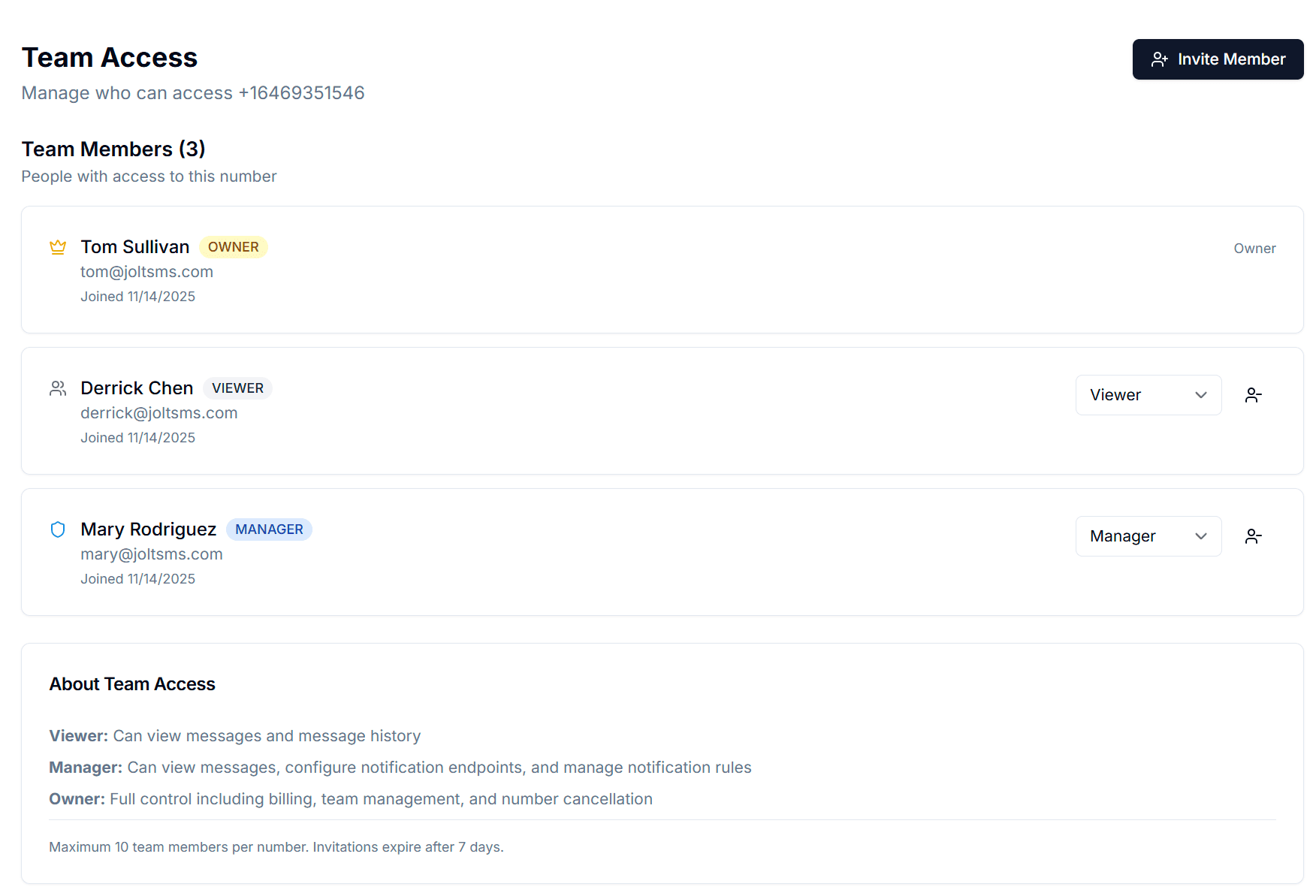
- Team Access with Owner, Manager, and Viewer roles so IT and operations staff control who sees what
- Message history provides a timestamped audit trail for CMMC MFA documentation and cyber insurance attestation

Verification codes from HubSpot, Procore, Deltek, and SAM.gov arrive in one shared inbox — visible to the right people regardless of who is in the office.
How professional services firms accidentally make phone verification a single point of failure
It starts the day the firm signs up for HubSpot. The business development director registers using her personal cell as the 2FA contact because it is the fastest path to getting the CRM live. Six months later, the firm onboards Procore. The project manager who runs the account setup uses his iPhone because that is what he has at his desk. A year after that, the IT consultant who migrated the firm to Deltek cloud configures 2FA on her personal number before she moves to a new engagement. Nobody documents any of this. By the time the firm has 8–12 active SaaS platforms, access credentials are scattered across personal phones belonging to people who may or may not still be at the firm. Average annual turnover in management consulting is 15–20% (McKinsey Global Institute data). Every departure is a potential access crisis — and for government contractors, CMMC Phase 1 enforcement began November 10, 2025, making undocumented personal-phone MFA a direct compliance failure.
| Problem | What it looks like for professional services firms |
|---|---|
| Staff departure platform lockout | A senior consultant leaves mid-engagement. The firm's HubSpot account is locked because the 2FA is routed to her personal phone — already ported to a new carrier. The sales team cannot access active deals and pipeline data while HubSpot support processes an account recovery request that takes 2–3 business days. |
| Procore MFA enforcement with no firm number | Procore now mandates MFA for all cloud users and requires it for every Procore Pay disbursement. Engineering and AEC firms with dozens of project managers each using their personal phone for Procore 2FA have no central access control. When a project manager leaves mid-project, the client-facing Procore workspace becomes inaccessible until support recovery. |
| Deltek cloud single-phone dependency | Deltek Vantagepoint and Costpoint — the dominant ERP for AEC firms and government contractors — require 2FA for all cloud deployments. Mid-size firms without enterprise SSO default to personal phones. When the IT manager who configured Deltek cloud 2FA departs, the entire ERP access chain is at risk. |
| CMMC MFA documentation failure | CMMC 2.0 enforcement began November 10, 2025. Level 1 and above require MFA across all systems handling Federal Contract Information (FCI) and Controlled Unclassified Information (CUI). CMMC assessors require documented evidence of firm-controlled MFA. Personal-phone 2FA fails this requirement — the firm cannot demonstrate control over an authentication factor held on an individual's personal device. |
| SAM.gov annual renewal risk | SAM.gov requires Login.gov with mandatory SMS 2FA for federal contractor registration. Registrations must be renewed annually. When the staff member responsible for SAM.gov registration leaves before the renewal window, the firm may miss the renewal deadline — potentially disqualifying active contract bids. |
Turn verification from a personal phone problem into a firm-owned system
JoltSMS provides your firm with a dedicated, non-VoIP, real-SIM US number that belongs to the practice — not to any individual consultant, engineer, or project manager. Register it as the 2FA contact on HubSpot, Procore, Deltek, ShareFile, SAM.gov, and every other platform your firm uses. When staff join or leave, nothing changes — the number stays with the firm, and every platform account stays accessible.
- Dedicated US real-SIM number accepted by HubSpot, Procore, Deltek, ShareFile, and SAM.gov Login.gov — survives any personnel change without account recovery
- Non-VoIP real SIM passes carrier verification checks on platforms that block Google Voice and VoIP numbers
- Shared inbox with role-based access — project managers and consultants see codes, IT administrators and operations directors control permissions
- Complete message history for every received code — timestamped audit trail that satisfies CMMC MFA documentation requirements and cyber insurance MFA attestation reviews
- Instant Slack, Teams, email, or webhook notifications so the right person receives the code the moment it arrives — even during client site visits or remote engagements

One firm-owned number. Registered across your entire professional services platform stack. Stable through any personnel change.
Common ways professional services firms use JoltSMS
CRM and Sales Platform Access Continuity
A consulting firm's HubSpot Super Admin configured 2FA on her personal phone before she left for a competitor. The firm's entire CRM — active deals, client history, pipeline — is locked behind her personal number. With JoltSMS, the HubSpot 2FA is registered to the firm number. When the admin departs, the operations director removes her JoltSMS team access. HubSpot remains fully accessible. No support ticket, no pipeline gap, no client relationship disruption.
CMMC MFA Documentation for Defense Contractors
CMMC 2.0 Phase 1 enforcement began November 2025. Defense contractors at Level 1 and above must demonstrate firm-controlled MFA across all systems handling FCI and CUI. A JoltSMS firm-owned number provides the documented control point CMMC assessors require: the firm owns the authentication factor (not any individual's personal device), message history timestamps each authentication event, and role-based team access logs who has permission to view codes and when that access was granted or revoked.
Engineering Firm Procore and Deltek Access
An AEC firm manages 15 active construction projects in Procore and runs project financials in Deltek Vantagepoint. Both platforms enforce MFA for cloud users. With JoltSMS, one firm-owned number handles 2FA for both systems. Project managers and principals access codes via the shared inbox. When a project manager transitions to a new role or firm, IT removes their JoltSMS access. Procore and Deltek remain fully accessible to whoever is managing the work.
How a professional services firm typically rolls out a company verification number
Provision a dedicated firm number
Sign up for JoltSMS and provision a dedicated US real-SIM number. This becomes the firm's permanent verification contact — not tied to any individual consultant, engineer, or project manager.
Replace personal numbers on platform accounts
Work through each platform — HubSpot, Procore, Deltek, ShareFile, SAM.gov, Asana, DocuSign, Microsoft 365 admin — and update the 2FA phone number from personal cell phones to the JoltSMS firm number. This one-time migration typically takes 45–90 minutes across a full professional services platform stack.
Configure the shared inbox and team access
Invite IT administrators, operations directors, practice administrators, and relevant project leads with appropriate roles. Owners manage billing and number provisioning. Managers configure notification rules. Viewers receive codes in the shared inbox without changing firm settings.
Route codes to where your team already works
Configure notification rules to deliver incoming codes to Microsoft Teams channels, Slack, or email. A Deltek 2FA code reaches the operations team immediately — even when principals are on client sites or traveling.
Establish a staff offboarding protocol
When a consultant, engineer, or administrator departs, remove their JoltSMS team access. The firm number remains registered on every platform — unchanged and accessible. For CMMC-scope firms, document this offboarding step in your System Security Plan (SSP) as evidence of controlled MFA access revocation.
Role-based access that mirrors how consulting and engineering firms actually operate
Professional services firms have clear operational hierarchies: principals and partners set direction, managers and practice leads supervise projects, and staff handle day-to-day workflows. JoltSMS Team Access maps directly to that structure — IT administrators and operations directors keep control while project teams get the codes they need.
- Owner role — Assigned to the IT manager, operations director, or managing principal. Controls billing, number provisioning, and full team access. Typically one or two people at the firm.
- Manager role — Assigned to practice administrators, senior project managers, or department heads. Can configure notification rules and manage team members without touching billing or provisioning.
- Viewer role — Assigned to consultants, engineers, project coordinators, and staff who need to receive verification codes. Read-only inbox access — they see and use codes but cannot change firm settings or team membership.
- Invite team members by email with a 7-day expiry link. When a consultant or project manager departs, one click removes their JoltSMS access — the firm number and all platform registrations remain exactly as they were.
Get verification codes where your team already works
Consulting and engineering firms run on Microsoft Teams, Slack, and email. JoltSMS delivers verification codes to whatever channel your team uses — so a Procore 2FA code during an active project never sits unseen in a dashboard tab while a deadline approaches.
- Microsoft Teams — Professional services firms on Microsoft 365 can receive HubSpot, Procore, and Deltek verification codes directly in Teams channels — without leaving the environment where the work happens.
- Slack — Route incoming codes to a private operations Slack channel. The project manager or consultant who needs the code gets it instantly without interrupting a client call or checking a separate app.
- Email — Forward all incoming verification codes to an IT operations email address or a shared distribution list. Every code becomes a timestamped email record — directly useful as a CMMC MFA audit trail.
- Webhooks — For firms with PSA systems, custom project management integrations, or security automation toolchains, codes can be HTTP-posted to any endpoint — enabling automated logging and routing without manual dashboard access.

Professional services verification — common questions
If the HubSpot 2FA is registered to that consultant's personal phone, your firm will lose SMS access to the CRM when they leave. Recovery requires contacting HubSpot support, which can take 2–3 business days — time your sales and business development team cannot afford to lose. The solution is to register your HubSpot account to a JoltSMS number the firm owns outright, before the departure. When a consultant leaves, you simply remove their JoltSMS team access. The number — and your HubSpot account access — remains exactly as it was.
Also see how law firms handle the same attorney-departure risk with ABA Model Rule 1.6 compliance — a parallel compliance mandate where personal-phone 2FA creates the same unauthorized access exposure for client-matter platforms.
Also see how accounting firms manage QuickBooks and ProSeries 2FA under FTC Safeguards Rule compliance — the same firm-owned number solution applied to a parallel regulatory mandate.
Nonprofits using SAM.gov for grant compliance (not defense contracting) should see how nonprofits and NGOs manage SAM.gov and Google Workspace access through executive transitions — a different compliance frame (2 CFR 200) than the CMMC/contractor angle on this page.
Also see how healthcare practices manage EHR and HIPAA-scoped platform access when clinical staff leave — HIPAA as the equivalent compliance driver to CMMC in a different regulated professional services vertical.
General contractors, homebuilders, and specialty subcontractors — who use Procore for field operations rather than AEC design — should see how construction firms manage Procore Pay disbursement MFA and certified payroll portal access through 68% annual turnover — a distinct operational angle from the engineering consulting frame on this page.
Give your firm a verification number that survives any personnel change
Stop routing HubSpot, Procore, and Deltek access through personal phones. One firm-owned JoltSMS number keeps every platform tied to the practice — not to whoever happens to be the current project manager.