Keep Your EHR Accessible When Healthcare Staff Leave
When a front-desk coordinator's personal phone holds your DrChrono or athenahealth 2FA, their departure becomes a scheduling and billing crisis. JoltSMS gives your practice a dedicated, practice-owned verification number so EHR access stays with the office — not with whoever configured it last.
- Dedicated US number the practice owns — not tied to any front-desk staff member, billing coordinator, or office manager who might leave
- Shared inbox so authorized staff receive DrChrono, athenahealth, and SimplePractice codes instantly without relaying through a personal phone
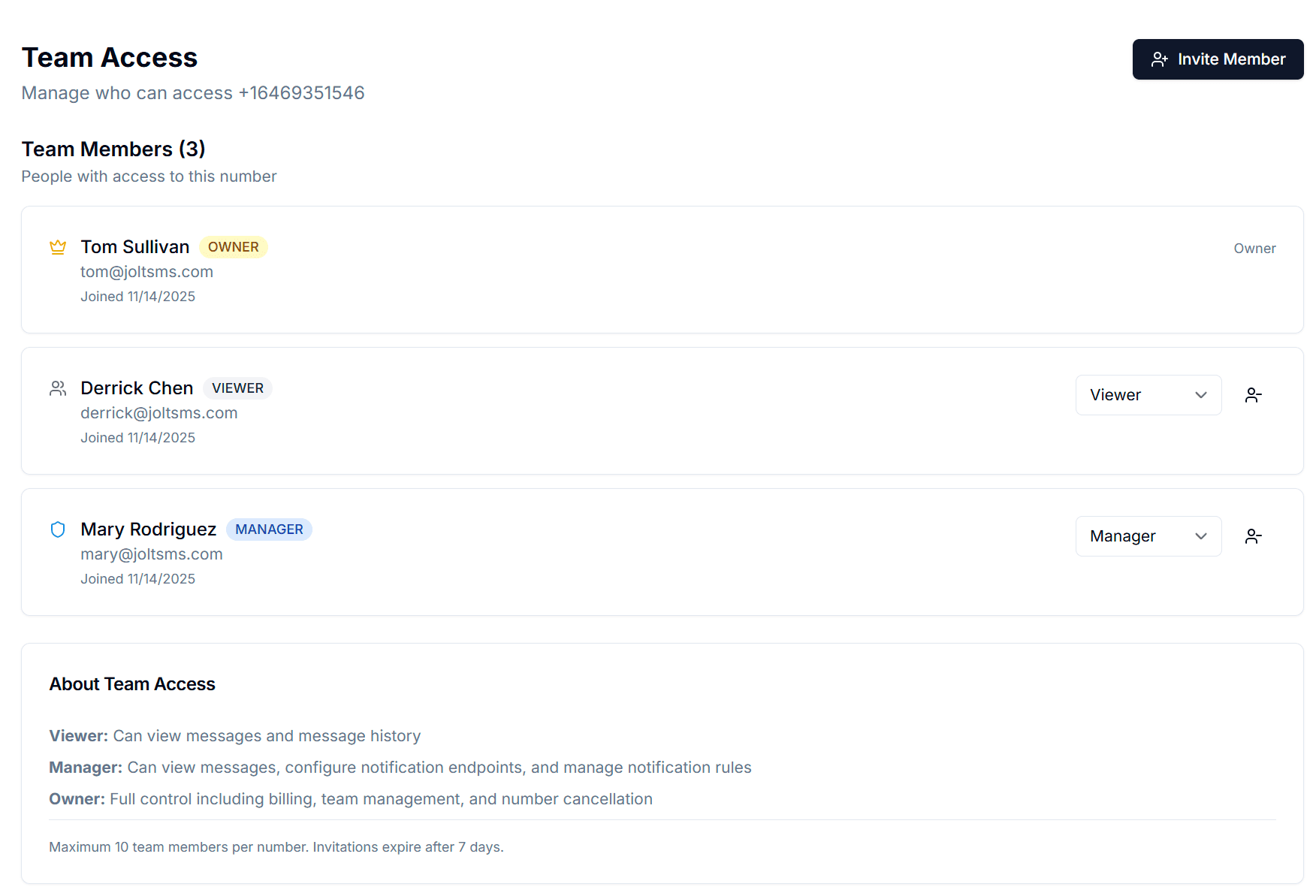
- Team Access with Owner, Manager, and Viewer roles so the practice administrator controls who sees what
- Message history with timestamps supports HIPAA MFA audit documentation — required under the 2025 proposed Security Rule update

Verification codes from DrChrono, athenahealth, Kareo, and SimplePractice arrive in a shared practice inbox — visible to authorized staff regardless of who is at the front desk.
How healthcare practices accidentally make phone verification a single point of failure
It starts at setup. The office manager who onboards the practice's DrChrono account registers their personal cell as the 2FA number. The billing coordinator links their iPhone to Kareo. A part-time receptionist adds their number to the insurance portal login. Nobody writes any of this down. Three years later, staff turnover has scattered 2FA credentials across six personal phones — and nobody knows which number controls which portal. Healthcare practices face annual staff turnover rates of 20-30%, driven by competitive wages and high burnout rates. Every departure is a potential lockout event. When a billing coordinator leaves mid-cycle and their phone controlled the Kareo 2FA, claims submission pauses until vendor support can verify your identity — a process that can take 24-72 hours during which revenue cycle management stops completely. The proposed 2025 HIPAA Security Rule update makes this even more urgent: HHS has moved MFA from addressable to explicitly required for all ePHI systems. Personal phones distributed across departing staff are not a defensible MFA implementation under that standard.
| Problem | What it looks like for healthcare practices |
|---|---|
| Staff departure billing lockout | A billing coordinator or office manager leaves. Their personal phone was the registered 2FA for the Kareo or athenahealth account. Claims submission pauses until vendor identity verification completes — typically 24-72 hours. Revenue cycle management stops mid-cycle. |
| Scheduling system inaccessibility | DrChrono, Jane App, or AdvancedMD is locked because the staff member who enrolled the 2FA phone has left or is unreachable. Patient scheduling, appointment reminders, and clinical notes cannot be accessed. The practice scrambles to reschedule the day's patients from memory or paper records. |
| HIPAA MFA compliance gap | The proposed 2025 HIPAA Security Rule update explicitly requires MFA for all ePHI systems. When 2FA is distributed across personal phones of current and former staff, the practice cannot demonstrate centrally controlled, auditable MFA to an HHS auditor or cyber insurance underwriter. |
| Multi-location verification fragmentation | A dental group or multi-site medical practice has three locations. Each location's platform accounts were set up by whoever happened to be the office manager at the time. Staff move between locations. 2FA phones are no longer at the location where the account is used. |
| Insurance and billing portal lockout | Insurance carrier portals require MFA for claims access. When the staff member whose phone controls a carrier portal login departs, the practice loses the ability to verify eligibility, submit claims, or check payment status until the carrier's support team resets the credentials. |
Turn verification from a personal phone problem into a practice-owned system
JoltSMS provides your practice with a dedicated, non-VoIP, real-SIM US number that belongs to the practice — not to any individual staff member. Register it as the 2FA contact on DrChrono, athenahealth, Kareo, SimplePractice, TherapyNotes, Jane App, AdvancedMD, and every insurance portal your practice uses. When staff join or leave, nothing changes — the number stays with the practice, and every platform account stays accessible.
- Dedicated US real-SIM number accepted by DrChrono, athenahealth, Kareo, SimplePractice, and TherapyNotes — survives any personnel change without account recovery or vendor support calls
- Non-VoIP real SIM passes carrier verification checks on EHR and practice management platforms that block VoIP numbers used by competitors
- Shared inbox with role-based access — front-desk staff and billing coordinators receive codes while the practice administrator controls permissions
- Complete message history for every received code — timestamped audit trail that supports HIPAA MFA compliance documentation under the 2025 proposed Security Rule
- Instant Slack, email, or webhook notifications so the right staff member receives the EHR code the moment it arrives — even during patient appointments or provider rounds

One practice-owned number. Registered across your entire EHR and billing software stack. Stable through any staff change.
Common ways healthcare practices use JoltSMS
EHR & Practice Management Continuity
An office manager gives two weeks' notice. With JoltSMS, the practice's athenahealth and Kareo accounts are registered to the practice number — not the office manager's iPhone. The practice administrator removes the departing staff member's JoltSMS team access on their last day. Every EHR and billing platform account remains fully accessible. No vendor support calls. No claims submission gap. No scheduling disruption during transition.
HIPAA MFA Compliance Documentation
HHS's proposed 2025 HIPAA Security Rule update moves MFA from "addressable" to explicitly required for all ePHI systems. A practice-owned JoltSMS number supports compliance in three ways: the practice controls the authentication factor (not an individual employee's personal phone), the message history inbox provides a timestamped log of all authentication events, and role-based team access lets the practice demonstrate granular permission controls to HHS auditors or cyber insurance underwriters.
Multi-Location Dental or Medical Group
A dental group with four locations uses JoltSMS to manage verification across all sites. Each location has its own practice-owned number registered to that location's platform accounts. Staff transfers between locations do not affect EHR or billing system access. The practice administrator manages all numbers from one JoltSMS account, with consistent team access controls across every location.
How a healthcare practice typically rolls out a practice-owned verification number
Provision a dedicated practice number
Sign up for JoltSMS and provision a dedicated US real-SIM number. This becomes the practice's permanent verification contact — not tied to any office manager, billing coordinator, or front-desk staff member.
Replace personal numbers on EHR and billing platforms
Work through each platform — DrChrono, athenahealth, Kareo, SimplePractice, Jane App, AdvancedMD, and any insurance carrier portals — and update the 2FA phone number from personal cell phones to the JoltSMS practice number. This one-time migration takes 30-90 minutes across a typical practice's software stack.
Configure the shared inbox and team access
Invite the practice administrator, office manager, billing coordinator, and front-desk staff with appropriate roles. Owners manage billing and provisioning. Managers configure notification rules. Viewers receive codes in the shared inbox without touching practice settings.
Route codes to where your team already works
Configure notification rules to deliver incoming EHR codes to Slack, email, or other communication tools. A DrChrono login code reaches the front-desk staff member who needs it without requiring them to check a separate dashboard during a busy check-in window.
Embed the number in your staff offboarding checklist
When a staff member departs, remove their JoltSMS team access as part of the standard HR offboarding process. The practice number remains registered on every platform account unchanged. Document the step in your practice's HIPAA security policies and procedures for compliance reviews.
Role-based access that mirrors how healthcare practices actually operate
Healthcare practices have clear working hierarchies: the practice administrator or office manager owns systems, billing staff and clinical coordinators handle day-to-day workflows, and front-desk staff execute patient-facing tasks. JoltSMS Team Access maps directly to that structure — the practice administrator keeps control of billing and permissions while front-desk staff get the EHR codes they need to do their jobs.
- Owner role — Assigned to the practice administrator or physician-owner. Controls billing, number provisioning, and full team access. Typically one or two people at the practice — the role that survives any individual staff member's departure.
- Manager role — Assigned to the office manager or billing coordinator lead. Can configure notification rules and manage team members without touching billing or number provisioning settings.
- Viewer role — Assigned to front-desk staff, billing coordinators, and clinical support staff who need to receive EHR verification codes. Read-only inbox access — they see and use codes but cannot change practice settings or team membership.
- Invite team members by email with a 7-day expiry link. When a staff member departs, one click removes their access — the practice number and all EHR and billing platform registrations remain untouched.
Get verification codes where your practice team already works
Healthcare practices run on fast patient throughput. Nobody has time to check a separate verification dashboard between patient appointments. JoltSMS delivers EHR and billing verification codes to the tools your team already uses — so a DrChrono 2FA code never sits unseen while a patient is waiting to check in.
- Slack — Route athenahealth, Kareo, and DrChrono codes to a private practice Slack channel. The billing coordinator handling the claim gets the code without interrupting a provider appointment or a front-desk check-in.
- Email — Forward all incoming verification codes to a practice operations email address or shared billing inbox. Every code becomes a timestamped email record — directly useful as part of your HIPAA MFA audit documentation.
- Discord — Smaller practices and mental health groups that use Discord for internal team communication can receive EHR codes in a private server channel, keeping the verification workflow inside existing tools.
- Webhooks — For practices with custom billing integrations or practice management systems that support automation, codes can be HTTP-posted to any endpoint — enabling automated logging without manual dashboard access.

FAQ for healthcare practices
If the 2FA for your EHR account is registered to that office manager's personal phone, your practice will lose SMS verification access when they leave — and recovery requires contacting the vendor's support team, which typically takes 24-72 hours. During that window, billing submissions, scheduling, and clinical note access may be disrupted. The fix is to register your EHR accounts to a JoltSMS number the practice owns outright. When a staff member departs, you simply remove their JoltSMS team access. The number — and your EHR account access — remains exactly as it was.
Also see how accounting firms use JoltSMS to satisfy the FTC Safeguards Rule MFA mandate — a parallel compliance obligation where seasonal staff turnover creates the same account-access crisis healthcare practices face under the proposed HIPAA Security Rule update.
Also relevant for insurance agencies managing provider portal MFA on the billing side — the same carrier portal access problem exists on the insurance verification side of healthcare revenue cycle management.
Give your healthcare practice a verification number that survives any staff change
Stop routing DrChrono, athenahealth, and Kareo access through personal phones. One practice-owned JoltSMS number keeps every EHR and billing platform tied to the practice — not to whoever happens to be the current office manager.