Stop Losing Carrier Portal Access Every Time an Agent Leaves
Your agency logs into 15 carrier portals a day — each with its own MFA. When that MFA is routed to a personal phone, every agent departure is a potential lockout across your entire book of business. JoltSMS gives your agency a dedicated, agency-owned verification number so carrier access stays with the agency, not with whoever is currently answering their personal phone.
- One agency-owned number for all carrier portals — survives any agent departure without lockout recovery
- Shared inbox so the right person grabs carrier codes during client calls, renewals, and endorsements
- Route codes to Slack, email, or Microsoft Teams so nobody is hunting through a personal phone
- Message history provides a documented MFA audit trail for NYDFS, GLBA, and cyber insurance attestation

All your carrier portal codes in one shared inbox — visible to whoever needs them, regardless of which agent is at their desk.
How insurance agencies accidentally make phone verification a single point of failure
It starts the day the agency opens. The principal registers the Progressive portal with their cell. The office manager sets up Allstate on their personal iPhone. Each new producer configures their own carrier logins on their own devices. After five years, the agency's access to 12 carrier portals is distributed across 8 personal phones — and nobody has documented which number goes with which portal. With 90%+ of new agents departing within their first year (industry average), this isn't a theoretical risk. It's a recurring operational crisis that happens every time someone walks out the door.
| Problem | What it looks like for insurance agencies |
|---|---|
| Agent departure lockout | A producer leaves mid-renewal season. Their personal phone was the MFA number for 4 carrier portals. The agency cannot access those portals until completing each carrier's account recovery process — which can take 2-5 business days per portal, during which renewals stall. |
| MFA fragmentation across 15 portals | Every carrier has its own MFA flow: Progressive sends SMS, Chubb uses an authenticator app, Nationwide has a portal-specific login. When the phone holding those credentials walks out the door, each portal requires its own separate recovery process. |
| New agent ramp-up delays | A new producer needs access to 8 carrier portals on day one. If each portal requires SMS verification during setup, and there is no agency number to use, the new agent is blocked until they configure personal devices — creating a security and compliance gap from the first day. |
| No compliance documentation | NYDFS 23 NYCRR Part 500 and the GLBA Safeguards Rule require agencies to document their MFA controls. When MFA is distributed across personal phones, the agency cannot demonstrate a firm-controlled authentication setup to regulators, auditors, or cyber insurance underwriters. |
| Shared account security gap | Agencies commonly share portal logins across multiple agents for efficiency. When MFA is on one person's phone and another agent needs to log in, the answer is "text me the code" — creating an undocumented, uncontrolled credential sharing pattern that conflicts with NAIC Model Law requirements. |
Turn verification from a personal phone problem into an agency system
JoltSMS gives your agency a dedicated, non-VoIP, real-SIM US number that belongs to the agency — not to any individual producer, CSR, or principal. Register it as the MFA number on every carrier portal and agency management system your team uses. When agents join or leave, the MFA number never changes. Carrier access stays continuous. No recovery tickets, no renewal delays, no compliance gaps.
- Dedicated US real-SIM number accepted as the MFA contact on Progressive, Allstate, Nationwide, Chubb, Travelers, and all major carrier portals
- Shared inbox so any authorized team member can grab a verification code without waiting for a specific person to check their phone
- Complete message history with timestamps — documented evidence of MFA use for NYDFS, GLBA Safeguards Rule, and cyber insurance attestation
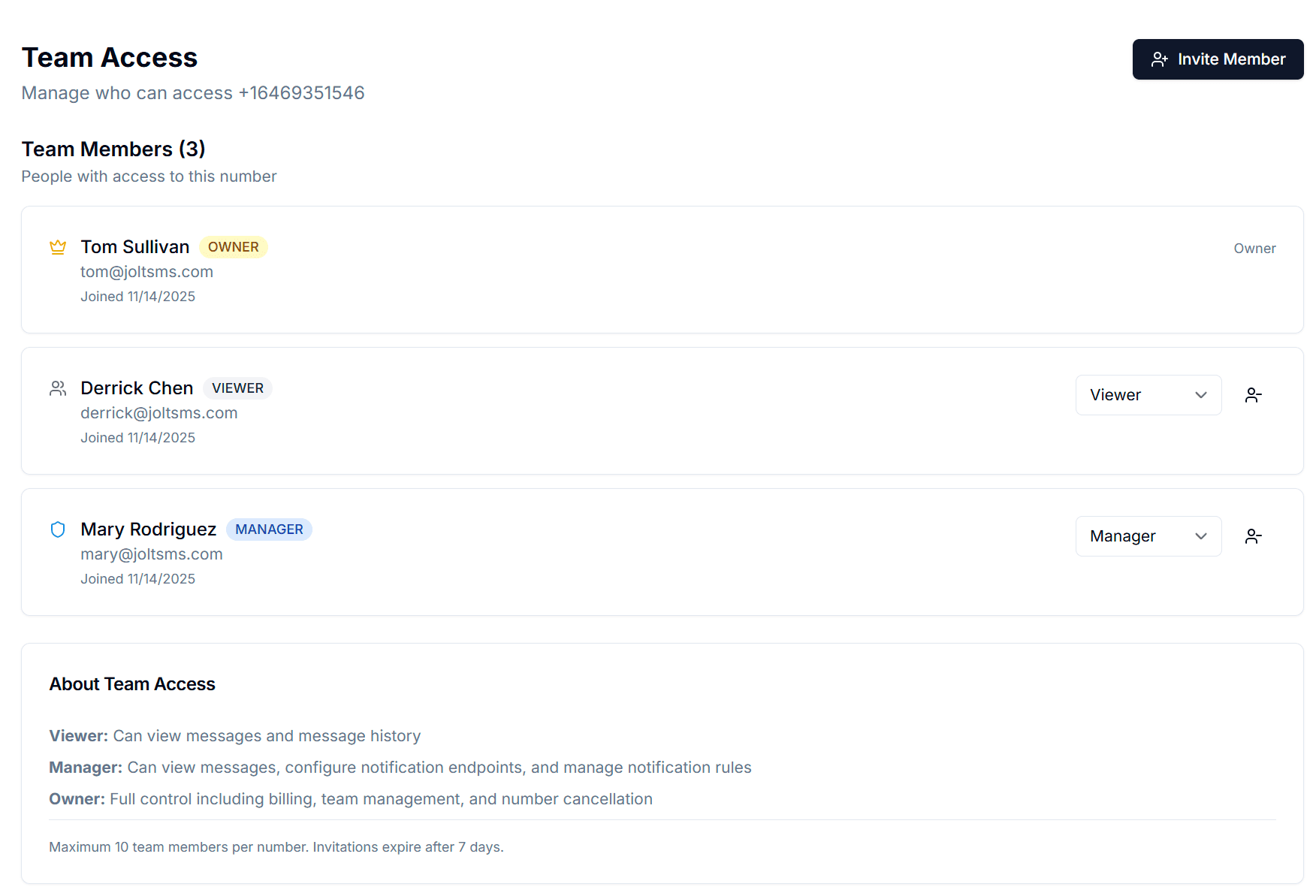
- Team Access with Owner, Manager, and Viewer roles so principals control who can change settings while agents and CSRs just receive codes
- Per-agent scaling: agencies with high-volume producers can provision additional numbers to isolate carrier access by agent, team, or line of business

Label each number by use — carrier portals, agency management system, E&O coverage. One number per use case.
Common ways insurance agencies use JoltSMS
The Agent Turnover Scenario
A producer leaves during renewal season. With JoltSMS, every carrier portal is registered to the agency number — not the departing producer's iPhone. The agency administrator removes the producer's JoltSMS team access. All carrier portals remain fully accessible. No lockout, no recovery delay, no renewals stalled.
Cyber Insurance and NYDFS Documentation
The agency's cyber insurer requests evidence of MFA controls at renewal. Because JoltSMS maintains a timestamped log of every verification code received, the agency can demonstrate a documented, agency-controlled MFA setup that satisfies NYDFS 23 NYCRR Part 500 and GLBA Safeguards Rule requirements.
Multi-Producer Agency Coordination
A 12-agent independent agency has producers handling personal lines, commercial lines, and benefits. JoltSMS Team Access lets each producer receive verification codes for their carrier portals without exposing the principal's billing controls or the ability to add or remove other agents. Codes go to the right person automatically.
How an insurance agency typically rolls out an agency-owned verification number
Provision one agency-owned JoltSMS number
Sign up and provision a dedicated US real-SIM number. This becomes the agency's permanent MFA contact — not tied to any individual agent, CSR, or principal. $50/month, month-to-month.
Inventory which carrier portals use personal phones for MFA
Walk through each carrier portal (Progressive Agent, Allstate Agent, Nationwide, Chubb Connect, Travelers, Liberty Mutual, etc.) and note which ones have personal phones registered as the MFA contact.
Migrate each portal to the agency JoltSMS number
Update the MFA phone number on each carrier portal and agency management system (Applied Epic, Vertafore, HawkSoft, EZLynx, AgencyBloc) to the JoltSMS number. This is a one-time migration per portal.
Set up the shared inbox and team access
Invite principals, CSRs, and producers to JoltSMS with the appropriate role. Owners control billing and team management. Managers configure notification rules. Viewers receive codes from the shared inbox.
Configure notification routing
Route incoming verification codes to Slack, email, or Microsoft Teams so the right person receives the code immediately — even when handling a client call or working from a remote location.
Role-based access that mirrors how insurance agencies actually operate
Insurance agencies have clear operating structures: principals make decisions, licensed agents manage their books, and CSRs handle day-to-day client service. JoltSMS Team Access maps directly to that structure — so every team member gets the verification codes they need without exposing billing controls or agency-level settings to producers who shouldn't have that access.
- Owner role — Assigned to the principal or agency administrator. Controls billing, number provisioning, and full team settings. This is the person who ensures the agency number never gets tied to an individual again.
- Manager role — Assigned to office managers or senior CSRs who configure notification rules and manage team members. They can adjust how codes are routed without touching billing.
- Viewer role — Assigned to licensed producers and CSRs who need to receive carrier portal verification codes. Read-only inbox access — they see and use codes but cannot alter agency settings.
- Invite team members by email with a 7-day expiry link. When an agent departs, one click removes their access — every carrier portal registration remains unchanged.
Get verification codes where your agency team already works
Insurance agencies run on email, phone, and increasingly Microsoft Teams. JoltSMS delivers carrier portal verification codes to whichever channel your team uses — so a MFA code for an urgent endorsement never sits unseen in a dashboard tab while a client is waiting on hold.
- Slack — Route carrier portal codes to a private agency Slack channel. The producer handling the endorsement or renewal sees the code instantly without checking a separate app.
- Email — Forward all incoming verification codes to the agency's operations email address or a distribution list. Every code becomes a timestamped email record — useful for NYDFS, GLBA, and cyber insurance audit trails.
- Microsoft Teams — Agencies on Microsoft 365 can receive verification codes directly in Teams channels or personal chats, without leaving the environment where agents already work.
- Webhooks — For agencies with custom agency management system integrations or automation workflows, codes can be posted to any endpoint — enabling notification routing without manual dashboard checks.

FAQ for insurance agencies
Yes. Your dedicated JoltSMS number can be registered as the MFA contact on Applied Epic, Vertafore, HawkSoft, EZLynx, and every carrier portal simultaneously — Progressive Agent, Allstate, Nationwide, Chubb Connect, Travelers, Liberty Mutual, and others. All incoming verification codes appear in the same shared inbox and are delivered to your configured notification channels. The number receives SMS from any sender, so there is no carrier compatibility issue. This is the recommended setup — one agency-owned number as the single authoritative verification contact across your entire carrier and tech stack.
Also see how accounting firms and CPA practices use JoltSMS for FTC Safeguards Rule MFA compliance — a parallel compliance mandate to GLBA where departing employees create the same carrier portal access crisis.
Also see how healthcare practices managing EHR and billing portal access use JoltSMS — insurance agencies handle provider-side billing portals; the healthcare page covers the practice side of the same patient-billing relationship.
Also see how professional services firms — consultants, engineers, and government contractors — use JoltSMS for CMMC MFA compliance and Procore access continuity — a comparable regulatory pressure to GLBA, with CMMC enforcement creating the same firm-owned number requirement.
Give your agency a verification number that survives every personnel change
Stop routing carrier portal access through producers' personal phones. One agency-owned JoltSMS number keeps your Applied Epic, Progressive, Allstate, and every other carrier portal tied to the agency — not to whoever happens to be the current agent on the account.