Keep Nonprofit Accounts Accessible Through Every Staff Transition
When your executive director's personal phone holds the 2FA for your Google Workspace super-admin account, their departure becomes an org-wide lockout — and Microsoft or Google recovery can take days. JoltSMS gives your organization a dedicated, org-owned verification number that survives every staff change, volunteer handoff, and device upgrade.
- Dedicated US number the organization owns — not tied to any executive director, IT volunteer, or staff member
- Shared inbox so authorized staff instantly receive Google Workspace, Microsoft 365, SAM.gov, and Salesforce codes
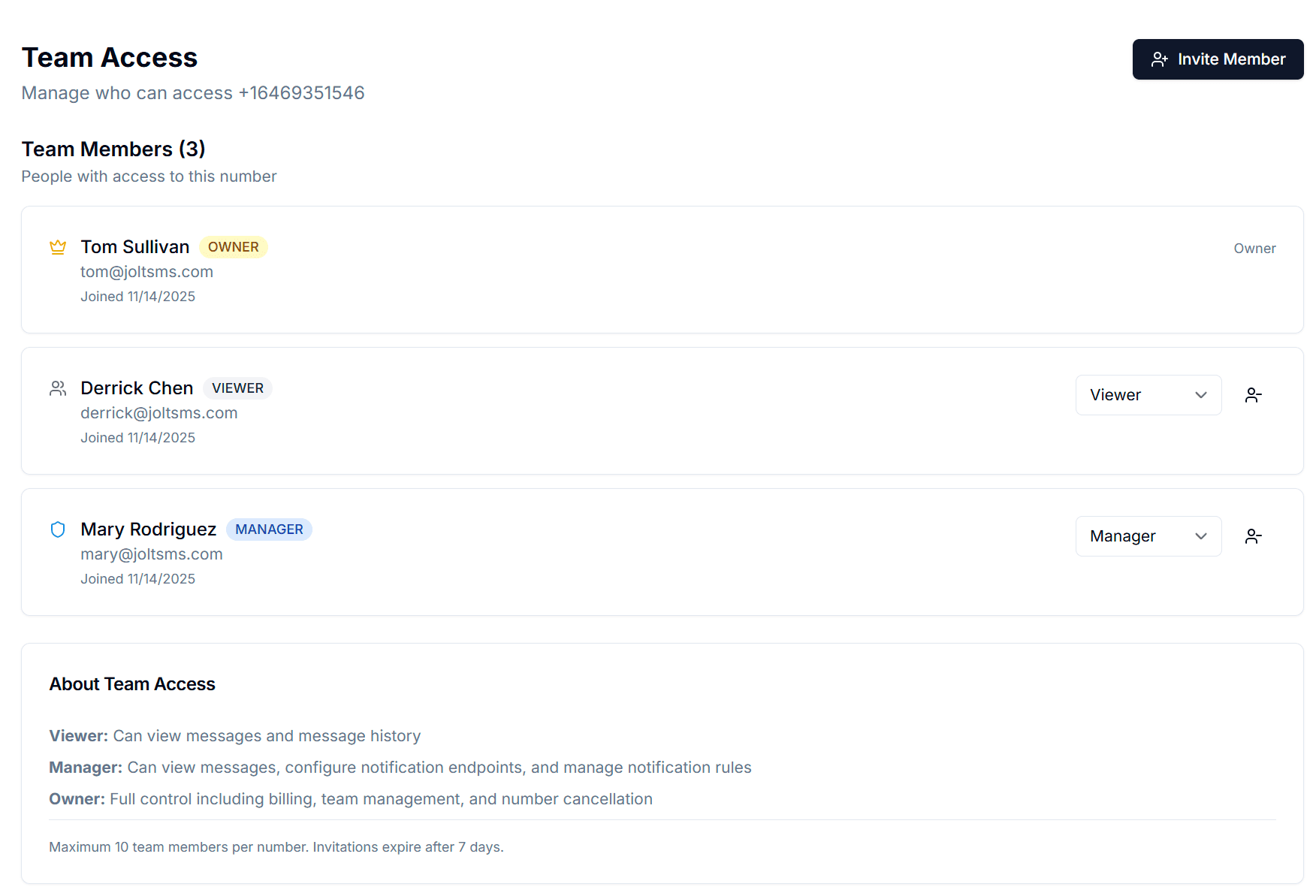
- Team Access with Owner, Manager, and Viewer roles so the right people have access without sharing passwords
- Message history gives your org a documented MFA audit trail for cyber insurance renewals and 990 internal controls reviews

Verification codes arrive in a shared org inbox — visible to authorized staff, regardless of who enrolled the account.
How nonprofits accidentally make phone verification a single point of failure
It starts with the best intentions. The founding executive director registers the org's Google Workspace under their personal Gmail and links their personal cell as the 2FA backup. An IT volunteer sets up the Salesforce Nonprofit account on their iPhone. A grant manager registers the SAM.gov entity with their personal login.gov account. Nobody documents it. Nobody thinks about what happens next. Then the ED takes a new job at another organization. Or the IT volunteer moves away. Or a board transition happens mid-fiscal-year. Nonprofit staff turnover rates exceed 19% annually (NonprofitHR) — more than twice the private sector average — and every departure is a potential lockout event. For a nonprofit managing federal grant portals, donor databases, and state charity registrations, a single access crisis can suspend operations, freeze grant disbursements, or expose the organization to compliance penalties.
| Problem | What it looks like for nonprofits & ngos |
|---|---|
| Executive director departure lockout | The ED leaves for a new role. Their personal phone was the enrolled 2FA device for the organization's Google Workspace super-admin account. The incoming ED cannot access Google Admin Console. Email, Drive, and all productivity tools are locked until Google support completes identity verification — a process that can take 9+ days (documented in Microsoft Q&A cases). |
| Federal grant portal suspension | SAM.gov and Grants.gov registrations are linked to individual login.gov accounts. When the staff member who registered those accounts leaves, the org loses the ability to update registrations, submit grant applications, or receive award notifications — directly threatening 2 CFR 200 compliance for federal grantees. |
| Donor platform inaccessibility | The Salesforce Nonprofit or Blackbaud account was set up by an IT volunteer under their personal phone. That volunteer departs between your fall and spring fundraising campaigns. Accessing donor records requires account recovery from a vendor support queue — during the exact window when donor engagement is most critical. |
| Cyber insurance MFA gap | Cyber insurers now require documented, organization-controlled MFA on administrative accounts as a condition of coverage or renewal. When 2FA is distributed across personal phones of past and present staff, the nonprofit cannot demonstrate a verifiable, org-controlled authentication setup to the underwriter. |
| State charity registration risk | Most states require annual charity registrations renewed through portals tied to individual accounts. When the staff member who set up those accounts leaves, the org risks missing renewal deadlines — potentially triggering late fees, penalties, or loss of fundraising authorization in the state. |
Turn verification from a personal phone problem into an org-owned system
JoltSMS provides your organization with a dedicated, non-VoIP, real-SIM US number that the organization owns and controls. Register it as the 2FA number on Google Workspace, Microsoft 365, Salesforce Nonprofit, SAM.gov, Blackbaud, and every other platform your org depends on. When staff turn over, nothing changes — the number stays with the organization.
- Dedicated US number registered to your organization — survives any executive transition, staff departure, or device change without account recovery
- Real-SIM, non-VoIP number accepted by Google Workspace, Microsoft 365, SAM.gov, Salesforce, and Blackbaud — platforms that reject VoIP numbers for 2FA
- Shared inbox with role-based Team Access — operations staff and IT administrators see codes; board members and volunteers have appropriate permissions without sharing passwords
- Complete message history for every received code — provides a timestamped audit trail for cyber insurance reviews and IRS Form 990 internal controls documentation
- Instant Slack, email, or webhook notifications so the right staff member receives the code the moment it arrives — even during an all-hands event or board meeting

One org-owned number. Stable across every staff transition and volunteer handoff.
Common ways nonprofits use JoltSMS
The Executive Director Transition
An ED accepts a position at another organization. With JoltSMS, the Google Workspace and Microsoft 365 super-admin 2FA is registered to the org number — not the ED's iPhone. The incoming ED or operations manager is already a team member in JoltSMS. On day one, they have full access to every platform account. No emergency board vote, no vendor support queue, no 9-day lockout.
Federal Grant Portal Continuity
A community health nonprofit holds active federal grants through SAM.gov and GrantSolutions. The grants manager who registered those portals departs mid-grant cycle. Because the JoltSMS number belongs to the organization, not any individual, the incoming grants manager can update registrations, submit required reports, and access award correspondence from day one — without triggering a 2 CFR 200 compliance gap.
Volunteer IT Handoff
Many small nonprofits rely on pro bono IT volunteers to manage Google Workspace or Microsoft 365 tenants. When one volunteer hands off to the next, JoltSMS makes the transition seamless: the outgoing volunteer's team access is removed, the incoming volunteer is invited, and the org's 2FA number never changes. The IT infrastructure stays intact through every volunteer rotation.
How a nonprofit typically rolls out an org-owned verification number
Provision a dedicated org number
Sign up for JoltSMS and provision a dedicated US real-SIM number. This becomes the organization's permanent verification number — not tied to any individual staff member, volunteer, or board officer.
Migrate platform accounts from personal phones
Work through each platform — Google Workspace Admin, Microsoft 365, SAM.gov, Salesforce Nonprofit, Blackbaud, and state charity portals — and update the enrolled 2FA phone number from personal cells to the JoltSMS org number. This is a one-time migration that eliminates the personal-phone dependency permanently.
Configure the shared inbox and team access
Invite your operations manager, IT volunteer, and any board officers who need access to the JoltSMS team with appropriate roles. Owners manage billing and provisioning. Managers configure notification rules. Viewers receive codes in the shared inbox without touching org settings.
Set up notification routing
Route incoming verification codes to Slack, email, or your org's communication tools so codes reach the right person immediately — even if they are working remotely, at a program site, or in a board meeting.
Embed the number in your offboarding checklist
When a staff member or volunteer departs, remove their JoltSMS team access as part of the standard offboarding process. The org's verification number remains unchanged. Every platform account stays accessible to the incoming team. Document the step in your IT security policy for cyber insurance renewals.
Role-based access built for nonprofit org structures
Nonprofits operate with mixed teams of paid staff, board officers, and volunteers — all with different levels of appropriate access. JoltSMS Team Access maps directly to that structure so the right people receive verification codes without exposing administrative credentials to everyone who touches a program.
- Owner role — Assigned to the executive director or operations manager. Controls billing, number provisioning, and full team access. Remains with the organization even through leadership transitions.
- Manager role — Assigned to IT administrators, grants managers, or senior staff. Can configure notification rules and manage team members without accessing billing or provisioning settings.
- Viewer role — Assigned to program staff or volunteers who need to receive codes for specific platforms. Read-only inbox access — they see codes but cannot change org settings or number configuration.
- Invite team members by email with a 7-day expiry link. When a staff member or volunteer departs, one click removes their access — the org's number and all platform registrations remain fully intact.
Get verification codes where your team already works
Nonprofit teams run lean. Nobody checks a separate dashboard app when they are in the middle of a grant deadline or donor event. JoltSMS delivers verification codes to whatever channel your organization already uses — so a SAM.gov 2FA code never goes unseen.
- Slack — Route Google Workspace and SAM.gov codes to a private org Slack channel. Staff working remotely or at program sites see codes instantly without logging into a separate tool.
- Email — Forward all incoming verification codes to an operations inbox or a distribution list. Every code becomes a timestamped email record — useful for cyber insurance audit trails and IRS Form 990 internal controls documentation.
- Discord — For smaller nonprofits or volunteer-led organizations that coordinate on Discord, codes can be routed to a private server channel — meeting the team where they already communicate.
- Webhooks — For nonprofits with custom donor management integrations or automated grant-reporting workflows, codes can be HTTP-posted to any endpoint, enabling automated workflows without manual dashboard access.

Nonprofit verification — common questions
If your ED's personal phone is enrolled as the 2FA device for your Google Workspace super-admin or Microsoft 365 Global Admin account, the organization loses access to that account when they leave. Recovery requires contacting Google or Microsoft support and completing an identity verification process that can take several days — during which email, file storage, and every other productivity tool tied to that tenant may be inaccessible. The direct fix is to register those accounts to a JoltSMS number the organization owns outright. When the ED departs, you remove their JoltSMS team access. The super-admin account — and your entire Google Workspace or Microsoft 365 tenant — remains fully accessible to the incoming leadership.
Give your organization a verification number that survives any transition
Stop routing admin account access through personal phones that leave with your staff. One org-owned JoltSMS number keeps Google Workspace, SAM.gov, Salesforce, and every other platform tied to your organization — not to whoever happens to be the current ED.